SQL Server 2005 Full Text Searching at the Huntsville Alabama Code Camp

My third and final presentation for the Alabama Code Camp 6 is “Introduction to SQL Server Full Text Searching”. Here are the materials I’ll be using during the demo.

First, here is a PDF of the PowerPoint slides:

Full Text Search Power Points

Next, most of the demos used SQL statements. This PDF file has all of the SQL plus some associated notes.

Full Text Search Demo Scripts

Finally, I did a WPF project that demonstrated how to call a full text search query from a WPF Windows application. Annoyingly enough WordPress (who hosts my blog) won’t let me upload ZIP files, so I renamed the extension to pdf. After you download the file to your drive, remove the .pdf and put the zip extension back on, then it should expand all the source for you correctly. (Yes, I know, I really need to get a host server for binaries, one of these days I’ll get around to it, but for today…)

Source for WPF Demo

Introduction to SQL Server Integration Services – Huntsville Alabama Code Camp

My second post of the day at Alabama Code Camp 6 in Huntsville is “Introduction to SQL Server Integration Services”.

The slide deck is here: Intro to SSIS Slide Deck

The “cheat sheet” or script I used to do the demo is here: Script for doing the SSIS Demo You can step through it to recreate all of the things I did in the demo today.

Finally here is the finished project. It’s actually zipped, but my current host doesn’t like zip extensions so when you download it change the extension from txt back to ZIP. Finished SSIS Project

The Developer Experience

In case you’re wondering why the slowdown in the blog this week, I’ve been spending all my free time getting ready for Alabama Code Camp 6. My first presentation of the day is “The Developer Experience”. It’s chock full of practical, low cost (or even free!) ways to make your life as a programmer more productive.

As promised in the session, here’s the complete PDF of my slides:  The Developer Experience

Steel City SQL Server Users Group – SQL Server 2005 Full Text Searching

Tonight I’ll be presenting at the Steel City SQL Users Group “Introduction to SQL Server Full Text Searching”. Here are the materials I’ll be using during the demo.

First, here is a PDF of the PowerPoint slides:

Full Text Search Power Points

Next, most of the demos used SQL statements. This PDF file has all of the SQL plus some associated notes.

Full Text Search Demo Scripts

Finally, I did a WPF project that demonstrated how to call a full text search query from a WPF Windows application. Annoyingly enough WordPress (who hosts my blog) won’t let me upload ZIP files, so I renamed the extension to pdf. After you download the file to your drive, remove the .pdf and put the zip extension back on, then it should expand all the source for you correctly. (Yes, I know, I really need to get a host server for binaries, one of these days I’ll get around to it, but for today…)

Source for WPF Demo

Look forward to seeing you at the New Horizons Training center tonight, 6:00 PM!

Don’t Uninstall Visual Studio 2005 Yet!

One of the great benefits of Visual Studio 2008 is the ability for it to target multiple .Net Frameworks. This means, in theory you could go ahead and begin using Visual Studio 2008 even though you still need to write apps that are 2005 / .Net 2.0 compliant. You might be tempted to go ahead and uninstall 2005. And that would be fine if you are only doing .Net development. But wait…

If you are still doing SQL Server BIDS (Business Intelligence Developer Studio) then don’t uninstall Visual Studio 2005! Currently there’s no support in VS2008 for doing SQL Server 2005 BIDS Development. If you uninstall VS2005 you won’t be able to do any more BIDS work. Trust me, I found out the hard way.

After uninstalling VS2005, I went to do a BIDS project and that’s when I got hit with the nasty surprise. The uninstall had also removed the Dev Environment that was shared with BIDS. I tried to rerun the install of my SQL Server Developer Edition, but for some reason it thought I wanted to upgrade. It kept giving me the message “You cannot upgrade a version of SQL Server from the GUI, you must use the command line.”

I finally had to reinstall VS2005, along with all it’s service packs. After that I was able to work on my BIDS projects again. So take it from me, if you are still doing SQL Server 2005 Business Intelligence projects, Visual Studio 2005 still has some life in it yet.

Huntsville User Group – SQL Server 2005 Full Text Searching

Tonight I’ll be presenting at the Huntsville Users Group “Introduction to SQL Server Full Text Searching”. Here are the materials I’ll be using during the demo.

First, here is a PDF of the PowerPoint slides:

Full Text Search Power Points

Next, most of the demos used SQL statements. This PDF file has all of the SQL plus some associated notes.

Full Text Search Demo Scripts

Finally, I did a WPF project that demonstrated how to call a full text search query from a WPF Windows application. Annoyingly enough WordPress (who hosts my blog) won’t let me upload ZIP files, so I renamed the extension to pdf. After you download the file to your drive, remove the .pdf and put the zip extension back on, then it should expand all the source for you correctly. (Yes, I know, I really need to get a host server for binaries, one of these days I’ll get around to it, but for today…)

Source for WPF Demo

Look forward to seeing you in Huntsville tonight!

Do It Yourself Quick Launch Menu

One of my upcoming presentations at Alabama Code Camp 6 will be “The Developer Experience”. I intend to cover three aspects of the developer experience: physical, virtual, and mental. Falling into the virtual category are things like Windows and Visual Studio Add-Ins. Launcher programs seem very popular these days, and I’ll be covering a few of them in my presentation, but did you know it’s very easy to create your own “quick launch” menu right on the Windows Start Bar? (I’ve also heard it referred to as the Task Bar.)

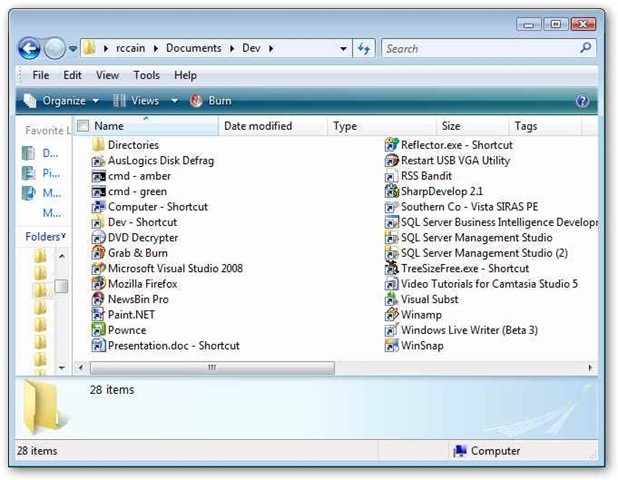
Start by going to your “My Documents” or some other location on your drive. Create a new folder, and give it a name. I chose something short, “Dev”, since it’ll take up some space on the Start Bar and it was pretty descriptive. Now in this folder you should create short cuts to all the applications you use on a frequent basis. You can also create other folders, which will turn into submenus when we’re done. Here you can see I’ve got my shortcuts, plus one folder called “Directories” which holds shortcuts to folders I access frequently. Here’s a ‘best practice’ for you: I also find it a good idea to create a shortcut to the Dev folder itself, so you can quickly and easily add or remove shortcuts to your system.

diymenu01

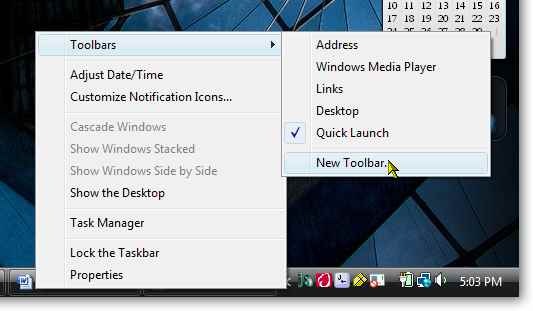
Once you have all of your shortcuts, right click on your start bar and pick Toolbars, New Toolbar (I’m doing this in Vista by the way, but it works equally well in XP as I’ve done it there for years).

diymenu02

When the New Toolbar dialog appears, navigate to the place where you stored your “Dev” folder, click on it and click “Select Folder”.

diymenu03

Now you should see a new item appear on your Start Bar with the word “Dev” (or whatever you named your menu). Here you can see my menu; I’ve highlighted the “Directories” submenu so you can see it working as well.

diymenu04

If the menu doesn’t appear where you want it simply click on the little bar to the left of the name of the menu and drag it where you want. Your menu may also appear but “spread out”. If so, simply place the cursor over the bar, and drag it back into a collapsed position as I demonstrate below.

diymenu05

You can create as many of these little do it yourself quick launchers as you want. I usually have my Dev menu all the time, which holds my generic shortcuts or shortcuts to general items such as my RSS reader, Visual Studio, or Paint.Net. When I’m working on a big project, I like to create shortcuts specific to that project. Thus I’ll create another one for that specific project that will open the folders where my source code or data is stored, has links to open the project right in Visual Studio, and more. They are easy enough to take off the Start Bar, simply right click on the menu again, go back to Toolbars, and click on the menu name. It will remove itself from the Start Bar, but the folder will remain intact for when “phase 2” of your project comes around.

Using my “Do it yourself quick launch menu” I almost never need to go through the Start Menu. In addition it allows me to keep my Quick Launch toolbar extremely small, I only have icons there to apps I really do use many times a day. And the best part is it’s all built into your copy of Windows already. Nothing to download, install, no additional overhead, totally safe and secure. This is a real benefit when you work in an environment where you are not allowed to install any third party applications. Give it a try and see if you don’t find it a better way to work.

Arcane Hardware Hint

Not too long ago I picked up a Targus ACP50US Universal Docking Port. This nifty contraption makes it easy for me to connect all my gizmos to my laptop when I get home every day. All I have to do is plug in one USB connection and I’ve got my network, speakers, microphone, and through the USB ports my external hard disk, mouse, keyboard, external DVD drive, PDA docking station, and more. What’s really handy is the video port. Using it, as well as the video port already built into the laptop gives me the ability to have three monitors hooked up. (The internal laptop, the laptops external monitor, and the monitor hooked up to the Targus).

I’ve discovered a really interesting quirk regarding the video port in the Targus. It advertises a maximum resolution of 1024×768. Not great considering the resolution of most modern monitors, but I thought it would be useful enough for my e-mail program. I will add the refresh rate is really really jerky. I have to move my mouse slow. Still, for information that is fairly static such as a reference manual or e-mail it is OK.

Not too long ago though I found something odd. I had booted my laptop but neglected to plug in the Targus. So I plugged it in, and was amazed when the Targus’ video came up to a full 1600×1200 resolution! Maybe it’s just some odd quirk in my system, or perhaps the driver in Vista is over-riding the Targus driver. For the record, I have an HP Pavilion dv8000 (the 8195 if I recall the model correctly) laptop running Vista. The external monitor hooked to the Targus is a 20 inch ViewSonic G800. (The other monitor, the one hooked directly to the laptop is also a ViewSonic, a 21 inch G220f.)

Now when I boot my laptop, I wait until I’ve logged into Vista before plugging in the Targus docking port. The video displays flicker then I get my third monitor with 1600×1200 resolution. The refresh rate still stinks, but it’s no worse than it was at 1024×768 but I get a nice big screen. As I said it’s just fine for fairly static info such as electronic books (pdfs or chms), web pages, word documents, database diagrams or other types of data that I’m only reading, not trying to work with intensively.

If you happen to own one of these docking stations, I’m curious to see if anyone else experiences this phenomenon. Next time you power up, wait until after you’ve logged in to see if you get bigger video out of it, then leave a comment here for us all to know!

I’m Honored

Tonight I was given an honor. My fellow developers elected me President of the Birmingham Software Developer’s Association. I’m grateful for the confidence they placed in me, and will work hard not to disappoint. I have some big shoes to fill, my predecessor Wallace did a tremendous job for the last five years. A big public thanks to Wallace for his dedication to the BSDA.

Everyone has a vision of what they’d like to see done when they are elected to office, and I’m no different. Specifically, I’d like to double the regular attendance at club meetings. Further, I’d like to do at least one boot camp, and one .Net University session this year. With the release of Windows Server 2008 and SQL Server 2008 this year and the recent release of Visual Studio 2008 I’d like to see a lot of great presentations around these new technologies.

Finally, let me make it clear this is YOUR club. I’m just the guy who gets up and welcomes everyone. It’s the members who make the club work, and who I want to serve. If you have ideas for meetings, activities, special events, whatever I’m open and willing so let’s hear them.

Again, let me say thanks to everyone who attended tonight. I look forward to working with my fellow officers and club members to do some exciting things. I deeply appreciate the honor, and will work hard to make sure it’s deserved.

Allowing SQL Server 2005 Developer Edition to Receive Remote Connections

I was working with another developer on a SQL Server project, and we decided to copy his database changes to my box. The simplest thing would be to just connect to my instance of SQL Server 2005 Developer Edition from his, and then apply the changes. When we tried though we kept getting the error:

“An error has occurred while establishing a connection to the server. When connecting to SQL Server 2005, this failure may be caused by the fact that under the default settings SQL Server does not allow remote connections. “

Huh? I’m scratching my head thinking the developer edition is supposed to be the same as the enterprise edition, and what good is a SQL Server that won’t allow connections? So I do a little digging and found a great knowledge base article 914277. According to it the Express and Developer editions are configured to NOT allow remote connections. When you think about it, there is some logic behind it. The Express edition is designed for light weight applications used locally and the Developer Edition is designed for a single developer to create test and prototype databases and then connect to the main development servers that will be used.

There are times though when it makes sense to turn on the ability to remote connect. Collaboration is one of the main reasons I can point out, as was the case with my co-worker and I. Another is testing, you may want to install and test your new application in a clean virtual PC and let it connect to your developer instance of SQL Server 2005.

The instructions from the knowledge base article are very well laid out and simple, so I won’t bother to reiterate them here. I did want to get the word out however so others could find this as well. We didn’t find it necessary to have to complete the firewall pieces of the instructions, only the first two parts. However we are behind a pretty heavy duty firewall at work, so your environment may be different.

Alabama Code Camp

The sixth Alabama Code Camp is coming up February 23rd, 2008. Registration is now open, as is the call for speakers. Many, including myself have submitted, you can see them by going to the Alabama Code Camp site and clicking on the speakers link. The list of speakers is very impressive, no less than eight MVPs, and at least two authors. I’m humbled to be amongst such distinguished company!

Here’s the synopsis for my two sessions, in case you are curious:

Introduction to SQL Server Integration Services

Whether you are creating a full blown data warehouse, doing a data conversion from an old system to a new one, or integrating applications together SQL Server Integration Services can help. Get an overview of this powerful tool built into SQL Server.

The Developer Experience

Learn about tips and tricks to enhance your experience as a developer both in the physical world and the virtual world. See hardware that can make your life easier, software additions for Windows and Visual Studio, even how just a few tweaks in the Visual Studio options can make your experience as a developer more pleasant and productive.

This is shaping up to be an impressive code camp, so don’t hesitate and get registered today!

Birmingham User Groups

Birmingham is blessed with a wide variety of user groups. I’m doing a brief presentation today at our internal company user group. Do you have a lot of developers that work for your company? Maybe you should start your own user group. It’s a great place to meet with other developers in your organization, make new friends, and learn a few new techniques. But enough on that, here’s a list of just a few of the user groups in this area. The last link goes to the TechBirmingham site which has a comprehensive list of user groups in the Birmingham area.

Steel City SQL – SQL Server User Group http://steelcitysql.org/default.aspx

Birmingham Software Developers Association http://www.bsda.info/

Birmingham .Net User Group (BUG.NET) http://www.bugdotnet.com/

Internet Professional Society of Alabama (IPSA) http://ipsaonline.org/

Birmingham UX Group (User Experience) http://groups.google.com/group/bhamux?hl=en

SOA Society (Service Oriented Architecture) http://soasociety.com/

Birmingham Microsoft Management Users Group http://www.myitforum.com/groups/group81/

RubyHam – Birmingham Ruby Users Group http://tech.groups.yahoo.com/group/rubyham/

TechBirmingham Listing of Technology User Groups http://techbirmingham.com/default.aspx?id=117&linkAction=showcat&catid=1&cat=Technology%20Association%20/%20User%20Group

Upcoming Events

Just thought I’d fill you in on some of the upcoming user events in the Birmingham area. February is shaping up to be an active month for tech in Birmingham! Follow the links for more info on any of these events you are interested in.

VS2008 Seminar / Geek Dinner – Feb 4, 2008 – Doug Turnure and Chad Brooks will be doing a VS2008 seminar in Jackson MS, then a Geek Dinner in Hattiesburg MS.

BSDA – Feb 7, 2008 6:30 pm – Doug Turnure of Microsoft will be speaking on Visual Studio 2008. Geek dinner afterward!

Microsoft TS2 Event – Feb 7, 2008 1:00 pm – Event showcasing Windows Server 2008 and SQL Server 2008.

IPSA – Feb 8, 2008 11:30am – Jere Chandler will be speaking on Simplicity in Design.

Huntsville User Group – Feb 12, 2008 – 6:00 pm – Yours truly will be giving the presentation on SQL Server 2005 Full Text Searching

TechMixer Expo – Feb 12, 2008 5:30 pm – Birmingham’s Tech Event – TechMixer Expo is back! Come mingle with IT’s Finest.

Steel City SQL Group Meeting – Feb 19, 2008 – Join the group for it’s first program meeting of the year

Alabama Code Camp – Feb 23, 2008 – This time Huntsville will play host city to the Alabama Code Camp. Registration is now open!

Getting Table Space Usage in SQL Server 2005

I had the need to determine how much space was being used by each of my tables in a certain schema. I found various solutions on the web, most of which involved the built in system stored procedure sp_spaceused. However none of them produced the output quite like I wanted it. Most worked on a single table, or else produced the output in multiple returns. So I did what comes naturally and cobbled together my own solution.It’s fairly straight forward. I create a temp table to hold the output, then create a cursor to cycle through all the table names in the schema set in the variable @schemaname. I set it to the most common one, dbo, but you may wish to change it. Next I cycle through each of the tables using a cursor and for each one call the sp_spaceused and insert the output as a new row in my temp table. Finally I select the results back to the user and drop the temp table to clean up.

You may note I check to see if the temp table exists as the very first thing, then if it is I drop it. Then as the last step I drop it. Call it paranoid programming, if something crashes part way through the routine I wanted the code to be “self repairing”, i.e. I didn’t want to have to remember to run the drop table statement just to start the procedure all over.

Also, you may have read somewhere that cursors in SQL Server are “evil”. Well, as a general rule you should avoid them in favor of set based coding. However there are times, such as this when I need to call a stored procedure for each row in the cursor, that a cursor will solve the issue nicely. Additionally this isn’t code I’m going to be running 500 times a day on a production server, but instead just occasionally as a system monitor type of utility.

You may notice that most of the columns are all returned as strings (varchars). That’s because the stored procedure returns them in that way. I may go back later and modify this to convert them to numbers so I can do some math, but we’ll see if that need arises.

Here’s the code, use it and abuse it, modify it and enjoy it!

/******************************************************************************

**    File: “GetTableSpaceUseage.sql”

**    Name: Get Table Space Useage for a specific schema

**    Auth: Robert C. Cain

**    Date: 01/27/2008

**

**    Desc: Calls the sp_spaceused proc for each table in a schema and returns

**        the Table Name, Number of Rows, and space used for each table.

**

**    Called by:

**     n/a – As needed

**

**    Input Parameters:

**     In the code check the value of @schemaname, if you need it for a

**     schema other than dbo be sure to change it.

**

**    Output Parameters:

**     NA

**

*******************************************************************************

**        Change History

*******************************************************************************

**    Date:            Author:                Description:

**    ——–        ——–            —————————————

**

*******************************************************************************/


/*—————————————————————————-*/

/* Drop the temp table if it’s there from a previous run                     */

/*—————————————————————————-*/

if object_id(N‘tempdb..[#TableSizes]’) is not null

  drop table #TableSizes ;

go


/*—————————————————————————-*/

/* Create the temp table                                                     */

/*—————————————————————————-*/

create table #TableSizes

  (

    [Table Name] nvarchar(128)   /* Name of the table */

  , [Number of Rows] char(11)    /* Number of rows existing in the table. */

  , [Reserved Space] varchar(18) /* Reserved space for table. */

  , [Data Space] varchar(18)    /* Amount of space used by data in table. */

  , [Index Size] varchar(18)    /* Amount of space used by indexes in table. */

  , [Unused Space] varchar(18)   /* Amount of space reserved but not used. */

  ) ;

go


/*—————————————————————————-*/

/* Load the temp table                                                        */

/*—————————————————————————-*/

declare @schemaname varchar(256) ;

— Make sure to set next line to the Schema name you want!

set @schemaname = ‘dbo’ ;


— Create a cursor to cycle through the names of each table in the schema

declare curSchemaTable cursor

  for select sys.schemas.name + ‘.’ + sys.objects.name

      from    sys.objects

            , sys.schemas

      where   object_id > 100

              and sys.schemas.name = @schemaname

              /* For a specific table uncomment next line and supply name */

            –and sys.objects.name = ‘specific-table-name-here’    

              and type_desc = ‘USER_TABLE’

              and sys.objects.schema_id = sys.schemas.schema_id ;


open curSchemaTable ;

declare @name varchar(256) ;  /* This holds the name of the current table*/


— Now loop thru the cursor, calling the sp_spaceused for each table

fetch curSchemaTable into @name ;

while ( @@FETCH_STATUS = 0 )

  begin    

    insert into #TableSizes

            exec sp_spaceused @objname = @name ;       

    fetch curSchemaTable into @name ;   

  end


— Important to both close and deallocate!

close curSchemaTable ;     

deallocate curSchemaTable ;


/*—————————————————————————-*/

/* Feed the results back                                                     */

/*—————————————————————————-*/

select [Table Name]

      , [Number of Rows]

      , [Reserved Space]

      , [Data Space]

      , [Index Size]

      , [Unused Space]

from    [#TableSizes]

order by [Table Name] ;


/*—————————————————————————-*/

/* Remove the temp table                                                     */

/*—————————————————————————-*/

drop table #TableSizes ;

Visual Studio 2008 Loadfest – Birmingham

On Thursday night, January 24th 2008 the BUG.NET group in conjunction with Microsoft is sponsoring a Visual Studio 2008 Loadfest. Bring your laptop or desktop and lets load VS 2008 on it! The first 75 people to register will get a free copy of VS2008. In addition there will be some fun and games, there will be several XBox 360’s and huge TVs to play games on. (Sorry, no give aways of the XBoxes or TVs, but you still get to have fun with them.)

The event will begin at 6:30 pm across from the New Horizons training center,  and will last about 2 hours. (See the link below for more details and directions).

To attend and get your free copy of VS2008 you must register! Go to

https://www.clicktoattend.com/invitation.aspx?code=124185

No cost, but like I said you must register. See you there!