Alabama Code Camp

The sixth Alabama Code Camp is coming up February 23rd, 2008. Registration is now open, as is the call for speakers. Many, including myself have submitted, you can see them by going to the Alabama Code Camp site and clicking on the speakers link. The list of speakers is very impressive, no less than eight MVPs, and at least two authors. I’m humbled to be amongst such distinguished company!

Here’s the synopsis for my two sessions, in case you are curious:

Introduction to SQL Server Integration Services

Whether you are creating a full blown data warehouse, doing a data conversion from an old system to a new one, or integrating applications together SQL Server Integration Services can help. Get an overview of this powerful tool built into SQL Server.

The Developer Experience

Learn about tips and tricks to enhance your experience as a developer both in the physical world and the virtual world. See hardware that can make your life easier, software additions for Windows and Visual Studio, even how just a few tweaks in the Visual Studio options can make your experience as a developer more pleasant and productive.

This is shaping up to be an impressive code camp, so don’t hesitate and get registered today!

Birmingham User Groups

Birmingham is blessed with a wide variety of user groups. I’m doing a brief presentation today at our internal company user group. Do you have a lot of developers that work for your company? Maybe you should start your own user group. It’s a great place to meet with other developers in your organization, make new friends, and learn a few new techniques. But enough on that, here’s a list of just a few of the user groups in this area. The last link goes to the TechBirmingham site which has a comprehensive list of user groups in the Birmingham area.

Steel City SQL – SQL Server User Group http://steelcitysql.org/default.aspx

Birmingham Software Developers Association http://www.bsda.info/

Birmingham .Net User Group (BUG.NET) http://www.bugdotnet.com/

Internet Professional Society of Alabama (IPSA) http://ipsaonline.org/

Birmingham UX Group (User Experience) http://groups.google.com/group/bhamux?hl=en

SOA Society (Service Oriented Architecture) http://soasociety.com/

Birmingham Microsoft Management Users Group http://www.myitforum.com/groups/group81/

RubyHam – Birmingham Ruby Users Group http://tech.groups.yahoo.com/group/rubyham/

TechBirmingham Listing of Technology User Groups http://techbirmingham.com/default.aspx?id=117&linkAction=showcat&catid=1&cat=Technology%20Association%20/%20User%20Group

Upcoming Events

Just thought I’d fill you in on some of the upcoming user events in the Birmingham area. February is shaping up to be an active month for tech in Birmingham! Follow the links for more info on any of these events you are interested in.

VS2008 Seminar / Geek Dinner – Feb 4, 2008 – Doug Turnure and Chad Brooks will be doing a VS2008 seminar in Jackson MS, then a Geek Dinner in Hattiesburg MS.

BSDA – Feb 7, 2008 6:30 pm – Doug Turnure of Microsoft will be speaking on Visual Studio 2008. Geek dinner afterward!

Microsoft TS2 Event – Feb 7, 2008 1:00 pm – Event showcasing Windows Server 2008 and SQL Server 2008.

IPSA – Feb 8, 2008 11:30am – Jere Chandler will be speaking on Simplicity in Design.

Huntsville User Group – Feb 12, 2008 – 6:00 pm – Yours truly will be giving the presentation on SQL Server 2005 Full Text Searching

TechMixer Expo – Feb 12, 2008 5:30 pm – Birmingham’s Tech Event – TechMixer Expo is back! Come mingle with IT’s Finest.

Steel City SQL Group Meeting – Feb 19, 2008 – Join the group for it’s first program meeting of the year

Alabama Code Camp – Feb 23, 2008 – This time Huntsville will play host city to the Alabama Code Camp. Registration is now open!

Visual Studio 2008 Loadfest – Birmingham

On Thursday night, January 24th 2008 the BUG.NET group in conjunction with Microsoft is sponsoring a Visual Studio 2008 Loadfest. Bring your laptop or desktop and lets load VS 2008 on it! The first 75 people to register will get a free copy of VS2008. In addition there will be some fun and games, there will be several XBox 360’s and huge TVs to play games on. (Sorry, no give aways of the XBoxes or TVs, but you still get to have fun with them.)

The event will begin at 6:30 pm across from the New Horizons training center,  and will last about 2 hours. (See the link below for more details and directions).

To attend and get your free copy of VS2008 you must register! Go to

https://www.clicktoattend.com/invitation.aspx?code=124185

No cost, but like I said you must register. See you there!

SOA Society Meeting

Just thought I’d let you know of more doings in Birmingham. The SOA Society will hold it’s first meeting of 2008 next Tuesday, the 22nd. SOA stands for Service Oriented Architecture, a methodology for integrating IT and Business. That’s a pretty broad simplification, to learn more about SOA you’ll just have to come to the meetings!

See the Society’s website at http://soasociety.com for more info.

VS 2008 Technical Overview

Just thought I’d pass along an upcoming event, on Thursday January 17th 2008 Doug Turnure will be presenting a technical overview of Visual Studio 2008 at the IPSA (Internet Professional Society of Alabama). Doug’s will be talking about new features and designers in VS2008, LINQ, and will even be giving away a couple of copies of VS2008. RSVP ahead of time at the IPSA site, especially if you want to purchase a lunch.

Enjoy!

SOA Society Meet and Greet Tuesday Night

The SOA Society is a group of professionals, gathered from both the corporate management and information technology areas. The purpose of the SOA Society is to educate and inform it’s members about the policies and practices surrounding Service Oriented Architecture. Further, the SOA Society seeks to keep it’s members informed by providing exposure to the tools and technologies available today, and to talk about the trends for tomorrow.

The SOA Society is in it’s early stages of being formed. Regular meetings will begin in January 2008. However, we’d like to invite you to an early meet and greet meeting. We’ll have a time for socializing and meeting one another, followed by a brief presentation to further explain the goals of the organization.

Location: 1800 International Drive, Suite 500, Hoover AL 35243

Time: Tuesday, November 27th, 2007, Social at 5:30 PM Presentation at 6:30 PM

More Info: Robert at 205-288-5713 or Johna at jledlow@axcan.com

.Net University – BizTalk

Earlier this week I was privilidged to attend the first .Net University for BizTalk. It was a very informative day long session, I feel like I now have a grasp on at least the fundementals of BizTalk and can talk intelligently about it. I have a long way to go, of course, but this was a great launching point.

If you are not familiar with .Net University, you need to check out their website http://www.dotnet-u.com/ . All of the slide decks, labs, and other courseware are availble not only for you to look at, but to use in doing your own presentation. Your user group or business could put on it’s very own .Net University using the supplied materials. Don’t worry if you are not a guru, they are even publishing videos of the sessions for you to watch and see how the “pros” did it. Currently courseware is available for .Net 3.0 and BizTalk, and the video sessions for .Net 3.0 were just released. They videoed the presentations at the BizTalk session I was in, so I would expect them to be released in the near future. Coming soon will be courseware for Sharepoint and Silverlight.

.Net University was the brainchild of Microsoft Developer Evangelist Doug Tunure ( http://blogs.msdn.com/dougturn/ ). Recently he and Mark Dunn of Dunn Training (http://www.dunntraining.com/) went to TechEd in Asia and used .Net U there. Mark Dunn recorded interviews and talked about it in a recent Dot Net Rocks episode (#288: http://www.dotnetrocks.com/default.aspx?showNum=288 ). Take a listen, they do a better job of explaining it than I can. Mark, by the way, was also one of the presenters at the BizTalk session I was in.

If your user group is looking for a good opportunity to reach out to the community, consider putting on your own .Net U. You can do it in one day, or break it into two or four sessions. Looks like there will be a lot of good material to get you started, and you can even get certificates to present to your attendees.

Birmingham Events

I was on the road last week, traveling to various places in the SouthEast. Sure is good to be back home again! Speaking of back home, there are some events coming up in the Birmingham AL area you should know about.

First up is on Tuesday evening, November 6th, TechMixer Unplugged. If you’ve been to previous TechMixer events you’ll find this a bit different. Previous events have had more of an “expo” feel, with vendor booths and presentations. This event, dubbed “Unplugged” is more of a social mixer. A chance for everyone to get together, relax, enjoy some food and have a good time. For more info go to http://www.techbirmingham.com/default.aspx?id=171 . I’ll be there, hope to see you there.

On Thursday night, November 8th I’ll be speaking at the Birmingham Software Developer’s Association. (http://www.bsda.info/) My subject will be SQL Server 2005 Full Text Searching for Developers.

My coworker and new MVP Jeff W. Barnes will be speaking at the Birmingham Dot Net User Group meeting on Tuesday, November 13th. His subject sounds very interesting, WCF and the Programmable Web. See his blog for more info: http://jeffbarnes.net/portal/blogs/jeff_barnes/archive/2007/10/31/bug-net-meeting-on-nov-13th.aspx

Hope to see you at all these great events!

Conference Recovery

Whew. I got home from DevLink late last night, wired but tired as they say. I went to some really great sessions. Most of my time was spent in SQL Server 2005 sessions, I spend most of my time these days in the SQL Server Business Intelligence arena, so decided to focus my efforts there.

I have to hand it to those folks in Nashville, they did a great job. Registration was very smooth, things seemed well organized, and ran well. All in all I had a great time and can’t wait to go back next year.

Over the next few days I’ll comment on some of the more interesting sessions I attended and provide a few links. For tonight though I’m still in a state of shock, gotta get my “think meat” organized.

The Silverlight Match the Dot Net Rocks Hosts Game – Part 3 – The Javascript

Today I’ve posted the Javascript for my DNR game (see posts from last two days). As you can see, it’s very straight forward and doesn’t require much explanation.

When the app loads, it calls a routine that uses a random number generator to randomly select a layout for the photos.

The other large routine handles mouse clicks. The really tricky part was determining which images were displayed and which were not. I finally resorted to using the Tag property of each Canvas control. In the Tag I put two numbers, each being a 0 or a 1. The first number represents a Boolean that flags whether the images is visible or not. The second position notes whether the image has already been matched. There are a number of SetCanvas… helper routines to make the setting of these flags a bit easier.

I make a lot of use of Math.Random to generate random numbers. I then use these to determine various messages that get displayed across the middle of the screen, tha way the user won’t get bored.

OK, enough talk, here’s the code. I’ve documented it pretty well, but if you have questions send me an e-mail or post a comment.


if (!window.DNRMatch)

  window.DNRMatch = {};


DNRMatch.Scene = function()

{

}


// ****************************************************************************

// * Author: Robert C. Cain, Arcane Code, http://arcanecode.com

// *

// * Notes

// *

// * The heart of the system relies on the tag property of the Canvas controls

// * used to display the pictures. It was the only mechanism I could find to

// * easily provide persistance between calls.

// *

// * The tag currently is a two character string. The first character is 0

// * or 1 and indicates if the ? is showing (a 0) or the Answer image is

// * being displayed (value is 1).

// *

// * The second position is also a 0 or 1, and indicates if the image has been

// * matched yet by the user or not. (0=no, 1=yes)

// *

// ****************************************************************************


// I store this here as it gets loaded and used in several places

var imgList = new Array(10);


DNRMatch.Scene.prototype =

{

  // Runs when app is first loaded

  handleLoad: function(plugIn, userContext, rootElement)

  {

    // Get the inital list of images into imgList array

    RandomizeImages();


    this.plugIn = plugIn;


    // Can’t use SetImages function since we don’t have a sender

    for(i=0; i<10; i++)

    {     

      plugIn.content.findName(“imgAnswer0” + i.toString()).Source=imgList[i];

    }

  }

}


//=============================================================================

// Main routine, activated when a user clicks on any image

//=============================================================================

function imgMouseLeftButtonDown(sender, mouseEventArgs)

{           

    var imgNumber = sender.Name.substr(3,2);

    var imgIndex = imgNumber.valueOf();

    var msg = sender.findName(“StatusArea”);

    var imgCurrentImage = sender.findName(“imgAnswer” + imgNumber);


    // Show the hidden image   

    if(CanvasVisible(sender, imgIndex)==“0”)

    {

      sender.findName(“img” + imgNumber + “RevealAnimation”).begin();

      sender.tag = “1” + sender.tag.substr(1,1);

    }


    var msgText=“”;

    var foundMatch=false;


    // Now check to see if another image is also visible.

    // If so, we’ll want to check for a match.     

    for(i=0; i<10; i++)

    {

      // If we’re not dealing with the same image

      if(i != imgIndex)

      {

        var imgLoopAnswer = sender.findName(“imgAnswer” + imgNumber);


        // If the image is visible

        if(CanvasVisible(sender, i.toString()) == “1”)

        {

          // See if it’s same image

          if( GetSource(sender, i)==GetSource(sender, imgIndex) )

          {

            // Congratulate user, then set the matched tags

            msg.text=GoodJobMessage(sender, i);

            SetCanvasMatchedTag(sender, i);

            SetCanvasMatchedTag(sender, imgIndex);

            foundMatch=true;

          }

        }

      }

    } 


    // See if we need to show a “no match” message

    if(foundMatch==false// If we didn’t find a match…

    {

      // If there are two items visible

      if (VisibleButUnmatchedCount(sender)==2)

      {

        // Show the bad job message

        msg.text=BadJobMessage();

      }

      else

      {

        // Only one image visible, set message to empty

        msg.text=“”;

      }

    }


    // Reset non-matches

    if (VisibleButUnmatchedCount(sender)==2)

    {

      for(i=0; i<10; i++)  // for each canvas

      {

        if(CanvasMatched(sender, i) == “0”) // if it hasn’t been matched

        {

          if(CanvasVisible(sender, i) == “1”// but it’s visible

          {

            sender.findName(“img0” + i.toString() + “HideAnimation”).begin(); // hide it

            SetCanvasInVisibleTag(sender, i);

            SetCanvasUnMatchedTag(sender, i);

          }

        }

      }     

    }


    // Check For Victory

    if(MatchCount(sender)==10)

    {

      msg.text=“You Won!!! Press Reset Game to play again.”;

    }


//    Just some debugging code, will leave it as it makes for good demo   

//    msg.text=ShowTags(sender);

//    msg.text=ShowSources(sender);

}


//=============================================================================

// Check the Tag property of the canvas to see if the image is visible

//=============================================================================

function CanvasVisible(sender, canvasNumber)

{

  var canvasNum = canvasNumber.toString();

  if(canvasNum.length > 1)

  {

    canvasNum = canvasNum.substr(canvasNum.length –  1, 1);

  }

  var currentCanvas = sender.findName(“img0” + canvasNum);

  var isCanvasVisible = currentCanvas.tag.substr(0,1);

  return isCanvasVisible;


}


//=============================================================================

// Check the Tag property of the canvas to see if the image has been matched

//=============================================================================

function CanvasMatched(sender, canvasNumber)

{

  var canvasNum = canvasNumber.toString();

  if(canvasNum.length > 1)

  {

    canvasNum = canvasNum.substr(canvasNum.length –  1, 1);

  }

  var currentCanvas = sender.findName(“img0” + canvasNum);

  var isCanvasMatched = currentCanvas.tag.substr(1,1);

  return isCanvasMatched;

}


//=============================================================================

// Set the Tag property of the canvas to indicate

// this canvas’s image is visible

//=============================================================================

function SetCanvasVisibleTag(sender, canvasNumber)

{

  var canvasNum = canvasNumber.toString();

  if(canvasNum.length > 1)

  {

    canvasNum = canvasNum.substr(canvasNum.length –  1, 1);

  }

  var currentCanvas = sender.findName(“img0” + canvasNum);

  currentCanvas.tag = “1” + currentCanvas.tag.substr(1,1);

}


//=============================================================================

// Set the Tag property of the canvas to indicate

// this canvas’s image is not visible

//=============================================================================

function SetCanvasInVisibleTag(sender, canvasNumber)

{

  var canvasNum = canvasNumber.toString();

  if(canvasNum.length > 1)

  {

    canvasNum = canvasNum.substr(canvasNum.length –  1, 1);

  }

  var currentCanvas = sender.findName(“img0” + canvasNum);

  currentCanvas.tag = “0” + currentCanvas.tag.substr(1,1);

}


//=============================================================================

// Set the Tag property of the canvas to indicate

// this canvas’s image has been matched

//=============================================================================

function SetCanvasMatchedTag(sender, canvasNumber)

{

  var canvasNum = canvasNumber.toString();

  if(canvasNum.length > 1)

  {

    canvasNum = canvasNum.substr(canvasNum.length –  1, 1);

  }

  var currentCanvas = sender.findName(“img0” + canvasNum);

  currentCanvas.tag = currentCanvas.tag.substr(0,1) + “1” ;

}


//=============================================================================

// Set the Tag property of the canvas to indicate

// this canvas’s image is not matched

//=============================================================================

function SetCanvasUnMatchedTag(sender, canvasNumber)

{

  var canvasNum = canvasNumber.toString();

  if(canvasNum.length > 1)

  {

    canvasNum = canvasNum.substr(canvasNum.length –  1, 1);

  }

  var currentCanvas = sender.findName(“img0” + canvasNum);

  currentCanvas.tag = currentCanvas.tag.substr(0,1) + “0” ;

}


//=============================================================================

// Count the number of items left that are visible, but not

// matched. In theory this should either be 0, 1 or 2.

//=============================================================================

function VisibleButUnmatchedCount(sender)

{

  var retVal=0;


  for(i=0; i<10; i++)

  {

    if(CanvasVisible(sender, i)==“1”)

    {

      if(CanvasMatched(sender, i)==“0”)

      {

        retVal++;

      }

    }

  }


  return retVal;

}


//=============================================================================

// Count the number of items that are matched.

// When it reached 10 we’ll know they won

//=============================================================================

function MatchCount(sender)

{

  var retVal=0;


  for(i=0; i<10; i++)

  {

    if(CanvasMatched(sender, i)==“1”)

    {

      retVal++;

    }

  }


  return retVal;

}


//=============================================================================

// Get the file name of the image used in the sender control

//=============================================================================

function GetSource(sender, imageNumber)

{

  var imgNum = imageNumber.toString();

  if(imgNum.length > 1)

  {

    imgNum = imgNum.substr(imgNum.length – 1, 1);

  }


  var img = sender.findName(“imgAnswer0” + imgNum );

  return img.Source; 

}


//=============================================================================

// Create a “Bad Guess” message

//=============================================================================

function BadJobMessage()

{

  // Randomly select from the list of “Try again” messages

  var possibleMsgs = new Array(5);

  possibleMsgs[0] = “Nope, try again.”;

  possibleMsgs[1] = “I don’t think so!”;

  possibleMsgs[2] = “Dude, not even close!”;

  possibleMsgs[3] = “Don’t give up yet, keep trying!”;

  possibleMsgs[4] = “Ha! Don’t make me laugh.”;

  possibleMsgs[5] = “I’ve heard of wild guesses, but gee whiz. Try again.”;


  var randomNum = Math.floor(Math.random()*6);


  return possibleMsgs[randomNum];


}


//=============================================================================

// Create a Good Job message based on the image the user

// just matched.

//=============================================================================

function GoodJobMessage(sender, imageNumber)

{

  var retMsg = “Good Job.”;

  var possibleMsgs = new Array(9);


  if(GetSource(sender, imageNumber)==“Carl02.png”)

  {

    possibleMsgs[0] = “Carl says you da man!”;

    possibleMsgs[1] = “You must be that squirt king of C#. We will make a T-shirt for you.”;

    possibleMsgs[2] = “A catheter and somebody to bring you a sandwich once in a while. That’s living man.”;

    possibleMsgs[3] = “While you shampoo your hair… Wait I guess that rules out C++ programmers.”;

    possibleMsgs[4] = “Some people go to sleep listening to DNR.”;

    possibleMsgs[5] = “”;

    possibleMsgs[6] = “”;

    possibleMsgs[7] = “”;

    possibleMsgs[8] = “”;

    retMsg = possibleMsgs[Math.floor(Math.random()*5)];

  }


  if(GetSource(sender, imageNumber)==“Richard01.png”)

  {

    possibleMsgs[0] = “It’s Richard, the Toy Boy!”;

    possibleMsgs[1] = “Now we got emotional baggage.”;

    possibleMsgs[2] = “Ballmer is always great. He seems a lot less angry these days, I think they switched him to decaf.”;

    possibleMsgs[3] = “Everytime you say Web 2.0, a startup dies.”;

    possibleMsgs[4] = “My favorite Martian is Mark Miller!”;

    possibleMsgs[5] = “Don’t play with it, just look at it!”;

    possibleMsgs[6] = “You [Mark Miller] are the Jim Carey of the podcasting world.”;

    possibleMsgs[7] = “Welcome to the dark side baby!”;

    possibleMsgs[8] = “”;

    retMsg = possibleMsgs[Math.floor(Math.random()*8)];

  }


  if(GetSource(sender, imageNumber)==“Rory.png”)

  {

    possibleMsgs[0] = “Rory rewards you by allowing you to gaze upon his magnificence.”;

    possibleMsgs[1] = “You are testing my patience Franklin!”;

    possibleMsgs[2] = “You’re like some kid from a third world country…”;

    possibleMsgs[3] = “It’s a place where you can talk about anal leakage.”;

    possibleMsgs[4] = “I was pretending to tweak Mark Dunn’s nipples like they were radio knobs.”;

    possibleMsgs[5] = “I was talking about how weird it was to see Mark Dunn in the flesh.”;

    possibleMsgs[6] = “”;

    possibleMsgs[7] = “”;

    possibleMsgs[8] = “”;

    retMsg = possibleMsgs[Math.floor(Math.random()*5)];

  }


  if(GetSource(sender, imageNumber)==“Mark.png”)

  {

    possibleMsgs[0] = “Mark Dunn says it’s always sunny in the south!”;

    possibleMsgs[1] = “I gotta clean my underwear now Carl.”;

    possibleMsgs[2] = “I am higher than a California Condor on Ecstasy, that’s how excited I am to be here.”;

    possibleMsgs[3] = “”;

    possibleMsgs[4] = “”;

    possibleMsgs[5] = “”;

    possibleMsgs[6] = “”;

    possibleMsgs[7] = “”;

    possibleMsgs[8] = “”;

    retMsg = possibleMsgs[Math.floor(Math.random()*3)];

  }


  if(GetSource(sender, imageNumber)==“Miller.png”)

  {

    possibleMsgs[0] = “I got nuthin’ man.”;

    possibleMsgs[1] = “You guys are messing with me again!”;

    possibleMsgs[2] = “My golden ticket on the candy bar said it was about a new co-host!”;

    possibleMsgs[3] = “I want one of these!”;

    possibleMsgs[4] = “What about me Carl?”;

    possibleMsgs[5] = “I’m good lookin too!”;

    possibleMsgs[6] = “”;

    possibleMsgs[7] = “”;

    possibleMsgs[8] = “”;

    retMsg = possibleMsgs[Math.floor(Math.random()*6)];

  }


  return retMsg;

}


//=============================================================================

// Reset the game for another play

//=============================================================================

function ResetGame(sender, mouseEventArgs)

{

    sender.findName(“mainHideAnimation”).begin(); // hide it


    for(i=0; i<10; i++)  // for each canvas

    {

      SetCanvasUnMatchedTag(sender, i);

      if(CanvasVisible(sender, i) == “1”// but it’s visible

      {

        sender.findName(“img0” + i.toString() + “HideAnimation”).begin(); // hide it

        SetCanvasInVisibleTag(sender, i);

      }

    }


    RandomizeImages();

    SetImages(sender);


    var msg = sender.findName(“StatusArea”);

    msg.text = “Play the game!”;


    sender.findName(“mainRevealAnimation”).begin(); // hide it


}


//=============================================================================

// Create a random number, then use it to pick and load the

// imgList array. Used to mix up the images.

//=============================================================================

function RandomizeImages()

{

    // Default set

    imgList[0] = “Carl02.png”;

    imgList[1] = “Richard01.png”;

    imgList[2] = “Rory.png”;

    imgList[3] = “Mark.png”;

    imgList[4] = “Miller.png”;

    imgList[5] = “Miller.png”;

    imgList[6] = “Mark.png”;

    imgList[7] = “Rory.png”;

    imgList[8] = “Richard01.png”;

    imgList[9] = “Carl02.png”;


    var randomNum = Math.floor(Math.random()*9);


    if(randomNum==0)

    {

      imgList[0] = “Carl02.png”;

      imgList[1] = “Richard01.png”;

      imgList[2] = “Rory.png”;

      imgList[3] = “Mark.png”;

      imgList[4] = “Miller.png”;

      imgList[5] = “Miller.png”;

      imgList[6] = “Mark.png”;

      imgList[7] = “Rory.png”;

      imgList[8] = “Richard01.png”;

      imgList[9] = “Carl02.png”;

    }


    if(randomNum==1)

    {

      imgList[0] = “Rory.png”;

      imgList[1] = “Mark.png”;

      imgList[2] = “Miller.png”;

      imgList[3] = “Richard01.png”;

      imgList[4] = “Carl02.png”;

      imgList[5] = “Rory.png”;

      imgList[6] = “Carl02.png”;

      imgList[7] = “Miller.png”;

      imgList[8] = “Richard01.png”;

      imgList[9] = “Mark.png”;

    }


    if(randomNum==2)

    {

      imgList[0] = “Rory.png”;

      imgList[1] = “Mark.png”;

      imgList[2] = “Miller.png”;

      imgList[3] = “Richard01.png”;

      imgList[4] = “Carl02.png”;

      imgList[5] = “Mark.png”;

      imgList[6] = “Rory.png”;

      imgList[7] = “Carl02.png”;

      imgList[8] = “Richard01.png”;

      imgList[9] = “Miller.png”;

    }


    if(randomNum==3)

    {

      imgList[0] = “Carl02.png”;

      imgList[1] = “Rory.png”;

      imgList[2] = “Richard01.png”;

      imgList[3] = “Carl02.png”;

      imgList[4] = “Miller.png”;

      imgList[5] = “Rory.png”;

      imgList[6] = “Miller.png”;

      imgList[7] = “Mark.png”;

      imgList[8] = “Richard01.png”;

      imgList[9] = “Mark.png”;

    }


    if(randomNum==4)

    {

      imgList[0] = “Mark.png”;

      imgList[1] = “Rory.png”;

      imgList[2] = “Rory.png”;

      imgList[3] = “Carl02.png”;

      imgList[4] = “Miller.png”;

      imgList[5] = “Carl02.png”;

      imgList[6] = “Richard01.png”;

      imgList[7] = “Mark.png”;

      imgList[8] = “Richard01.png”;

      imgList[9] = “Miller.png”;

    }


    if(randomNum==5)

    {

      imgList[0] = “Carl02.png”;

      imgList[1] = “Mark.png”;

      imgList[2] = “Richard01.png”;

      imgList[3] = “Richard01.png”;

      imgList[4] = “Rory.png”;

      imgList[5] = “Mark.png”;

      imgList[6] = “Rory.png”;

      imgList[7] = “Carl02.png”;

      imgList[8] = “Miller.png”;

      imgList[9] = “Miller.png”;

    }


    if(randomNum==6)

    {

      imgList[0] = “Mark.png”;

      imgList[1] = “Carl02.png”;

      imgList[2] = “Mark.png”;

      imgList[3] = “Richard01.png”;

      imgList[4] = “Rory.png”;

      imgList[5] = “Miller.png”;

      imgList[6] = “Rory.png”;

      imgList[7] = “Miller.png”;

      imgList[8] = “Richard01.png”;

      imgList[9] = “Carl02.png”;

    }


    if(randomNum==7)

    {

      imgList[0] = “Rory.png”;

      imgList[1] = “Carl02.png”;

      imgList[2] = “Mark.png”;

      imgList[3] = “Richard01.png”;

      imgList[4] = “Mark.png”;

      imgList[5] = “Miller.png”;

      imgList[6] = “Miller.png”;

      imgList[7] = “Richard01.png”;

      imgList[8] = “Carl02.png”;

      imgList[9] = “Rory.png”;

    }


    if(randomNum==8)

    {

      imgList[0] = “Richard01.png”;

      imgList[1] = “Rory.png”;

      imgList[2] = “Mark.png”;

      imgList[3] = “Carl02.png”;

      imgList[4] = “Miller.png”;

      imgList[5] = “Mark.png”;

      imgList[6] = “Carl02.png”;

      imgList[7] = “Richard01.png”;

      imgList[8] = “Rory.png”;

      imgList[9] = “Miller.png”;

    }

}


//=============================================================================

// Sets the image source property for all the images

// to the image name loaded in the imgList array

//=============================================================================

function SetImages(sender)

{

    for(i=0; i<10; i++)

    {     

      sender.findName(“imgAnswer0” + i.toString()).Source=imgList[i];

    }

}


//=============================================================================

// Causes the job to wait a certain number of milliseconds.

// Has a drawback in that it does not pause animations,

// so if you use it while an animation is happening you won’t

// see the animation effect but it will ‘jerk’ to the final result.

//=============================================================================

function wait(msecs)

{

  var start = new Date().getTime();

  var cur = start

  while(cur – start < msecs)

  {

    cur = new Date().getTime();

  }

}


//=============================================================================

// For debugging only – Shows all the images.

//=============================================================================

function ShowSources(sender)

{

  var retVal=“”;

  for(i=0; i<10; i++)

  {


    retVal += i.toString() + “: “ + GetSource(sender, i);

  }

  return retVal;

}


//=============================================================================

// For debugging only – Shows the tags

//=============================================================================

function ShowTags(sender)

{

  retVal = “”;

  for(i=0; i<10; i++)

  {

    var currentCanvas = sender.findName(“img0” + i.toString());

    retVal += currentCanvas.tag + ” “;

  }

  return retVal; 

}

The Silverlight Match the Dot Net Rocks Hosts Game – Part 2 – The XAML

Because it’s quite long I’ve posted the XAML at the foot of this post. It’s pretty straight forward though. In Silverlight 1.0 XAML, you’re restricted to using a Canvas for your containers.

In this case I use 10 child canvases, one for each of the photos. At the start of the XAML for each image canvas I have two Storyboards in the Canvas.Resources section. One storyboard fades the question mark out then the photo in. The other reverses it, fading out the photo and in the question mark.

Next I put a rectangle around the entire game, then display the title bar. After that I display the instructions at the bottom using colors similar to the title bar.

A series of 10 canvases come next, each one holds two image controls, one for the question mark and one for the picture of the host. When the app starts, the Javascript replaces the Source property for each of the Answer images with a photo of the host, but you’ll see that tomorrow.

The only other thing to note is how mouse clicks are captured. There is no Click even as you might be used to with WPF, instead you have to capture the MouseLeftButtonDown. I route all 10 images’ MouseLeftButtonDown events to the same Javascript method, and use the Sender parameter to differentiate which of the 10 Canvases were clicked.

The final thing to note is the Reset Game button, which really isn’t a button but a canvas, which holds a rectangle with some cool gradients and a text block. Just like with the images, the canvas’ MouseLeftButtonDown is captured and the corresponding Javascript routine is called.

OK, enough explanation for today, here’s the code:


<Canvas xmlns=http://schemas.microsoft.com/client/2007

        xmlns:x=http://schemas.microsoft.com/winfx/2006/xaml

        x:Name=mainCanvas

        Width=800 Height=500 Background=Black>


  <Canvas.Resources>

    <Storyboard x:Name=mainRevealAnimation >

      <DoubleAnimation Duration=00:00:01.5 From=0 To=1

                      Storyboard.TargetName=mainCanvas

                        Storyboard.TargetProperty=Opacity  />

    </Storyboard>

    <Storyboard x:Name=mainHideAnimation >

      <DoubleAnimation Duration=00:00:01.5 From=1 To=0

                      Storyboard.TargetName=mainCanvas

                        Storyboard.TargetProperty=Opacity  />

    </Storyboard>


    <Storyboard x:Name=img00RevealAnimation >

      <DoubleAnimation Duration=00:00:00.5 From=1 To=0

                      Storyboard.TargetName=imgQuestion00

                        Storyboard.TargetProperty=Opacity  />

      <DoubleAnimation Duration=00:00:00.5 From=0 To=1

                      Storyboard.TargetName=imgAnswer00

                        Storyboard.TargetProperty=Opacity  />

    </Storyboard>

    <Storyboard x:Name=img00HideAnimation >

      <DoubleAnimation Duration=00:00:00.5 From=1 To=0

                      Storyboard.TargetName=imgAnswer00

                        Storyboard.TargetProperty=Opacity  />

      <DoubleAnimation Duration=00:00:00.5 From=0 To=1

                      Storyboard.TargetName=imgQuestion00

                        Storyboard.TargetProperty=Opacity  />

    </Storyboard>

    <Storyboard x:Name=img01RevealAnimation >

      <DoubleAnimation Duration=00:00:00.5 From=1 To=0

                      Storyboard.TargetName=imgQuestion01

                        Storyboard.TargetProperty=Opacity  />

      <DoubleAnimation Duration=00:00:00.5 From=0 To=1

                      Storyboard.TargetName=imgAnswer01

                        Storyboard.TargetProperty=Opacity  />

    </Storyboard>

    <Storyboard x:Name=img01HideAnimation >

      <DoubleAnimation Duration=00:00:00.5 From=1 To=0

                      Storyboard.TargetName=imgAnswer01

                        Storyboard.TargetProperty=Opacity  />

      <DoubleAnimation Duration=00:00:00.5 From=0 To=1

                      Storyboard.TargetName=imgQuestion01

                        Storyboard.TargetProperty=Opacity  />

    </Storyboard>

    <Storyboard x:Name=img02RevealAnimation >

      <DoubleAnimation Duration=00:00:00.5 From=1 To=0

                      Storyboard.TargetName=imgQuestion02

                        Storyboard.TargetProperty=Opacity  />

      <DoubleAnimation Duration=00:00:00.5 From=0 To=1

                      Storyboard.TargetName=imgAnswer02

                        Storyboard.TargetProperty=Opacity  />

    </Storyboard>

    <Storyboard x:Name=img02HideAnimation >

      <DoubleAnimation Duration=00:00:00.5 From=1 To=0

                      Storyboard.TargetName=imgAnswer02

                        Storyboard.TargetProperty=Opacity  />

      <DoubleAnimation Duration=00:00:00.5 From=0 To=1

                      Storyboard.TargetName=imgQuestion02

                        Storyboard.TargetProperty=Opacity  />

    </Storyboard>

    <Storyboard x:Name=img03RevealAnimation >

      <DoubleAnimation Duration=00:00:00.5 From=1 To=0

                      Storyboard.TargetName=imgQuestion03

                        Storyboard.TargetProperty=Opacity  />

      <DoubleAnimation Duration=00:00:00.5 From=0 To=1

                      Storyboard.TargetName=imgAnswer03

                        Storyboard.TargetProperty=Opacity  />

    </Storyboard>

    <Storyboard x:Name=img03HideAnimation >

      <DoubleAnimation Duration=00:00:00.5 From=1 To=0

                      Storyboard.TargetName=imgAnswer03

                        Storyboard.TargetProperty=Opacity  />

      <DoubleAnimation Duration=00:00:00.5 From=0 To=1

                      Storyboard.TargetName=imgQuestion03

                        Storyboard.TargetProperty=Opacity  />

    </Storyboard>

    <Storyboard x:Name=img04RevealAnimation >

      <DoubleAnimation Duration=00:00:00.5 From=1 To=0

                      Storyboard.TargetName=imgQuestion04

                        Storyboard.TargetProperty=Opacity  />

      <DoubleAnimation Duration=00:00:00.5 From=0 To=1

                      Storyboard.TargetName=imgAnswer04

                        Storyboard.TargetProperty=Opacity  />

    </Storyboard>

    <Storyboard x:Name=img04HideAnimation >

      <DoubleAnimation Duration=00:00:00.5 From=1 To=0

                      Storyboard.TargetName=imgAnswer04

                        Storyboard.TargetProperty=Opacity  />

      <DoubleAnimation Duration=00:00:00.5 From=0 To=1

                      Storyboard.TargetName=imgQuestion04

                        Storyboard.TargetProperty=Opacity  />

    </Storyboard>

    <Storyboard x:Name=img05RevealAnimation >

      <DoubleAnimation Duration=00:00:00.5 From=1 To=0

                      Storyboard.TargetName=imgQuestion05

                        Storyboard.TargetProperty=Opacity  />

      <DoubleAnimation Duration=00:00:00.5 From=0 To=1

                      Storyboard.TargetName=imgAnswer05

                        Storyboard.TargetProperty=Opacity  />

    </Storyboard>

    <Storyboard x:Name=img05HideAnimation >

      <DoubleAnimation Duration=00:00:00.5 From=1 To=0

                      Storyboard.TargetName=imgAnswer05

                        Storyboard.TargetProperty=Opacity  />

      <DoubleAnimation Duration=00:00:00.5 From=0 To=1

                      Storyboard.TargetName=imgQuestion05

                        Storyboard.TargetProperty=Opacity  />

    </Storyboard>

    <Storyboard x:Name=img06RevealAnimation >

      <DoubleAnimation Duration=00:00:00.5 From=1 To=0

                      Storyboard.TargetName=imgQuestion06

                        Storyboard.TargetProperty=Opacity  />

      <DoubleAnimation Duration=00:00:00.5 From=0 To=1

                      Storyboard.TargetName=imgAnswer06

                        Storyboard.TargetProperty=Opacity  />

    </Storyboard>

    <Storyboard x:Name=img06HideAnimation >

      <DoubleAnimation Duration=00:00:00.5 From=1 To=0

                      Storyboard.TargetName=imgAnswer06

                        Storyboard.TargetProperty=Opacity  />

      <DoubleAnimation Duration=00:00:00.5 From=0 To=1

                      Storyboard.TargetName=imgQuestion06

                        Storyboard.TargetProperty=Opacity  />

    </Storyboard>

    <Storyboard x:Name=img07RevealAnimation >

      <DoubleAnimation Duration=00:00:00.5 From=1 To=0

                      Storyboard.TargetName=imgQuestion07

                        Storyboard.TargetProperty=Opacity  />

      <DoubleAnimation Duration=00:00:00.5 From=0 To=1

                      Storyboard.TargetName=imgAnswer07

                        Storyboard.TargetProperty=Opacity  />

    </Storyboard>

    <Storyboard x:Name=img07HideAnimation >

      <DoubleAnimation Duration=00:00:00.5 From=1 To=0

                      Storyboard.TargetName=imgAnswer07

                        Storyboard.TargetProperty=Opacity  />

      <DoubleAnimation Duration=00:00:00.5 From=0 To=1

                      Storyboard.TargetName=imgQuestion07

                        Storyboard.TargetProperty=Opacity  />

    </Storyboard>

    <Storyboard x:Name=img08RevealAnimation >

      <DoubleAnimation Duration=00:00:00.5 From=1 To=0

                      Storyboard.TargetName=imgQuestion08

                        Storyboard.TargetProperty=Opacity  />

      <DoubleAnimation Duration=00:00:00.5 From=0 To=1

                      Storyboard.TargetName=imgAnswer08

                        Storyboard.TargetProperty=Opacity  />

    </Storyboard>

    <Storyboard x:Name=img08HideAnimation >

      <DoubleAnimation Duration=00:00:00.5 From=1 To=0

                      Storyboard.TargetName=imgAnswer08

                        Storyboard.TargetProperty=Opacity  />

      <DoubleAnimation Duration=00:00:00.5 From=0 To=1

                      Storyboard.TargetName=imgQuestion08

                        Storyboard.TargetProperty=Opacity  />

    </Storyboard>

    <Storyboard x:Name=img09RevealAnimation >

      <DoubleAnimation Duration=00:00:00.5 From=1 To=0

                      Storyboard.TargetName=imgQuestion09

                        Storyboard.TargetProperty=Opacity  />

      <DoubleAnimation Duration=00:00:00.5 From=0 To=1

                      Storyboard.TargetName=imgAnswer09

                        Storyboard.TargetProperty=Opacity  />

    </Storyboard>

    <Storyboard x:Name=img09HideAnimation >

      <DoubleAnimation Duration=00:00:00.5 From=1 To=0

                      Storyboard.TargetName=imgAnswer09

                        Storyboard.TargetProperty=Opacity  />

      <DoubleAnimation Duration=00:00:00.5 From=0 To=1

                      Storyboard.TargetName=imgQuestion09

                        Storyboard.TargetProperty=Opacity  />

    </Storyboard>


  </Canvas.Resources>


  <Rectangle Width=800 Height=500 Canvas.Left=0 Canvas.Top=0>

    <Rectangle.Fill>

      <LinearGradientBrush>

        <GradientStop Color=#00000000 Offset=0.0 />

        <GradientStop Color=#55555555 Offset=0.25 />

        <GradientStop Color=#00000000 Offset=0.75 />

        <GradientStop Color=#88888888 Offset=1.0 />

      </LinearGradientBrush>

    </Rectangle.Fill>

  </Rectangle>


  <!– Title bar –>

  <Rectangle x:Name=TitleBar Canvas.Left=25 Canvas.Top=10

            Width=750 Height=75 RadiusX=16 RadiusY=16

            Stroke=#E0F0F0 StrokeThickness=8>

    <Rectangle.Fill>

      <LinearGradientBrush StartPoint=0.5,0 EndPoint=0.5,1 >

        <GradientStop Color=#FFC4E1F0 Offset=0/>

        <GradientStop Color=#FF64E1F0 Offset=1/>

      </LinearGradientBrush>

    </Rectangle.Fill>

  </Rectangle>


  <TextBlock Canvas.Left=50 Canvas.Top=33

            FontFamily=Arial FontSize=28 FontWeight=Bold>

    Arcane Code’s Match the Dot Net Rocks Hosts Game

  </TextBlock>


  <!– Instructions –>

  <Canvas Canvas.Left=50 Canvas.Top=390>

    <Rectangle x:Name=Instructions Canvas.Top=0 Canvas.Left=0

            Width=625 Height=105 RadiusX=16 RadiusY=16

            Stroke=#E0F0F0 StrokeThickness=4>

      <Rectangle.Fill>

        <LinearGradientBrush StartPoint=0.5,0 EndPoint=0.5,1 >

          <GradientStop Color=#FFC4E1F0 Offset=0/>

          <GradientStop Color=#FF64E1F0 Offset=1/>

        </LinearGradientBrush>

      </Rectangle.Fill>

    </Rectangle>


    <TextBlock Canvas.Left=10 Canvas.Top=15

              FontFamily=Arial FontSize=16 FontWeight=Bold>

      Instructions

    </TextBlock>


    <TextBlock Canvas.Left=15 Canvas.Top=38 Width=550

              FontFamily=Arial FontSize=12 TextWrapping=Wrap >

      Click on the question marks to reveal the hosts of Dot Net Rocks. Carl Franklin,

      Richard Campbell, Rory Blyth, Mark Dunn and Mark Miller challenge you to find them.

      Watch the message bar in the middle for quotes from the DNR hosts.

      (Yes, I know, technically Mark Miller isn’t a host, but every time he’s on he thinks he

      is, so I decided to let him live out his fantasies in this game.)

    </TextBlock>

  </Canvas>


  <!– The images –>

  <Canvas x:Name=img00 Canvas.Left=050 Canvas.Top=100 Height=100

      MouseLeftButtonDown=imgMouseLeftButtonDown Tag=00    >

    <Image x:Name=imgQuestion00 Height=100 Width=100 Source=Dunno.png />

    <Image x:Name=imgAnswer00 Height=100 Source=Carl01.png Opacity=0 />

  </Canvas>


  <Canvas x:Name=img01 Canvas.Left=200 Canvas.Top=100 Height=100

      MouseLeftButtonDown=imgMouseLeftButtonDown Tag=00    >

    <Image x:Name=imgQuestion01 Height=100 Width=100 Source=Dunno.png />

    <Image x:Name=imgAnswer01 Height=100 Source=Carl01.png Opacity=0 />

  </Canvas>


  <Canvas x:Name=img02 Canvas.Left=350 Canvas.Top=100 Height=100

      MouseLeftButtonDown=imgMouseLeftButtonDown Tag=00    >

    <Image x:Name=imgQuestion02 Height=100 Width=100 Source=Dunno.png />

    <Image x:Name=imgAnswer02 Height=100 Source=Carl01.png Opacity=0 />

  </Canvas>


  <Canvas x:Name=img03 Canvas.Left=500 Canvas.Top=100 Height=100

      MouseLeftButtonDown=imgMouseLeftButtonDown Tag=00    >

    <Image x:Name=imgQuestion03 Height=100 Width=100 Source=Dunno.png />

    <Image x:Name=imgAnswer03 Height=100 Source=Carl01.png Opacity=0 />

  </Canvas>


  <Canvas x:Name=img04 Canvas.Left=650 Canvas.Top=100 Height=100

      MouseLeftButtonDown=imgMouseLeftButtonDown Tag=00    >

    <Image x:Name=imgQuestion04 Height=100 Width=100 Source=Dunno.png />

    <Image x:Name=imgAnswer04 Height=100 Source=Carl01.png Opacity=0 />

  </Canvas>


  <Canvas x:Name=img05 Canvas.Left=050 Canvas.Top=250 Height=100

      MouseLeftButtonDown=imgMouseLeftButtonDown Tag=00    >

    <Image x:Name=imgQuestion05 Height=100 Width=100 Source=Dunno.png />

    <Image x:Name=imgAnswer05 Height=100 Source=Carl01.png Opacity=0 />

  </Canvas>


  <Canvas x:Name=img06 Canvas.Left=200 Canvas.Top=250 Height=100

      MouseLeftButtonDown=imgMouseLeftButtonDown Tag=00    >

    <Image x:Name=imgQuestion06 Height=100 Width=100 Source=Dunno.png />

    <Image x:Name=imgAnswer06 Height=100 Source=Carl01.png Opacity=0 />

  </Canvas>


  <Canvas x:Name=img07 Canvas.Left=350 Canvas.Top=250 Height=100

    MouseLeftButtonDown=imgMouseLeftButtonDown Tag=00    >

    <Image x:Name=imgQuestion07 Height=100 Width=100 Source=Dunno.png />

    <Image x:Name=imgAnswer07 Height=100 Source=Carl01.png Opacity=0 />

  </Canvas>


  <Canvas x:Name=img08 Canvas.Left=500 Canvas.Top=250 Height=100

      MouseLeftButtonDown=imgMouseLeftButtonDown Tag=00    >

    <Image x:Name=imgQuestion08 Height=100 Width=100 Source=Dunno.png />

    <Image x:Name=imgAnswer08 Height=100 Source=Carl01.png Opacity=0 />

  </Canvas>


  <Canvas x:Name=img09 Canvas.Left=650 Canvas.Top=250 Height=100

      MouseLeftButtonDown=imgMouseLeftButtonDown Tag=00    >

    <Image x:Name=imgQuestion09 Height=100 Width=100 Source=Dunno.png />

    <Image x:Name=imgAnswer09 Height=100 Source=Carl01.png Opacity=0 />

  </Canvas>


  <!– Message Bar across Middle of Screen –>

  <Rectangle Width=700 Height=26 Stroke=#FF000000 Canvas.Left=50 Canvas.Top=212>

    <Rectangle.Fill>

      <LinearGradientBrush EndPoint=1,0.5 StartPoint=0,0.5>

        <GradientStop Color=#FFDDDDDD Offset=1/>

        <GradientStop Color=#FF464646 Offset=0.393/>

        <GradientStop Color=#FE8B8B8B Offset=0.723/>

      </LinearGradientBrush>

    </Rectangle.Fill>

  </Rectangle>


  <TextBlock x:Name=StatusArea Canvas.Left=55 Canvas.Top=215

            FontSize=14 FontWeight=Medium Foreground=White >

    Match the Hosts!

  </TextBlock>


  <!– Reset Game Button–>

  <Canvas Canvas.Top=455 Canvas.Left=690 MouseLeftButtonDown=ResetGame>


    <Rectangle Stroke=Black StrokeThickness=2

        Width=100 Height=40

        RadiusX=10 RadiusY=10>

      <Rectangle.Fill>

        <LinearGradientBrush>

          <GradientStop Color=Gray Offset=0/>

          <GradientStop Color=Snow Offset=0.6/>

          <GradientStop Color=Gray Offset=1/>

        </LinearGradientBrush>

      </Rectangle.Fill>

    </Rectangle>


    <TextBlock Canvas.Top=10 Canvas.Left=10

              FontSize=14 FontWeight=Bold

              Text=Reset Game />


  </Canvas>


</Canvas>

The Silverlight Match the Dot Net Rocks Hosts Game – Part 1 – Intro

Alabama Code Camp 5 did something interesting, they sponsored a programming contest. The rules were pretty simple, you had to code a game using Silverlight 1.0. First prize would be awarded a Zune.

If I tell you I still want a Zune, you’ll be able to figure out how I did. Actually, I did come in second place, but that’s OK. I had a fun time coding the game, and it was neat to get in there roll up my sleeves and learn a new technology. Not to mention listening to all those old DNR episodes to get the quotes. (I still want a Zune though. 😉

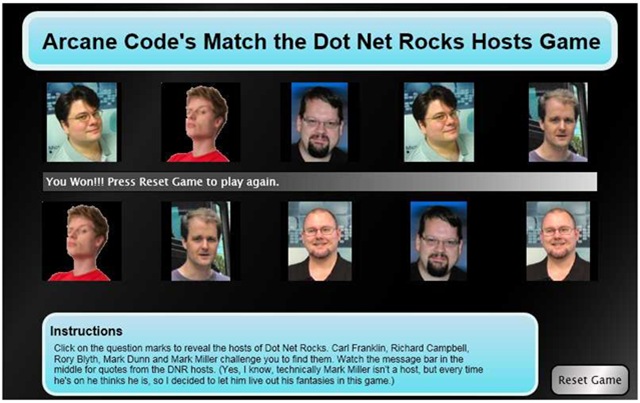
Here’s what I came up with, the Arcane Code Match the Dot Net Rocks Hosts Game. Play is quite simple, you click on the question marks. The first click reveals a DNR host, if you match with the second click the hosts photo stays up, and you are rewarded with a witty quote across the middle of the screen. If you fail to match, you are cruelly taunted then the pictures fade back to question marks. Match all the hosts to win. Below is an example before play begins. (Click for a bigger image).

Questions

And here is a game with all the hosts revealed. Carl Franklin, Mark Dunn, Rory Blyth, Richard Campbell and Mark Miller revealed in all their glory.

dnrmatch02

Now, before I get a zillion comments and e-mails, yes I am perfectly aware that Mark Miller is not a DNR Host. However, every time he gets on Mark Miller thinks he’s a host! And frankly, if it will help him to achieve his goal of 125 refactorings inside RefactorPro, then hey I’m certainly willing to help him live out his delusions inside the game.

Each time you play, by the way, the pictures get scrambled in a different order. In a few weeks I hope to figure out a place to host the game so you can actually play for yourself and not just have to look at static screen shots. Right now though I use WordPress for my blog and it (unfortunately) doesn’t do Silverlight.

Over the next two days I’ll show you the code behind, tomorrow I’ll post the XAML and Friday the Javascript. On both days I’ll talk a little bit about the code and what I did. If anyone would like a copy of the entire project, just shoot me an e-mail: arcanecode at gmail.com and I will send you a zip file with the whole project.

Arcane Fun Fridays

WHEW! All of this WPF / XAML sure has been a lot of fun. But I think it’s time to come up for air and see what else is happing out there in Dot Net land.

Alabama Code Camp is coming up in just a little over a week, Saturday October 6th to be exact. Still plenty of time to register and even just a bit of time if you want to get in on the Silverlight programming contest. First prize for that is a Zune! http://www.alabamacodecamp.com/home.html

devLink, the large conference for a cheap price comes up right afterward in Nashville, Friday and Saturday October 12th and 13th. http://www.devlink.net/ . You can tell I’ll be there, my name’s on the front page as a winner of a Barnes and Nobel gift card (look for the dude from AL !)

(By the way, anyone know of a good dog repellent? My nephew is coming to house sit and is bringing Marshmallow and Buttercup, his twin Dobermans along because I have a big back yard they can play in. Last time though they ate the garden hose, chewed the handle off my shovel, and bit through one of my lawnmower tires.)

There’s a new add-on for SQL Server Management Studio I’m eager to try out. It’s still in Beta but looks promising. It was blogged about at http://weblogs.sqlteam.com/mladenp/archive/2007/09/20/SSMS-Tools-Pack—an-add-in-for-SQL-Management-Studio.aspx or you can download it directly at http://www.ssmstoolspack.com/ .

If you are a fan of NUnit, you’ll appreciate the new xUnit. Read James’ announcement at http://jamesnewkirk.typepad.com/posts/2007/09/announcing-xuni.html .

In a recent Dot Net Rocks episode, Carl Franklin announced they would be taking over Shrinkster.com. Shrinkster has been down due to spam abuse, as soon as Carl gets everything setup we’ll be able to go back to using short links again!

Speaking of Dot Net Rocks, I especially enjoyed show 274, where the new features of VB.Net and C# for the 2008 release were discussed. Entertaining and lots of good tidbits. I think my favorite feature so far has got to be C#’s extension methods. http://www.dotnetrocks.com/default.aspx?showNum=274

During my long drive to the Tallahassee Code Camp last week, I put together a podcast theme session, and copied a bunch of related podcasts onto my cheapo SanDisk mp3 player. This time I went with a “Millenator” theme and got all the episodes of Dot Net Rocks that Mark Miller appeared on. Good stuff, lots of thoughtful material combined with some humor. Next time you go on a trip, copy a bunch of past episodes of your favorite podcast that are in the same theme and make that long drive go much quicker.

There have been several updates to the world’s greatest Visual Studio Add-In, CodeRush, over the last few weeks ( http://www.devexpress.com/Home/Announces/CodeRush25.xml ). Apparently Mark Miller and the boys have been busy! If you’re not on 2.5.4 go update yours today.

Speaking of Mark Miller, I love his intro slide for his VSLive session coming up in LasVegas. Take a look, pure genius. http://www.doitwith.net/2007/09/11/MyLastVSLiveSessionEver.aspx

A final note, between getting ready for Alabama Code Camp and going to devLink my blogging may get spotty for the next few weeks, bear with me and I’ll have full reports from both code camps and lots of fun new stuff to share.

Tallahassee Code Camp A Blast!

I got home a little while ago from spending all day Saturday at the Tallahassee Code Camp. And I have to say, it was a blast! Despite a six hour drive, which included driving through the remains of a tropical storm, it was well worth my time.

The day opened with me actually giving a presentation on SQL Server 2005 Compact Edition. I always like giving my presentations in the first slot, as the attendees are awake (mostly) and energized (or at least heavily caffeinated). They typically ask great questions, and this group was no exception. After my presentation, I was able to spend the rest of the day relaxing and learning about all sorts of great technologies. I attended sessions on Silverlight, LINQ, Windows WorkFlow (WF), and Ajax. All great, and very informative.

The Tallahassee User Group really knows how to put on a good show. Registration was extremely fast, they had more than enough doughnuts and coffee at breakfast and great pizza at lunch. The rooms were nice, all in all quite well run.

And the swag, baby! I have to brag and say I scored some great stuff, primarily a stack of new books on various .Net 3.0 technologies. My best score though came from Joe Healy (http://www.devfish.net/) who gave me one of those cool oval Microsoft stickers which I’ve now proudly affixed to the top of my laptop, just under my Coding Horror sticker.

I also have to give and extra special thanks to my long suffering wife the Southern TinkerBelle ( http://southerntinkerbelle.com/ ), who bent over backwards to arrange things so I could attend. Thanks sweetie!

Thanks again to everyone for a great time, and I look forward to going back next year!