The Silverlight Match the Dot Net Rocks Hosts Game – Part 3 – The Javascript

Today I’ve posted the Javascript for my DNR game (see posts from last two days). As you can see, it’s very straight forward and doesn’t require much explanation.

When the app loads, it calls a routine that uses a random number generator to randomly select a layout for the photos.

The other large routine handles mouse clicks. The really tricky part was determining which images were displayed and which were not. I finally resorted to using the Tag property of each Canvas control. In the Tag I put two numbers, each being a 0 or a 1. The first number represents a Boolean that flags whether the images is visible or not. The second position notes whether the image has already been matched. There are a number of SetCanvas… helper routines to make the setting of these flags a bit easier.

I make a lot of use of Math.Random to generate random numbers. I then use these to determine various messages that get displayed across the middle of the screen, tha way the user won’t get bored.

OK, enough talk, here’s the code. I’ve documented it pretty well, but if you have questions send me an e-mail or post a comment.


if (!window.DNRMatch)

  window.DNRMatch = {};


DNRMatch.Scene = function()

{

}


// ****************************************************************************

// * Author: Robert C. Cain, Arcane Code, http://arcanecode.com

// *

// * Notes

// *

// * The heart of the system relies on the tag property of the Canvas controls

// * used to display the pictures. It was the only mechanism I could find to

// * easily provide persistance between calls.

// *

// * The tag currently is a two character string. The first character is 0

// * or 1 and indicates if the ? is showing (a 0) or the Answer image is

// * being displayed (value is 1).

// *

// * The second position is also a 0 or 1, and indicates if the image has been

// * matched yet by the user or not. (0=no, 1=yes)

// *

// ****************************************************************************


// I store this here as it gets loaded and used in several places

var imgList = new Array(10);


DNRMatch.Scene.prototype =

{

  // Runs when app is first loaded

  handleLoad: function(plugIn, userContext, rootElement)

  {

    // Get the inital list of images into imgList array

    RandomizeImages();


    this.plugIn = plugIn;


    // Can’t use SetImages function since we don’t have a sender

    for(i=0; i<10; i++)

    {     

      plugIn.content.findName(“imgAnswer0” + i.toString()).Source=imgList[i];

    }

  }

}


//=============================================================================

// Main routine, activated when a user clicks on any image

//=============================================================================

function imgMouseLeftButtonDown(sender, mouseEventArgs)

{           

    var imgNumber = sender.Name.substr(3,2);

    var imgIndex = imgNumber.valueOf();

    var msg = sender.findName(“StatusArea”);

    var imgCurrentImage = sender.findName(“imgAnswer” + imgNumber);


    // Show the hidden image   

    if(CanvasVisible(sender, imgIndex)==“0”)

    {

      sender.findName(“img” + imgNumber + “RevealAnimation”).begin();

      sender.tag = “1” + sender.tag.substr(1,1);

    }


    var msgText=“”;

    var foundMatch=false;


    // Now check to see if another image is also visible.

    // If so, we’ll want to check for a match.     

    for(i=0; i<10; i++)

    {

      // If we’re not dealing with the same image

      if(i != imgIndex)

      {

        var imgLoopAnswer = sender.findName(“imgAnswer” + imgNumber);


        // If the image is visible

        if(CanvasVisible(sender, i.toString()) == “1”)

        {

          // See if it’s same image

          if( GetSource(sender, i)==GetSource(sender, imgIndex) )

          {

            // Congratulate user, then set the matched tags

            msg.text=GoodJobMessage(sender, i);

            SetCanvasMatchedTag(sender, i);

            SetCanvasMatchedTag(sender, imgIndex);

            foundMatch=true;

          }

        }

      }

    } 


    // See if we need to show a “no match” message

    if(foundMatch==false)  // If we didn’t find a match…

    {

      // If there are two items visible

      if (VisibleButUnmatchedCount(sender)==2)

      {

        // Show the bad job message

        msg.text=BadJobMessage();

      }

      else

      {

        // Only one image visible, set message to empty

        msg.text=“”;

      }

    }


    // Reset non-matches

    if (VisibleButUnmatchedCount(sender)==2)

    {

      for(i=0; i<10; i++)  // for each canvas

      {

        if(CanvasMatched(sender, i) == “0”) // if it hasn’t been matched

        {

          if(CanvasVisible(sender, i) == “1”)  // but it’s visible

          {

            sender.findName(“img0” + i.toString() + “HideAnimation”).begin(); // hide it

            SetCanvasInVisibleTag(sender, i);

            SetCanvasUnMatchedTag(sender, i);

          }

        }

      }     

    }


    // Check For Victory

    if(MatchCount(sender)==10)

    {

      msg.text=“You Won!!! Press Reset Game to play again.”;

    }


//    Just some debugging code, will leave it as it makes for good demo   

//    msg.text=ShowTags(sender);

//    msg.text=ShowSources(sender);

}


//=============================================================================

// Check the Tag property of the canvas to see if the image is visible

//=============================================================================

function CanvasVisible(sender, canvasNumber)

{

  var canvasNum = canvasNumber.toString();

  if(canvasNum.length > 1)

  {

    canvasNum = canvasNum.substr(canvasNum.length –  1, 1);

  }

  var currentCanvas = sender.findName(“img0” + canvasNum);

  var isCanvasVisible = currentCanvas.tag.substr(0,1);

  return isCanvasVisible;


}


//=============================================================================

// Check the Tag property of the canvas to see if the image has been matched

//=============================================================================

function CanvasMatched(sender, canvasNumber)

{

  var canvasNum = canvasNumber.toString();

  if(canvasNum.length > 1)

  {

    canvasNum = canvasNum.substr(canvasNum.length –  1, 1);

  }

  var currentCanvas = sender.findName(“img0” + canvasNum);

  var isCanvasMatched = currentCanvas.tag.substr(1,1);

  return isCanvasMatched;

}


//=============================================================================

// Set the Tag property of the canvas to indicate

// this canvas’s image is visible

//=============================================================================

function SetCanvasVisibleTag(sender, canvasNumber)

{

  var canvasNum = canvasNumber.toString();

  if(canvasNum.length > 1)

  {

    canvasNum = canvasNum.substr(canvasNum.length –  1, 1);

  }

  var currentCanvas = sender.findName(“img0” + canvasNum);

  currentCanvas.tag = “1” + currentCanvas.tag.substr(1,1);

}


//=============================================================================

// Set the Tag property of the canvas to indicate

// this canvas’s image is not visible

//=============================================================================

function SetCanvasInVisibleTag(sender, canvasNumber)

{

  var canvasNum = canvasNumber.toString();

  if(canvasNum.length > 1)

  {

    canvasNum = canvasNum.substr(canvasNum.length –  1, 1);

  }

  var currentCanvas = sender.findName(“img0” + canvasNum);

  currentCanvas.tag = “0” + currentCanvas.tag.substr(1,1);

}


//=============================================================================

// Set the Tag property of the canvas to indicate

// this canvas’s image has been matched

//=============================================================================

function SetCanvasMatchedTag(sender, canvasNumber)

{

  var canvasNum = canvasNumber.toString();

  if(canvasNum.length > 1)

  {

    canvasNum = canvasNum.substr(canvasNum.length –  1, 1);

  }

  var currentCanvas = sender.findName(“img0” + canvasNum);

  currentCanvas.tag = currentCanvas.tag.substr(0,1) + “1” ;

}


//=============================================================================

// Set the Tag property of the canvas to indicate

// this canvas’s image is not matched

//=============================================================================

function SetCanvasUnMatchedTag(sender, canvasNumber)

{

  var canvasNum = canvasNumber.toString();

  if(canvasNum.length > 1)

  {

    canvasNum = canvasNum.substr(canvasNum.length –  1, 1);

  }

  var currentCanvas = sender.findName(“img0” + canvasNum);

  currentCanvas.tag = currentCanvas.tag.substr(0,1) + “0” ;

}


//=============================================================================

// Count the number of items left that are visible, but not

// matched. In theory this should either be 0, 1 or 2.

//=============================================================================

function VisibleButUnmatchedCount(sender)

{

  var retVal=0;


  for(i=0; i<10; i++)

  {

    if(CanvasVisible(sender, i)==“1”)

    {

      if(CanvasMatched(sender, i)==“0”)

      {

        retVal++;

      }

    }

  }


  return retVal;

}


//=============================================================================

// Count the number of items that are matched.

// When it reached 10 we’ll know they won

//=============================================================================

function MatchCount(sender)

{

  var retVal=0;


  for(i=0; i<10; i++)

  {

    if(CanvasMatched(sender, i)==“1”)

    {

      retVal++;

    }

  }


  return retVal;

}


//=============================================================================

// Get the file name of the image used in the sender control

//=============================================================================

function GetSource(sender, imageNumber)

{

  var imgNum = imageNumber.toString();

  if(imgNum.length > 1)

  {

    imgNum = imgNum.substr(imgNum.length – 1, 1);

  }


  var img = sender.findName(“imgAnswer0” + imgNum );

  return img.Source; 

}


//=============================================================================

// Create a “Bad Guess” message

//=============================================================================

function BadJobMessage()

{

  // Randomly select from the list of “Try again” messages

  var possibleMsgs = new Array(5);

  possibleMsgs[0] = “Nope, try again.”;

  possibleMsgs[1] = “I don’t think so!”;

  possibleMsgs[2] = “Dude, not even close!”;

  possibleMsgs[3] = “Don’t give up yet, keep trying!”;

  possibleMsgs[4] = “Ha! Don’t make me laugh.”;

  possibleMsgs[5] = “I’ve heard of wild guesses, but gee whiz. Try again.”;


  var randomNum = Math.floor(Math.random()*6);


  return possibleMsgs[randomNum];


}


//=============================================================================

// Create a Good Job message based on the image the user

// just matched.

//=============================================================================

function GoodJobMessage(sender, imageNumber)

{

  var retMsg = “Good Job.”;

  var possibleMsgs = new Array(9);


  if(GetSource(sender, imageNumber)==“Carl02.png”)

  {

    possibleMsgs[0] = “Carl says you da man!”;

    possibleMsgs[1] = “You must be that squirt king of C#. We will make a T-shirt for you.”;

    possibleMsgs[2] = “A catheter and somebody to bring you a sandwich once in a while. That’s living man.”;

    possibleMsgs[3] = “While you shampoo your hair… Wait I guess that rules out C++ programmers.”;

    possibleMsgs[4] = “Some people go to sleep listening to DNR.”;

    possibleMsgs[5] = “”;

    possibleMsgs[6] = “”;

    possibleMsgs[7] = “”;

    possibleMsgs[8] = “”;

    retMsg = possibleMsgs[Math.floor(Math.random()*5)];

  }


  if(GetSource(sender, imageNumber)==“Richard01.png”)

  {

    possibleMsgs[0] = “It’s Richard, the Toy Boy!”;

    possibleMsgs[1] = “Now we got emotional baggage.”;

    possibleMsgs[2] = “Ballmer is always great. He seems a lot less angry these days, I think they switched him to decaf.”;

    possibleMsgs[3] = “Everytime you say Web 2.0, a startup dies.”;

    possibleMsgs[4] = “My favorite Martian is Mark Miller!”;

    possibleMsgs[5] = “Don’t play with it, just look at it!”;

    possibleMsgs[6] = “You [Mark Miller] are the Jim Carey of the podcasting world.”;

    possibleMsgs[7] = “Welcome to the dark side baby!”;

    possibleMsgs[8] = “”;

    retMsg = possibleMsgs[Math.floor(Math.random()*8)];

  }


  if(GetSource(sender, imageNumber)==“Rory.png”)

  {

    possibleMsgs[0] = “Rory rewards you by allowing you to gaze upon his magnificence.”;

    possibleMsgs[1] = “You are testing my patience Franklin!”;

    possibleMsgs[2] = “You’re like some kid from a third world country…”;

    possibleMsgs[3] = “It’s a place where you can talk about anal leakage.”;

    possibleMsgs[4] = “I was pretending to tweak Mark Dunn’s nipples like they were radio knobs.”;

    possibleMsgs[5] = “I was talking about how weird it was to see Mark Dunn in the flesh.”;

    possibleMsgs[6] = “”;

    possibleMsgs[7] = “”;

    possibleMsgs[8] = “”;

    retMsg = possibleMsgs[Math.floor(Math.random()*5)];

  }


  if(GetSource(sender, imageNumber)==“Mark.png”)

  {

    possibleMsgs[0] = “Mark Dunn says it’s always sunny in the south!”;

    possibleMsgs[1] = “I gotta clean my underwear now Carl.”;

    possibleMsgs[2] = “I am higher than a California Condor on Ecstasy, that’s how excited I am to be here.”;

    possibleMsgs[3] = “”;

    possibleMsgs[4] = “”;

    possibleMsgs[5] = “”;

    possibleMsgs[6] = “”;

    possibleMsgs[7] = “”;

    possibleMsgs[8] = “”;

    retMsg = possibleMsgs[Math.floor(Math.random()*3)];

  }


  if(GetSource(sender, imageNumber)==“Miller.png”)

  {

    possibleMsgs[0] = “I got nuthin’ man.”;

    possibleMsgs[1] = “You guys are messing with me again!”;

    possibleMsgs[2] = “My golden ticket on the candy bar said it was about a new co-host!”;

    possibleMsgs[3] = “I want one of these!”;

    possibleMsgs[4] = “What about me Carl?”;

    possibleMsgs[5] = “I’m good lookin too!”;

    possibleMsgs[6] = “”;

    possibleMsgs[7] = “”;

    possibleMsgs[8] = “”;

    retMsg = possibleMsgs[Math.floor(Math.random()*6)];

  }


  return retMsg;

}


//=============================================================================

// Reset the game for another play

//=============================================================================

function ResetGame(sender, mouseEventArgs)

{

    sender.findName(“mainHideAnimation”).begin(); // hide it


    for(i=0; i<10; i++)  // for each canvas

    {

      SetCanvasUnMatchedTag(sender, i);

      if(CanvasVisible(sender, i) == “1”)  // but it’s visible

      {

        sender.findName(“img0” + i.toString() + “HideAnimation”).begin(); // hide it

        SetCanvasInVisibleTag(sender, i);

      }

    }


    RandomizeImages();

    SetImages(sender);


    var msg = sender.findName(“StatusArea”);

    msg.text = “Play the game!”;


    sender.findName(“mainRevealAnimation”).begin(); // hide it


}


//=============================================================================

// Create a random number, then use it to pick and load the

// imgList array. Used to mix up the images.

//=============================================================================

function RandomizeImages()

{

    // Default set

    imgList[0] = “Carl02.png”;

    imgList[1] = “Richard01.png”;

    imgList[2] = “Rory.png”;

    imgList[3] = “Mark.png”;

    imgList[4] = “Miller.png”;

    imgList[5] = “Miller.png”;

    imgList[6] = “Mark.png”;

    imgList[7] = “Rory.png”;

    imgList[8] = “Richard01.png”;

    imgList[9] = “Carl02.png”;


    var randomNum = Math.floor(Math.random()*9);


    if(randomNum==0)

    {

      imgList[0] = “Carl02.png”;

      imgList[1] = “Richard01.png”;

      imgList[2] = “Rory.png”;

      imgList[3] = “Mark.png”;

      imgList[4] = “Miller.png”;

      imgList[5] = “Miller.png”;

      imgList[6] = “Mark.png”;

      imgList[7] = “Rory.png”;

      imgList[8] = “Richard01.png”;

      imgList[9] = “Carl02.png”;

    }


    if(randomNum==1)

    {

      imgList[0] = “Rory.png”;

      imgList[1] = “Mark.png”;

      imgList[2] = “Miller.png”;

      imgList[3] = “Richard01.png”;

      imgList[4] = “Carl02.png”;

      imgList[5] = “Rory.png”;

      imgList[6] = “Carl02.png”;

      imgList[7] = “Miller.png”;

      imgList[8] = “Richard01.png”;

      imgList[9] = “Mark.png”;

    }


    if(randomNum==2)

    {

      imgList[0] = “Rory.png”;

      imgList[1] = “Mark.png”;

      imgList[2] = “Miller.png”;

      imgList[3] = “Richard01.png”;

      imgList[4] = “Carl02.png”;

      imgList[5] = “Mark.png”;

      imgList[6] = “Rory.png”;

      imgList[7] = “Carl02.png”;

      imgList[8] = “Richard01.png”;

      imgList[9] = “Miller.png”;

    }


    if(randomNum==3)

    {

      imgList[0] = “Carl02.png”;

      imgList[1] = “Rory.png”;

      imgList[2] = “Richard01.png”;

      imgList[3] = “Carl02.png”;

      imgList[4] = “Miller.png”;

      imgList[5] = “Rory.png”;

      imgList[6] = “Miller.png”;

      imgList[7] = “Mark.png”;

      imgList[8] = “Richard01.png”;

      imgList[9] = “Mark.png”;

    }


    if(randomNum==4)

    {

      imgList[0] = “Mark.png”;

      imgList[1] = “Rory.png”;

      imgList[2] = “Rory.png”;

      imgList[3] = “Carl02.png”;

      imgList[4] = “Miller.png”;

      imgList[5] = “Carl02.png”;

      imgList[6] = “Richard01.png”;

      imgList[7] = “Mark.png”;

      imgList[8] = “Richard01.png”;

      imgList[9] = “Miller.png”;

    }


    if(randomNum==5)

    {

      imgList[0] = “Carl02.png”;

      imgList[1] = “Mark.png”;

      imgList[2] = “Richard01.png”;

      imgList[3] = “Richard01.png”;

      imgList[4] = “Rory.png”;

      imgList[5] = “Mark.png”;

      imgList[6] = “Rory.png”;

      imgList[7] = “Carl02.png”;

      imgList[8] = “Miller.png”;

      imgList[9] = “Miller.png”;

    }


    if(randomNum==6)

    {

      imgList[0] = “Mark.png”;

      imgList[1] = “Carl02.png”;

      imgList[2] = “Mark.png”;

      imgList[3] = “Richard01.png”;

      imgList[4] = “Rory.png”;

      imgList[5] = “Miller.png”;

      imgList[6] = “Rory.png”;

      imgList[7] = “Miller.png”;

      imgList[8] = “Richard01.png”;

      imgList[9] = “Carl02.png”;

    }


    if(randomNum==7)

    {

      imgList[0] = “Rory.png”;

      imgList[1] = “Carl02.png”;

      imgList[2] = “Mark.png”;

      imgList[3] = “Richard01.png”;

      imgList[4] = “Mark.png”;

      imgList[5] = “Miller.png”;

      imgList[6] = “Miller.png”;

      imgList[7] = “Richard01.png”;

      imgList[8] = “Carl02.png”;

      imgList[9] = “Rory.png”;

    }


    if(randomNum==8)

    {

      imgList[0] = “Richard01.png”;

      imgList[1] = “Rory.png”;

      imgList[2] = “Mark.png”;

      imgList[3] = “Carl02.png”;

      imgList[4] = “Miller.png”;

      imgList[5] = “Mark.png”;

      imgList[6] = “Carl02.png”;

      imgList[7] = “Richard01.png”;

      imgList[8] = “Rory.png”;

      imgList[9] = “Miller.png”;

    }

}


//=============================================================================

// Sets the image source property for all the images

// to the image name loaded in the imgList array

//=============================================================================

function SetImages(sender)

{

    for(i=0; i<10; i++)

    {     

      sender.findName(“imgAnswer0” + i.toString()).Source=imgList[i];

    }

}


//=============================================================================

// Causes the job to wait a certain number of milliseconds.

// Has a drawback in that it does not pause animations,

// so if you use it while an animation is happening you won’t

// see the animation effect but it will ‘jerk’ to the final result.

//=============================================================================

function wait(msecs)

{

  var start = new Date().getTime();

  var cur = start

  while(cur – start < msecs)

  {

    cur = new Date().getTime();

  }

}


//=============================================================================

// For debugging only – Shows all the images.

//=============================================================================

function ShowSources(sender)

{

  var retVal=“”;

  for(i=0; i<10; i++)

  {


    retVal += i.toString() + “: “ + GetSource(sender, i);

  }

  return retVal;

}


//=============================================================================

// For debugging only – Shows the tags

//=============================================================================

function ShowTags(sender)

{

  retVal = “”;

  for(i=0; i<10; i++)

  {

    var currentCanvas = sender.findName(“img0” + i.toString());

    retVal += currentCanvas.tag + ” “;

  }

  return retVal; 

}

The Silverlight Match the Dot Net Rocks Hosts Game – Part 2 – The XAML

Because it’s quite long I’ve posted the XAML at the foot of this post. It’s pretty straight forward though. In Silverlight 1.0 XAML, you’re restricted to using a Canvas for your containers.

In this case I use 10 child canvases, one for each of the photos. At the start of the XAML for each image canvas I have two Storyboards in the Canvas.Resources section. One storyboard fades the question mark out then the photo in. The other reverses it, fading out the photo and in the question mark.

Next I put a rectangle around the entire game, then display the title bar. After that I display the instructions at the bottom using colors similar to the title bar.

A series of 10 canvases come next, each one holds two image controls, one for the question mark and one for the picture of the host. When the app starts, the Javascript replaces the Source property for each of the Answer images with a photo of the host, but you’ll see that tomorrow.

The only other thing to note is how mouse clicks are captured. There is no Click even as you might be used to with WPF, instead you have to capture the MouseLeftButtonDown. I route all 10 images’ MouseLeftButtonDown events to the same Javascript method, and use the Sender parameter to differentiate which of the 10 Canvases were clicked.

The final thing to note is the Reset Game button, which really isn’t a button but a canvas, which holds a rectangle with some cool gradients and a text block. Just like with the images, the canvas’ MouseLeftButtonDown is captured and the corresponding Javascript routine is called.

OK, enough explanation for today, here’s the code:


<Canvas xmlns=“http://schemas.microsoft.com/client/2007“

        xmlns:x=“http://schemas.microsoft.com/winfx/2006/xaml“

        x:Name=“mainCanvas“

        Width=“800“ Height=“500“ Background=“Black“>


  <Canvas.Resources>

    <Storyboard x:Name=“mainRevealAnimation“ >

      <DoubleAnimation Duration=“00:00:01.5“ From=“0“ To=“1“

                      Storyboard.TargetName=“mainCanvas“

                        Storyboard.TargetProperty=“Opacity“  />

    </Storyboard>

    <Storyboard x:Name=“mainHideAnimation“ >

      <DoubleAnimation Duration=“00:00:01.5“ From=“1“ To=“0“

                      Storyboard.TargetName=“mainCanvas“

                        Storyboard.TargetProperty=“Opacity“  />

    </Storyboard>


    <Storyboard x:Name=“img00RevealAnimation“ >

      <DoubleAnimation Duration=“00:00:00.5“ From=“1“ To=“0“

                      Storyboard.TargetName=“imgQuestion00“

                        Storyboard.TargetProperty=“Opacity“  />

      <DoubleAnimation Duration=“00:00:00.5“ From=“0“ To=“1“

                      Storyboard.TargetName=“imgAnswer00“

                        Storyboard.TargetProperty=“Opacity“  />

    </Storyboard>

    <Storyboard x:Name=“img00HideAnimation“ >

      <DoubleAnimation Duration=“00:00:00.5“ From=“1“ To=“0“

                      Storyboard.TargetName=“imgAnswer00“

                        Storyboard.TargetProperty=“Opacity“  />

      <DoubleAnimation Duration=“00:00:00.5“ From=“0“ To=“1“

                      Storyboard.TargetName=“imgQuestion00“

                        Storyboard.TargetProperty=“Opacity“  />

    </Storyboard>

    <Storyboard x:Name=“img01RevealAnimation“ >

      <DoubleAnimation Duration=“00:00:00.5“ From=“1“ To=“0“

                      Storyboard.TargetName=“imgQuestion01“

                        Storyboard.TargetProperty=“Opacity“  />

      <DoubleAnimation Duration=“00:00:00.5“ From=“0“ To=“1“

                      Storyboard.TargetName=“imgAnswer01“

                        Storyboard.TargetProperty=“Opacity“  />

    </Storyboard>

    <Storyboard x:Name=“img01HideAnimation“ >

      <DoubleAnimation Duration=“00:00:00.5“ From=“1“ To=“0“

                      Storyboard.TargetName=“imgAnswer01“

                        Storyboard.TargetProperty=“Opacity“  />

      <DoubleAnimation Duration=“00:00:00.5“ From=“0“ To=“1“

                      Storyboard.TargetName=“imgQuestion01“

                        Storyboard.TargetProperty=“Opacity“  />

    </Storyboard>

    <Storyboard x:Name=“img02RevealAnimation“ >

      <DoubleAnimation Duration=“00:00:00.5“ From=“1“ To=“0“

                      Storyboard.TargetName=“imgQuestion02“

                        Storyboard.TargetProperty=“Opacity“  />

      <DoubleAnimation Duration=“00:00:00.5“ From=“0“ To=“1“

                      Storyboard.TargetName=“imgAnswer02“

                        Storyboard.TargetProperty=“Opacity“  />

    </Storyboard>

    <Storyboard x:Name=“img02HideAnimation“ >

      <DoubleAnimation Duration=“00:00:00.5“ From=“1“ To=“0“

                      Storyboard.TargetName=“imgAnswer02“

                        Storyboard.TargetProperty=“Opacity“  />

      <DoubleAnimation Duration=“00:00:00.5“ From=“0“ To=“1“

                      Storyboard.TargetName=“imgQuestion02“

                        Storyboard.TargetProperty=“Opacity“  />

    </Storyboard>

    <Storyboard x:Name=“img03RevealAnimation“ >

      <DoubleAnimation Duration=“00:00:00.5“ From=“1“ To=“0“

                      Storyboard.TargetName=“imgQuestion03“

                        Storyboard.TargetProperty=“Opacity“  />

      <DoubleAnimation Duration=“00:00:00.5“ From=“0“ To=“1“

                      Storyboard.TargetName=“imgAnswer03“

                        Storyboard.TargetProperty=“Opacity“  />

    </Storyboard>

    <Storyboard x:Name=“img03HideAnimation“ >

      <DoubleAnimation Duration=“00:00:00.5“ From=“1“ To=“0“

                      Storyboard.TargetName=“imgAnswer03“

                        Storyboard.TargetProperty=“Opacity“  />

      <DoubleAnimation Duration=“00:00:00.5“ From=“0“ To=“1“

                      Storyboard.TargetName=“imgQuestion03“

                        Storyboard.TargetProperty=“Opacity“  />

    </Storyboard>

    <Storyboard x:Name=“img04RevealAnimation“ >

      <DoubleAnimation Duration=“00:00:00.5“ From=“1“ To=“0“

                      Storyboard.TargetName=“imgQuestion04“

                        Storyboard.TargetProperty=“Opacity“  />

      <DoubleAnimation Duration=“00:00:00.5“ From=“0“ To=“1“

                      Storyboard.TargetName=“imgAnswer04“

                        Storyboard.TargetProperty=“Opacity“  />

    </Storyboard>

    <Storyboard x:Name=“img04HideAnimation“ >

      <DoubleAnimation Duration=“00:00:00.5“ From=“1“ To=“0“

                      Storyboard.TargetName=“imgAnswer04“

                        Storyboard.TargetProperty=“Opacity“  />

      <DoubleAnimation Duration=“00:00:00.5“ From=“0“ To=“1“

                      Storyboard.TargetName=“imgQuestion04“

                        Storyboard.TargetProperty=“Opacity“  />

    </Storyboard>

    <Storyboard x:Name=“img05RevealAnimation“ >

      <DoubleAnimation Duration=“00:00:00.5“ From=“1“ To=“0“

                      Storyboard.TargetName=“imgQuestion05“

                        Storyboard.TargetProperty=“Opacity“  />

      <DoubleAnimation Duration=“00:00:00.5“ From=“0“ To=“1“

                      Storyboard.TargetName=“imgAnswer05“

                        Storyboard.TargetProperty=“Opacity“  />

    </Storyboard>

    <Storyboard x:Name=“img05HideAnimation“ >

      <DoubleAnimation Duration=“00:00:00.5“ From=“1“ To=“0“

                      Storyboard.TargetName=“imgAnswer05“

                        Storyboard.TargetProperty=“Opacity“  />

      <DoubleAnimation Duration=“00:00:00.5“ From=“0“ To=“1“

                      Storyboard.TargetName=“imgQuestion05“

                        Storyboard.TargetProperty=“Opacity“  />

    </Storyboard>

    <Storyboard x:Name=“img06RevealAnimation“ >

      <DoubleAnimation Duration=“00:00:00.5“ From=“1“ To=“0“

                      Storyboard.TargetName=“imgQuestion06“

                        Storyboard.TargetProperty=“Opacity“  />

      <DoubleAnimation Duration=“00:00:00.5“ From=“0“ To=“1“

                      Storyboard.TargetName=“imgAnswer06“

                        Storyboard.TargetProperty=“Opacity“  />

    </Storyboard>

    <Storyboard x:Name=“img06HideAnimation“ >

      <DoubleAnimation Duration=“00:00:00.5“ From=“1“ To=“0“

                      Storyboard.TargetName=“imgAnswer06“

                        Storyboard.TargetProperty=“Opacity“  />

      <DoubleAnimation Duration=“00:00:00.5“ From=“0“ To=“1“

                      Storyboard.TargetName=“imgQuestion06“

                        Storyboard.TargetProperty=“Opacity“  />

    </Storyboard>

    <Storyboard x:Name=“img07RevealAnimation“ >

      <DoubleAnimation Duration=“00:00:00.5“ From=“1“ To=“0“

                      Storyboard.TargetName=“imgQuestion07“

                        Storyboard.TargetProperty=“Opacity“  />

      <DoubleAnimation Duration=“00:00:00.5“ From=“0“ To=“1“

                      Storyboard.TargetName=“imgAnswer07“

                        Storyboard.TargetProperty=“Opacity“  />

    </Storyboard>

    <Storyboard x:Name=“img07HideAnimation“ >

      <DoubleAnimation Duration=“00:00:00.5“ From=“1“ To=“0“

                      Storyboard.TargetName=“imgAnswer07“

                        Storyboard.TargetProperty=“Opacity“  />

      <DoubleAnimation Duration=“00:00:00.5“ From=“0“ To=“1“

                      Storyboard.TargetName=“imgQuestion07“

                        Storyboard.TargetProperty=“Opacity“  />

    </Storyboard>

    <Storyboard x:Name=“img08RevealAnimation“ >

      <DoubleAnimation Duration=“00:00:00.5“ From=“1“ To=“0“

                      Storyboard.TargetName=“imgQuestion08“

                        Storyboard.TargetProperty=“Opacity“  />

      <DoubleAnimation Duration=“00:00:00.5“ From=“0“ To=“1“

                      Storyboard.TargetName=“imgAnswer08“

                        Storyboard.TargetProperty=“Opacity“  />

    </Storyboard>

    <Storyboard x:Name=“img08HideAnimation“ >

      <DoubleAnimation Duration=“00:00:00.5“ From=“1“ To=“0“

                      Storyboard.TargetName=“imgAnswer08“

                        Storyboard.TargetProperty=“Opacity“  />

      <DoubleAnimation Duration=“00:00:00.5“ From=“0“ To=“1“

                      Storyboard.TargetName=“imgQuestion08“

                        Storyboard.TargetProperty=“Opacity“  />

    </Storyboard>

    <Storyboard x:Name=“img09RevealAnimation“ >

      <DoubleAnimation Duration=“00:00:00.5“ From=“1“ To=“0“

                      Storyboard.TargetName=“imgQuestion09“

                        Storyboard.TargetProperty=“Opacity“  />

      <DoubleAnimation Duration=“00:00:00.5“ From=“0“ To=“1“

                      Storyboard.TargetName=“imgAnswer09“

                        Storyboard.TargetProperty=“Opacity“  />

    </Storyboard>

    <Storyboard x:Name=“img09HideAnimation“ >

      <DoubleAnimation Duration=“00:00:00.5“ From=“1“ To=“0“

                      Storyboard.TargetName=“imgAnswer09“

                        Storyboard.TargetProperty=“Opacity“  />

      <DoubleAnimation Duration=“00:00:00.5“ From=“0“ To=“1“

                      Storyboard.TargetName=“imgQuestion09“

                        Storyboard.TargetProperty=“Opacity“  />

    </Storyboard>


  </Canvas.Resources>


  <Rectangle Width=“800“ Height=“500“ Canvas.Left=“0“ Canvas.Top=“0“>

    <Rectangle.Fill>

      <LinearGradientBrush>

        <GradientStop Color=“#00000000“ Offset=“0.0“ />

        <GradientStop Color=“#55555555“ Offset=“0.25“ />

        <GradientStop Color=“#00000000“ Offset=“0.75“ />

        <GradientStop Color=“#88888888“ Offset=“1.0“ />

      </LinearGradientBrush>

    </Rectangle.Fill>

  </Rectangle>


  <!– Title bar –>

  <Rectangle x:Name=“TitleBar“ Canvas.Left=“25“ Canvas.Top=“10“

            Width=“750“ Height=“75“ RadiusX=“16“ RadiusY=“16“

            Stroke=“#E0F0F0“ StrokeThickness=“8“>

    <Rectangle.Fill>

      <LinearGradientBrush StartPoint=“0.5,0“ EndPoint=“0.5,1“ >

        <GradientStop Color=“#FFC4E1F0“ Offset=“0“/>

        <GradientStop Color=“#FF64E1F0“ Offset=“1“/>

      </LinearGradientBrush>

    </Rectangle.Fill>

  </Rectangle>


  <TextBlock Canvas.Left=“50“ Canvas.Top=“33“

            FontFamily=“Arial“ FontSize=“28“ FontWeight=“Bold“>

    Arcane Code’s Match the Dot Net Rocks Hosts Game

  </TextBlock>


  <!– Instructions –>

  <Canvas Canvas.Left=“50“ Canvas.Top=“390“>

    <Rectangle x:Name=“Instructions“ Canvas.Top=“0“ Canvas.Left=“0“

            Width=“625“ Height=“105“ RadiusX=“16“ RadiusY=“16“

            Stroke=“#E0F0F0“ StrokeThickness=“4“>

      <Rectangle.Fill>

        <LinearGradientBrush StartPoint=“0.5,0“ EndPoint=“0.5,1“ >

          <GradientStop Color=“#FFC4E1F0“ Offset=“0“/>

          <GradientStop Color=“#FF64E1F0“ Offset=“1“/>

        </LinearGradientBrush>

      </Rectangle.Fill>

    </Rectangle>


    <TextBlock Canvas.Left=“10“ Canvas.Top=“15“

              FontFamily=“Arial“ FontSize=“16“ FontWeight=“Bold“>

      Instructions

    </TextBlock>


    <TextBlock Canvas.Left=“15“ Canvas.Top=“38“ Width=“550“

              FontFamily=“Arial“ FontSize=“12“ TextWrapping=“Wrap“ >

      Click on the question marks to reveal the hosts of Dot Net Rocks. Carl Franklin,

      Richard Campbell, Rory Blyth, Mark Dunn and Mark Miller challenge you to find them.

      Watch the message bar in the middle for quotes from the DNR hosts.

      (Yes, I know, technically Mark Miller isn’t a host, but every time he’s on he thinks he

      is, so I decided to let him live out his fantasies in this game.)

    </TextBlock>

  </Canvas>


  <!– The images –>

  <Canvas x:Name=“img00“ Canvas.Left=“050“ Canvas.Top=“100“ Height=“100“

      MouseLeftButtonDown=“imgMouseLeftButtonDown“ Tag=“00“    >

    <Image x:Name=“imgQuestion00“ Height=“100“ Width=“100“ Source=“Dunno.png“ />

    <Image x:Name=“imgAnswer00“ Height=“100“ Source=“Carl01.png“ Opacity=“0“ />

  </Canvas>


  <Canvas x:Name=“img01“ Canvas.Left=“200“ Canvas.Top=“100“ Height=“100“

      MouseLeftButtonDown=“imgMouseLeftButtonDown“ Tag=“00“    >

    <Image x:Name=“imgQuestion01“ Height=“100“ Width=“100“ Source=“Dunno.png“ />

    <Image x:Name=“imgAnswer01“ Height=“100“ Source=“Carl01.png“ Opacity=“0“ />

  </Canvas>


  <Canvas x:Name=“img02“ Canvas.Left=“350“ Canvas.Top=“100“ Height=“100“

      MouseLeftButtonDown=“imgMouseLeftButtonDown“ Tag=“00“    >

    <Image x:Name=“imgQuestion02“ Height=“100“ Width=“100“ Source=“Dunno.png“ />

    <Image x:Name=“imgAnswer02“ Height=“100“ Source=“Carl01.png“ Opacity=“0“ />

  </Canvas>


  <Canvas x:Name=“img03“ Canvas.Left=“500“ Canvas.Top=“100“ Height=“100“

      MouseLeftButtonDown=“imgMouseLeftButtonDown“ Tag=“00“    >

    <Image x:Name=“imgQuestion03“ Height=“100“ Width=“100“ Source=“Dunno.png“ />

    <Image x:Name=“imgAnswer03“ Height=“100“ Source=“Carl01.png“ Opacity=“0“ />

  </Canvas>


  <Canvas x:Name=“img04“ Canvas.Left=“650“ Canvas.Top=“100“ Height=“100“

      MouseLeftButtonDown=“imgMouseLeftButtonDown“ Tag=“00“    >

    <Image x:Name=“imgQuestion04“ Height=“100“ Width=“100“ Source=“Dunno.png“ />

    <Image x:Name=“imgAnswer04“ Height=“100“ Source=“Carl01.png“ Opacity=“0“ />

  </Canvas>


  <Canvas x:Name=“img05“ Canvas.Left=“050“ Canvas.Top=“250“ Height=“100“

      MouseLeftButtonDown=“imgMouseLeftButtonDown“ Tag=“00“    >

    <Image x:Name=“imgQuestion05“ Height=“100“ Width=“100“ Source=“Dunno.png“ />

    <Image x:Name=“imgAnswer05“ Height=“100“ Source=“Carl01.png“ Opacity=“0“ />

  </Canvas>


  <Canvas x:Name=“img06“ Canvas.Left=“200“ Canvas.Top=“250“ Height=“100“

      MouseLeftButtonDown=“imgMouseLeftButtonDown“ Tag=“00“    >

    <Image x:Name=“imgQuestion06“ Height=“100“ Width=“100“ Source=“Dunno.png“ />

    <Image x:Name=“imgAnswer06“ Height=“100“ Source=“Carl01.png“ Opacity=“0“ />

  </Canvas>


  <Canvas x:Name=“img07“ Canvas.Left=“350“ Canvas.Top=“250“ Height=“100“

    MouseLeftButtonDown=“imgMouseLeftButtonDown“ Tag=“00“    >

    <Image x:Name=“imgQuestion07“ Height=“100“ Width=“100“ Source=“Dunno.png“ />

    <Image x:Name=“imgAnswer07“ Height=“100“ Source=“Carl01.png“ Opacity=“0“ />

  </Canvas>


  <Canvas x:Name=“img08“ Canvas.Left=“500“ Canvas.Top=“250“ Height=“100“

      MouseLeftButtonDown=“imgMouseLeftButtonDown“ Tag=“00“    >

    <Image x:Name=“imgQuestion08“ Height=“100“ Width=“100“ Source=“Dunno.png“ />

    <Image x:Name=“imgAnswer08“ Height=“100“ Source=“Carl01.png“ Opacity=“0“ />

  </Canvas>


  <Canvas x:Name=“img09“ Canvas.Left=“650“ Canvas.Top=“250“ Height=“100“

      MouseLeftButtonDown=“imgMouseLeftButtonDown“ Tag=“00“    >

    <Image x:Name=“imgQuestion09“ Height=“100“ Width=“100“ Source=“Dunno.png“ />

    <Image x:Name=“imgAnswer09“ Height=“100“ Source=“Carl01.png“ Opacity=“0“ />

  </Canvas>


  <!– Message Bar across Middle of Screen –>

  <Rectangle Width=“700“ Height=“26“ Stroke=“#FF000000“ Canvas.Left=“50“ Canvas.Top=“212“>

    <Rectangle.Fill>

      <LinearGradientBrush EndPoint=“1,0.5“ StartPoint=“0,0.5“>

        <GradientStop Color=“#FFDDDDDD“ Offset=“1“/>

        <GradientStop Color=“#FF464646“ Offset=“0.393“/>

        <GradientStop Color=“#FE8B8B8B“ Offset=“0.723“/>

      </LinearGradientBrush>

    </Rectangle.Fill>

  </Rectangle>


  <TextBlock x:Name=“StatusArea“ Canvas.Left=“55“ Canvas.Top=“215“

            FontSize=“14“ FontWeight=“Medium“ Foreground=“White“ >

    Match the Hosts!

  </TextBlock>


  <!– Reset Game Button–>

  <Canvas Canvas.Top=“455“ Canvas.Left=“690“ MouseLeftButtonDown=“ResetGame“>


    <Rectangle Stroke=“Black“ StrokeThickness=“2“

        Width=“100“ Height=“40“

        RadiusX=“10“ RadiusY=“10“>

      <Rectangle.Fill>

        <LinearGradientBrush>

          <GradientStop Color=“Gray“ Offset=“0“/>

          <GradientStop Color=“Snow“ Offset=“0.6“/>

          <GradientStop Color=“Gray“ Offset=“1“/>

        </LinearGradientBrush>

      </Rectangle.Fill>

    </Rectangle>


    <TextBlock Canvas.Top=“10“ Canvas.Left=“10“

              FontSize=“14“ FontWeight=“Bold“

              Text=“Reset Game“ />


  </Canvas>


</Canvas>

The Silverlight Match the Dot Net Rocks Hosts Game – Part 1 – Intro

Alabama Code Camp 5 did something interesting, they sponsored a programming contest. The rules were pretty simple, you had to code a game using Silverlight 1.0. First prize would be awarded a Zune.

If I tell you I still want a Zune, you’ll be able to figure out how I did. Actually, I did come in second place, but that’s OK. I had a fun time coding the game, and it was neat to get in there roll up my sleeves and learn a new technology. Not to mention listening to all those old DNR episodes to get the quotes. (I still want a Zune though. 😉

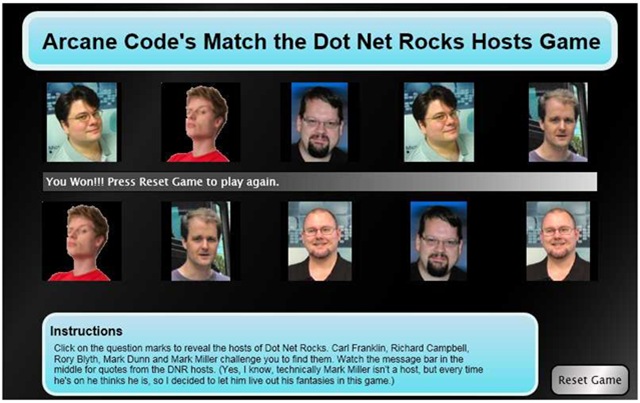
Here’s what I came up with, the Arcane Code Match the Dot Net Rocks Hosts Game. Play is quite simple, you click on the question marks. The first click reveals a DNR host, if you match with the second click the hosts photo stays up, and you are rewarded with a witty quote across the middle of the screen. If you fail to match, you are cruelly taunted then the pictures fade back to question marks. Match all the hosts to win. Below is an example before play begins. (Click for a bigger image).

Questions

And here is a game with all the hosts revealed. Carl Franklin, Mark Dunn, Rory Blyth, Richard Campbell and Mark Miller revealed in all their glory.

dnrmatch02

Now, before I get a zillion comments and e-mails, yes I am perfectly aware that Mark Miller is not a DNR Host. However, every time he gets on Mark Miller thinks he’s a host! And frankly, if it will help him to achieve his goal of 125 refactorings inside RefactorPro, then hey I’m certainly willing to help him live out his delusions inside the game.

Each time you play, by the way, the pictures get scrambled in a different order. In a few weeks I hope to figure out a place to host the game so you can actually play for yourself and not just have to look at static screen shots. Right now though I use WordPress for my blog and it (unfortunately) doesn’t do Silverlight.

Over the next two days I’ll show you the code behind, tomorrow I’ll post the XAML and Friday the Javascript. On both days I’ll talk a little bit about the code and what I did. If anyone would like a copy of the entire project, just shoot me an e-mail: arcanecode at gmail.com and I will send you a zip file with the whole project.