SQL Saturday Redmond – October 3 2009

I am fortunate enough to be able to give three presentations at Redmond WA’s SQL Saturday event. The first session is “Introduciton to Data Warehousing / Business Intelligence”. Here is the PDF slide deck for that presentation. (Right click and save as if you want to save a copy for later reference).

The second presentation is SQL Server Full Text Searching. You can find the slide deck in PDF format as well as sample code at http://code.msdn.microsoft.com/SqlServerFTS.

The final presentation of the day was Introduction to SQL Server Integration Services. The sample project, slide deck, and step by step instructions can be found at http://code.msdn.microsoft.com/introssis . In addition I also showed how to call SSIS from a .Net application. You can find that sample at http://code.msdn.microsoft.com/ssisfromnet .

SQL Server MVPs Help War Child International

SQL Server MVP Deep Divers CoverI’m proud to announce the new book SQL Server MVP Deep Dives has been released. You can find out more, as well as place your pre-order for the book at http://www.sqlservermvpdeepdives.com

I am proud for several reasons. First, I am a contributing author. If you look at Chapter 13, Full Text Searching, you’ll find my name, Robert C. Cain. This is my first work in print, and it was a great experience. I got a lot of great advice from the editors, fellow MVPs. It was also good as I got to do some editing myself. (To keep down costs we edited each others chapters.) In addition I got to work with the great folks at Manning and working through their publication process.

But I’m even more proud because all proceeds from the book go to War Child International. War Child International is a federation of charities devoted to helping children in war torn countries. They not only meet the basic needs of the kids, but work to give a message of peace, so when they grow up the cycle of violence will be broken.

The official book launch will take place at the PASS Summit, Nov. 2 to 5 in Seattle Washington. Manning promises to have plenty of the books in the Summit bookstore. Many of the MVPs, including myself, will be there and be glad to sign books for those interested.

To make the most of your donation though, placing your order at http://www.sqlservermvpdeepdives.com will get the most money to War Child. If you order now, you can access the early online version, and a printed copy will be mailed to you. This is a great chance to gain a tremendous amount of knowledge and help a worthy cause at the same time. Plus there is an added bonus for those attending the PASS Summit, if you buy now you can read chapters on line, and be prepared to ask questions of the authors at the summit!


wc_wallpaper23_800x600


How can you help?  Obviously, start by buying a copy of the book. Then let your fellow SQL Server and Developer geeks know about this effort. Urge them to buy a copy, get your company to buy several for the company library. Or do like I will, and buy several copies to give to friends. Finally, you can take the direct approach. Go directly to the War Child site and make a donation today.

WordCamp Birmingham 2009 – Freedom of Speech

Over the weekend I attended WordCamp Birmingham 2009. For those of you who don’t know, WordCamp is a code camp for WordPress users and developers. WordPress is a very popular open source blogging engine. Users can download the WordPress engine from http://wordpress.org/, then customize it to their needs.

WordPress can do some pretty amazing things, many of the developers there specialize in customizing WordPress to individual corporate needs, and transforming WordPress to a full Content Management System (CMS).

In addition to being an open source engine, it’s sister sight, http://wordpress.com, is a hosting site. Through it you can create your own blog, for free. You can customize your blog from a variety of base templates, then add further custom tweaks through the various widgets and plug-ins offered by the WordPress.com folks. For minimal fees you can add a custom domain name, and extend the amount of space you have available.

That’s what I’ve done with this blog. Arcane Code is hosted on WordPress.com, and I pay the small fee (about 15 dollars US per year) to have the http://arcanecode.com URL. You may ask “gee Robert, you’re a smart guy, why let them host and not get the software from the .org site and host yourself?” You’re right, I am a smart guy! 😉 Seriously, I could host the engine myself, but to be honest I would rather spend my time writing blog posts than worrying about upgrading my blog software to the current version. I let the nice folks at wordpress.com take care of those headaches for me.

Of course there are a few restrictions with the .com site that I would not have with the .org software and self hosting. The biggest is no advertising, I can’t sell ads on the blog while it’s on the .com site. I’m also limited on templates and customizations, I have to use the built in .com templates, with the .org software the sky is the limit to what I want to do. For not having to deal with the headaches of managing my blog engine though, these are trade off’s I’m willing to make. One day in the future I may change my mind, but for now I’m quite happy.

But enough about the blogging software, let’s talk about WordCamp. For my .Net developer buddies or fellow SQL geeks, WordCamp is just like any code camp or SQL Saturday you’ve been to. Speakers are organized into one or more tracks. Most of the speakers are from the local community or surrounding region, with a few big wigs thrown in for good measure.

This year Innovation Depot hosted the Saturday tracks, one for developers and the other for bloggers. The blogger track was aimed at new users or folks who simply wanted to work with social media, and leave the technical considerations to others. The developer track was for the geeks who liked to customize and develop widgets and plug ins for use with WordPress. Lunch was some great BBQ, fitting for a true southern event.

The Sunday event took place at Shift Workspace, which is a facility where you can rent space to work in for under $50 US a month. Tables, comfortable chairs, coffee and soda, and all the wi-fi you can eat. It’s a nice place, and the format was very open. On the first floor small groups gathered to discuss and debate topics around the software. The second floor was the experts area, I saw many groups of two huddled around laptops, getting and giving advice on particular issues folks were having.

The highlight of the event was Matt Mullenweg’s lunchtime keynote on Saturday. Matt is the original creator of WordPress, it was his idea and his guidance that made it successful. In addition Matt also founded a company to host WordPress.com and provide extra services for advanced users. In addition to being a good businessman Matt is also a great speaker, his lunch time presentation was both informative and humorous.

Also in attendance was Dougal Campbell. Dougal was one of the original group of developers of WordPress. He and Matt have been working together on the open source software since 2003. Oddly enough this event was something of a historic occasion for them, even though they have been e-mailing and phone calling with each other since 2003, this weekend was the first time Matt and Dougal had actually met face to face! In the interest of full disclosure I should add that Dougal is my brother-in-law, he is married to my kid sister. But I won’t hold that against him.

The closing keynote on Saturday was from an Iranian Bahrainian blogger. In the interest of protecting their security I won’t say too much, but it was a very moving presentation that reminded us all of how great a privilege freedom of speech is. One Iranian blogger has already died in jail, and another Egyptian blogger is currently in jail right now for doing nothing more than speaking his opinions through his blog. 

I have to give the organizers high marks, the event was run well, lunch arrived on time, and plenty of it. There was a big crowd, I heard about 165 registered, and I think just about every one of them made it from the crowds I saw. We had such a good response the organizers even spoke about the possibility of creating a WordPress user group of sorts, and having smaller events either on a monthly or quarterly basis.

This was a really fun event. I saw some friends (and relatives if you count Dougal) and met a lot of new people. I talked to folks from Nashville TN, Charlotte NC, Atlanta GA, and one lady from New Jersey. I also heard about one person coming in from Arkansas and another from Texas. I also came away with some great ideas around social networking, and using various forms of multimedia to enhance information and knowledge transfer in the work place. I spoke to a lawyer who specializes in discovery and got into an interesting discussion about data mining of unstructured data. I also have an idea that might be relevant for a presentation next year. Finally I am struck with the notion of taking WordPress and making it a dashboard for a SQL Server Business Intelligence solution. Hmmm…..

All in all it was a great WordCamp, and I’m looking forward to the 2010 event.

Calling SSIS from .Net

In a recent DotNetRocks show, episode 483, Kent Tegels was discussing SQL Server Integration Services and how it can be useful to both the BI Developer as well as the traditional application developer. While today I am a SQL Server BI guy, I come from a long developer background and could not agree more. SSIS is a very powerful tool that could benefit many developers even those not on Business Intelligence projects. It was a great episode, and I high encourage everyone to listen.

There is one point though that was not made very clear, but I think is tremendously important. It is indeed possible to invoke an SSIS package from a .Net application if that SSIS package has been deployed to the SQL Server itself. This article will give an overview of how to do just that. All of the sample code here will also be made available in download form from the companion Code Gallery site, http://code.msdn.microsoft.com/ssisfromnet .

In this article, I do assume a few prerequisites. First, you have a SQL Server with SSIS installed, even if it’s just your local development box with SQL Server Developer Edition installed. Second, I don’t get into much detail on how SSIS works, the package is very easy to understand. However you may wish to have a reference handy. You may also need the assistance of your friendly neighborhood DBA in setting up the SQL job used in the process.

Summary

While the technique is straightforward, there are a fair number of detailed steps involved. For those of you just wanting the overview, we need to start with some tables (or other data) we want to work with. After that we’ll write the SSIS package to manipulate that data.

Once the package is created it must be deployed to the SQL Server so it will know about it. This deploy can be to the file system or to SQL Server.

Once deployed, a SQL Server Job must be created that executes the deployed SSIS package.

Finally, you can execute the job from your .Net application via ADO.NET and a call to the sp_start_job stored procedure built into the msdb system database.

OK, let’s get to coding!

Setup the Tables

First we need some data to work with. What better than a listing of previous Dot Net Rocks episodes? I simply went to the Previous Shows page, highlighted the three columns of show number, show name, and date, and saved them to a text file. (Available on the Code Gallery site.)

Next we need a place to hold data so SSIS can work with it. I created a database and named it ArcaneCode, however any database should work. Next we’ll create a table to hold “staging” DNR Show data.

CREATE TABLE [dbo].[staging_DNRShows](
  [ShowData] [varchar](250) NOT NULL
) ON [PRIMARY]

This table will hold the raw data from the text file, each line in the text file becoming one row here. Next we want a table to hold the final results.

CREATE TABLE [dbo].[DNRShows](
  [ShowNumber] [int] NOT NULL,
  [ShowName] [varchar](250) NULL,
  [ShowDate] [datetime] NULL,
  CONSTRAINT [PK_DNRShows] PRIMARY KEY CLUSTERED
  (
  [ShowNumber] ASC
  )WITH (PAD_INDEX = OFF, STATISTICS_NORECOMPUTE = OFF, IGNORE_DUP_KEY = OFF, ALLOW_ROW_LOCKS = ON, ALLOW_PAGE_LOCKS = ON) ON [PRIMARY]
  ) ON [PRIMARY]

The job of the SSIS package will be to read each row in the staging table and split it into 3 columns, the show’s number, name, and date, then place those three columns into the DNRShows table above.

The SSIS Package

The next step is to create the SSIS package itself. Opening up Visual Studio / BIDS, create a new Business Intelligence SQL Server Integration Services project. First let’s setup a shared Data Source to the local server, using the ArcaneCode database as our source.

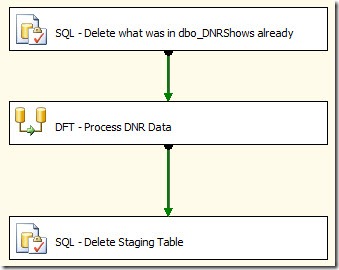
The default package name of “Package.dtsx” isn’t very informative, so let’s rename it ”LoadDNRShows.dtsx”. Start by adding a reference to the shared data source in the Connection Managers area, taking the default. Then in the Control Flow surface add 3 tasks, as seen here:
clip_image001

The first task is an Execute SQL Task that simply runs a “DELETE FROM dbo.DNRShows” command to wipe out what was already there. Of course in a true application we’d be checking for existing records in the data flow and doing updates or inserts, but for simplicity in this example we’ll just wipe and reload each time.

The final task is also an Execute SQL Task, after we have processed the data we no longer need it in the staging table, so we’ll issue a “DELETE FROM dbo.staging_DNRShows” to remove it.

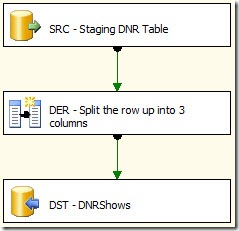
The middle item is our Data Flow Task. This is what does the heavy lifting of moving the staging data to the main table. Here is a snapshot of what it looks like:
clip_image002

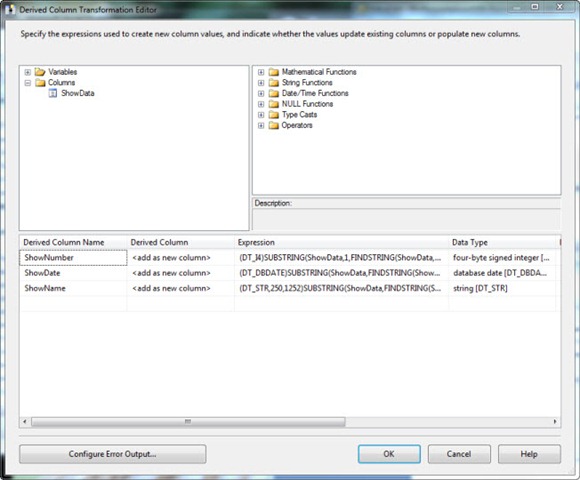
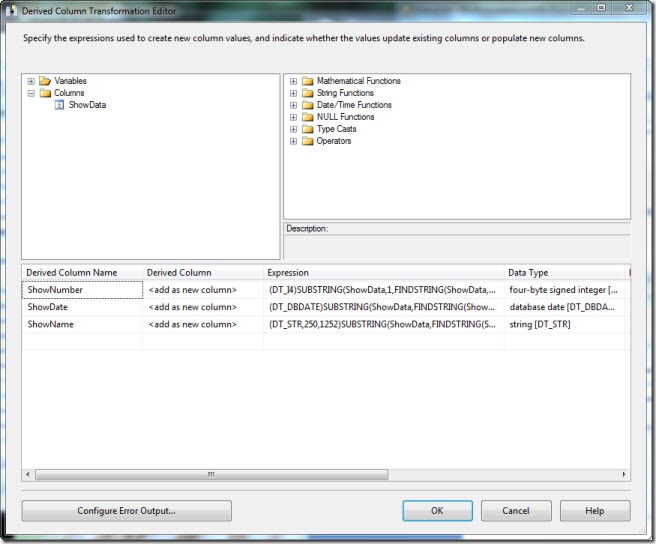
The first task is our OLEDB Source, it references the staging_DNRShows table. Next is what’s called a Derived Column Transformation. This will allow you to add new calculated columns to the flow, or add columns from variables. In this case we want to add three new columns, based on the single column coming from the staging table.
clip_image003

As you can see in under Columns in the upper left, we have one column in our source, ShowData. In the lower half we need to add three new columns, ShowNumber, ShowDate, and ShowName. Here are the expressions for each:

ShowNumber
    (DT_I4)SUBSTRING(ShowData,1,FINDSTRING(ShowData,"\t",1))

ShowDate
    (DT_DBDATE)SUBSTRING(ShowData,FINDSTRING(ShowData,"\t",2) + 1,LEN(ShowData) – FINDSTRING(ShowData,"\t",2))

ShowName
    (DT_STR,250,1252)SUBSTRING(ShowData,FINDSTRING(ShowData,"\t",1) + 1,FINDSTRING(ShowData,"\t",2) – FINDSTRING(ShowData,"\t",1) – 1)

The syntax is an odd blend of VB and C#. Each one starts with a “(DT_”, these are type casts, converting the result of the rest of the expression to what we need. For example, (DT_I4) converts to a four byte integer, which we need because in our database the ShowNumber column was defined as an integer. You will see SUBSTRING and LEN which work like their VB counterparts. FINDSTRING works like the old POS statement, it finds the location of the text and returns that number. The “\t” represents the tab character, here the C# fans win out as the Expression editor uses C# like escapes for special characters. \t for tab, \b for backspace, etc.

Finally we need to write out the data. For this simply add an OLEDB Destination and set it to the target table of dbo.DNRShows. On the mappings tab make sure our three new columns map correctly to the columns in our target table.

Deploy the Package

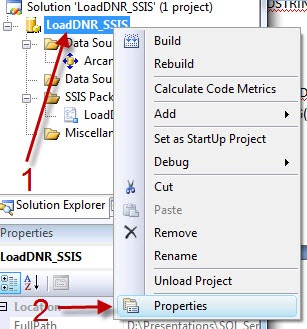
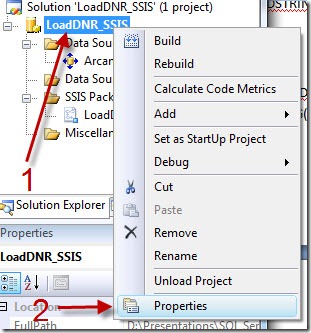
This completes the coding for the package, but there is one final step we need to do. First, in the solution explorer right click on the project (not the solution, the project as highlighted below) and pick properties.
clip_image004

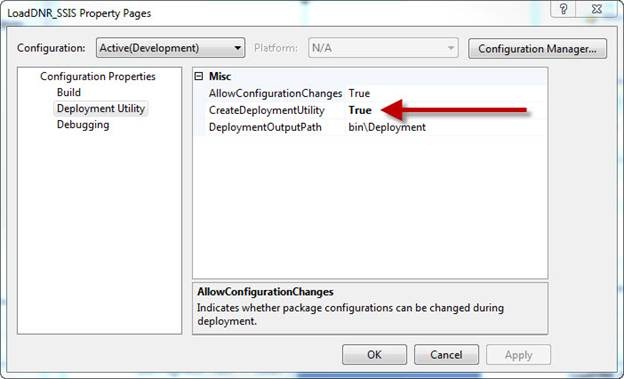
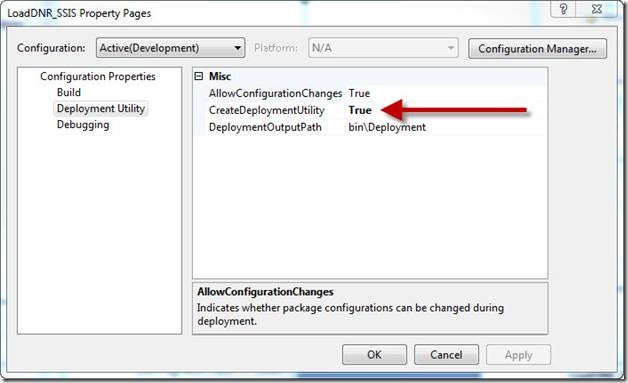
In the properties dialog, change the “CreateDeploymentUtility” option from false (the default) to True.
clip_image006

Now click the Build, Build Solution menu item. If all went well you should see the build was successful. It’s now time to deploy the package to the server. Navigate to the folder where your project is stored, under it you will find a bin folder, and in it a Deployment folder. In there you should find a file with a “.SSISDeploymentManifest” extension. Double click on this file to launch the Package Installation Wizard.

When the wizard appears there are two choices, File system deployment and SQL Server deployment. For our purposes we can use either one, there are pros and cons to each and many companies generally pick one or the other. In this example we’ll pick SQL Server deployment, but again know that I’ve tested this both ways and either method will work.

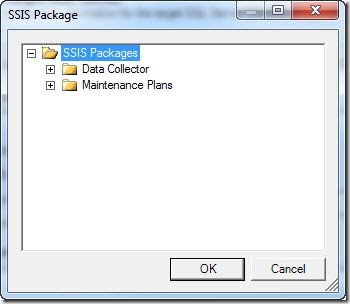
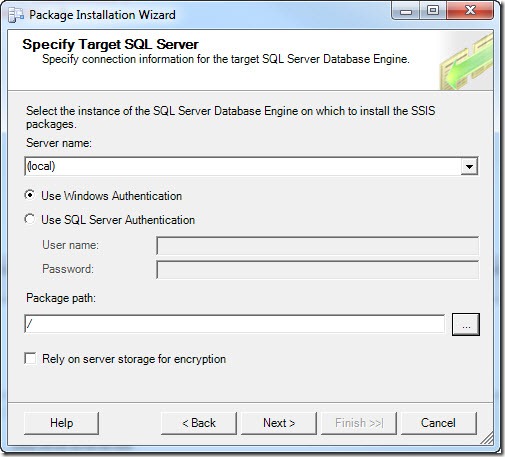
Once you pick SQL Server deployment, just click Next. Now it asks you for the server name, I’ve left it at (local) since I’m working with this on a development box; likewise I’ve left “Use Windows Authentication”. Finally I need the package path, I can select this by clicking the ellipse (the …) to the right of the text box. This brings up a dialog where I can select where to install.
clip_image007

In a real world production scenario we’d likely have branches created for each of our projects, but for this simple demo we’ll just leave it in the root and click OK.

Once your form is filled out as below, click Next.
clip_image008

We are next queried to what our installation folder should be. This is where SSIS will cache package dependencies. Your DBA may have a special spot setup for these, if not just click next to continue.

Finally we are asked to confirm we know what we are doing. Just click Next. If all went well, the install wizard shows us it’s happy with a report, and we can click Finish to exit.

Setup the SQL Server Job

We’ve come a long way and we’re almost to the finish line, just one last major step. We will need to setup a SQL Server Job which will launch the SSIS package for us. In SQL Server Management Studio, navigate to the “SQL Server Agent” in your Object Explorer. If it’s not running, right click and pick “Start”. Once it’s started, navigate to the Jobs branch. Right click and pick “New Job”.

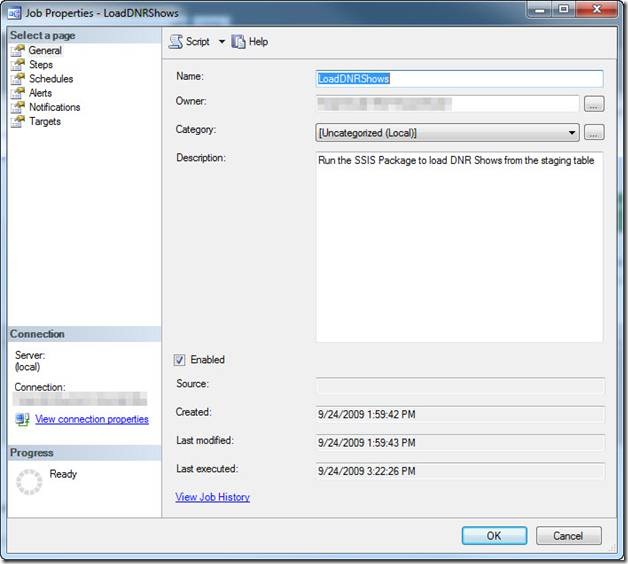
When the dialog opens, start by giving your job a name. As you can see below I used LoadDNRShows. I also entered a description.
clip_image010

Now click on the Jobs page over on the left “Select a page” menu. At the bottom click “New” to add a new job step.

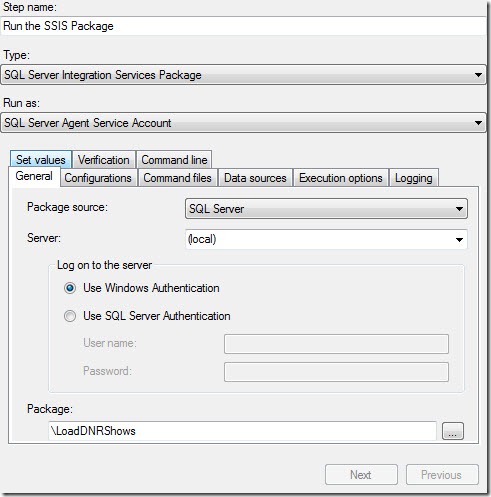
In the job step properties dialog, let’s begin by naming the step “Run the SSIS package”. Change the Type to “SQL Server Integration Services Package”. When you do, the dialog will update to give options for SSIS. Note the Run As drop down, this specifies the account to run under. For this demo we’ll leave it as the SQL Server Agent Service Account, check with your DBA as he or she may have other instructions.

In the tabbed area the General tab first allows us to pick the package source. Since we deployed to SQL Server we’ll leave it at the default, however if you had deployed to the file system this is where you’d need to change it to pick your package.

At the bottom we can use the ellipse to pick our package from a list. That done your screen should look something like:
clip_image011

For this demo that’s all we need to set, I do want to take a second to encourage you to browse through the other tabs. Through these tabs you can set many options related to the package. For example you could alter the data sources, allowing you to use one package with multiple databases.

Click OK to close the job step, then OK again to close the Job Properties window. Your job is now setup!

Calling from .Net

The finish line is in sight! Our last step is to call the job from .Net. To make it a useful example, I also wanted the .Net application to upload the data the SSIS package will manipulate. For simplicity I created a WinForms app, but this could easily be done in any environment. I also went with C#, again the VB.Net code is almost identical.

I started by creating a simple WinForm with two buttons and one label. (Again the full project will be on the Code Gallery site).
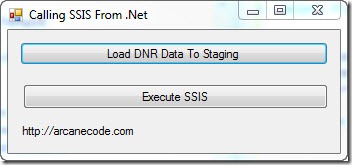
clip_image012

In the code, first be sure to add two using statements to the standard list:

using System.Data.SqlClient;

using System.IO;

Behind the top button we’ll put the code to copy the data from the text file we created from the DNR website to the staging table.

    private void btnLoadToStaging_Click(object sender, EventArgs e)

    {

      /* This method takes the data in the DNRShows.txt file and uploads them to a staging table */

      /* The routine is nothing magical, standard stuff to read as Text file and upload it to a  */

      /* table via ADO.NET                                                                      */


      // Note, be sure to change to your correct path

      string filename = @"D:\Presentations\SQL Server\Calling SSIS From Stored Proc\DNRShows.txt";

      string line;


      // If you used a different db than ArcaneCode be sure to set it here

      string connect = "server=localhost;Initial Catalog=ArcaneCode;Integrated Security=SSPI;";

      SqlConnection connection = new SqlConnection(connect);

      connection.Open();


      SqlCommand cmd = connection.CreateCommand();


      // Wipe out previous data in case of a crash

      string sql = "DELETE FROM dbo.staging_DNRShows";

      cmd.CommandText = sql;

      cmd.ExecuteNonQuery();


      // Now setup for new inserts

      sql = "INSERT INTO dbo.staging_DNRShows (ShowData) VALUES (@myShowData)";


      cmd.CommandText = sql;

      cmd.Parameters.Add("@myShowData", SqlDbType.VarChar, 255);


      StreamReader sr = null;


      // Loop thru text file, insert each line to staging table

      try

      {

        sr = new StreamReader(filename);

        line = sr.ReadLine();

        while (line != null)

        {

          cmd.Parameters["@myShowData"].Value = line;

          cmd.ExecuteNonQuery();

          lblProgress.Text = line;

          line = sr.ReadLine();

        }

      }

      finally

      {

        if (sr != null)

          sr.Close();

        connection.Close();

        lblProgress.Text = "Data has been loaded";

      }


Before you ask, yes I could have used any number of data access technologies, such as LINQ. I went with ADO.NET for simplicity and believing most developers are familiar with it due to its longevity. Do be sure and update the database name and path to the file in both this and the next example when you run the code.

This code really does nothing special, just loops through the text file and uploads each line as a row in the staging table. It does however serve as a realistic example of something you’d do in this scenario, upload some data, then let SSIS manipulate it on the server.

Once the data is there, it’s finally time for the grand finale. The code behind the second button, Execute SSIS, does just what it says; it calls the job, which invokes our SSIS package.

    private void btnRunSSIS_Click(object sender, EventArgs e)

    {

      string connect = "server=localhost;Initial Catalog=ArcaneCode;Integrated Security=SSPI;";

      SqlConnection connection = new SqlConnection(connect);

      connection.Open();


      SqlCommand cmd = connection.CreateCommand();


      // Wipe out previous data in case of a crash

      string sql = "exec msdb.dbo.sp_start_job N’LoadDNRShows’";

      cmd.CommandText = sql;

      cmd.ExecuteNonQuery();

      connection.Close();

      lblProgress.Text = "SSIS Package has been executed";


    }

The key is this sql command:

exec msdb.dbo.sp_start_job N’LoadDNRShows’

“exec” is the T-SQL command to execute a stored procedure. “sp_start_job” is the stored procedure that ships with SQL Server in the MSDB system database. This stored procedure will invoke any job stored on the server. In this case, it invokes the job “LoadDNRShows”, which as we setup will run an SSIS package.

Launch the application, and click the first button. Now jump over to SQL Server Management Studio and run this query:

select * from dbo.staging_DNRShows;

select * from dbo.DNRShows;

You should see the first query bring back rows, while the second has nothing. Now return to the app and click the “Execute SSIS” button. If all went well running the query again should now show no rows in our first query, but many nicely processed rows in the second. Success!

A few thoughts about xp_cmdshell

In researching this article I saw many references suggesting writing a stored procedure that uses xp_cmdshell to invoke dtexec. DTEXEC is the command line utility that you can use to launch SSIS Packages. Through it you can override many settings in the package, such as connection strings or variables.

xp_cmdshell is a utility built into SQL Server. Through it you can invoke any “DOS” command. Thus you could dynamically generate a dtexec command, and invoke it via xp_cmdshell.

The problem with xp_cmdshell is you can use it to invoke ANY “DOS” command. Any of them. Such as oh let’s say “DEL *.*” ? xp_cmdshell can be a security hole, for that reason it is turned off by default on SQL Server, and many DBA’s leave it turned off and are not likely to turn it on.

The techniques I’ve demonstrated here do not rely on xp_cmdshell. In fact, all of my testing has been done on my server with the xp_cmdshell turned off. Even though it can be a bit of extra work, setting up the job, etc., I still advise it over the xp_cmdshell method for security and the ability to use it on any server regardless of its setting.

In Closing

That seemed like a lot of effort, but can lead to some very powerful solutions. SSIS is a very powerful tool designed for processing large amounts of data and transforming it. In addition developing under SSIS can be very fast due to its declarative nature. The sample package from this article took the author less than fifteen minutes to code and test.

When faced with a similar task, consider allowing SSIS to handle the bulk work and just having your .Net application invoke your SSIS package. Once you do, there are no ends to the uses you’ll find for SQL Server Integration Services.

Intro to DW/BI at the Steel City SQL Users Group

Tonight I’ll be presenting “Introduction to Data Warehousing / Business Intelligence” at the Steel City SQL users group, right here in Birmingham Alabama. If you attended my Huntsville presentation last week, I’ve already added some new slides and revised the deck, so it will be worth another look.

My slide deck is IntroToDataWarehouse.pdf . Come join us tonight at 6 pm at New Horizons, there will be pizza and fun for all.

UPDATE: Before the presentation I was showing a video of Sara Ford jumping off a tower to support CodePlex. Got tons of laughs so here’s a link to the video:

http://blogs.msdn.com/saraford/archive/2009/09/14/my-codeplex-jump-from-tallest-building-in-the-southern-hemisphere-the-full-video.aspx

Intro to DW/BI at the Huntsville User Group meeting

Tonight at the Huntsville User group I am presenting “Introduction to Data Warehousing / Business Intelligence”. The slide deck for my presentation is now available in PDF format at the link below. If you have attended this presentation in the past you may wish to download the slides again as I have updated it with new information.

IntroToDataWarehousing

Data Warehousing / BI at the next HuntUG Meeting!

Business Intelligence is one of the most in demand skill sets right now. Do you want to know more about it? Be guided through all the terminology and concepts? Do you live in the Huntsville Alabama area? Well here’s your golden opportunity!

On Tuesday, September 8th I will be presenting “Introduction to Data Warehousing / Business Intelligence” at the next meeting of the Huntsville User Group. I’ll demystify all the terms around DW/BI and give a demonstration of the Microsoft SQL Server tools used in the DW/BI process. See their site for meeting time and directions. 

Handy Conference Tip

As you know if you follow me on Twitter, I’m attending DevLink. A thought just occurred to me, thought I’d pass it along as a handy conference tip.

If you plot out your schedule for the day, you can use Twitter to remind you where to go. Just sign up for a Tweet scheduling service (I’m using TweetLater but there are scads of them). Then schedule a tweet for the end of one session that says “Hey on my way to session X in room 999 to see so and so speak”. Now all you have to do is check your own Twitter feed to see where you need to be next!

Welcome to COMFRAME

I admit to being remiss lately, my poor blog has been neglected for these past few weeks. I can only plead mea culpa and explain.

A few weeks ago I had an opportunity placed before me that I simply could not refuse. I’d been happy at my old job and wasn’t looking, but a good friend of mine works for a great company called COMFRAME. They are a consulting firm that does a variety of things, including Enterprise Project Management, .Net and Java development projects, SOA, and most important to me, Business Intelligence.

To make a long story short my friend took a lesson from the Godfather movies and “made me an offer I couldn’t refuse”. I am now a COMFRAME employee! The work is very exciting, I’ll be an architect on a BI project that is using Silverlight 3 for it’s front end. We are working with data from Microsoft Project, not only that but it’s the world’s biggest implementation of Project Server, so I’ll get to work with the fine folks at Microsoft even more closely. We’re also a Microsoft Partner, which will give me new avenues for relationships that will compliment my MVP.

I got to meet the customer this week, although brief they seemed very easy to work with, and nice as well. I also got to meet the development team I’ll be working with, I’m impressed with the work they’ve done so far and can’t wait to roll up my sleeves and dive in.

I’ve had a crazy time wrapping up my old job and starting my new one, hopefully I can get back to regular blogging soon. I’ve been doing a lot with SSIS and SSAS which will give me lots of good material to talk about, not to mention any Silverlight 3 work I get to explore.

Podcast Junkie Week – THE Show

“So what is the one show I should listen to?”

“What show is the most important?”

“What is your favorite show?”

All great questions, and today I’ll answer all of the questions with one name:

Security Now

Yes, a podcast about security. I’m sure you are probably thinking “dull dull dull”. But my friend you’d be so mistaken.

First off, security is everyone’s business. Attacks come in all forms, and any good developer, DBA, or admin needs to know what forms they take and how best to protect yourself from them. Even if you are just a computer user, you need to know the basics of how to protect your system.

I also find the hosts very entertaining. Leo Laporte plays the role of the “every man”, asking the same questions you or I would. Steve Gibson is the security sage, the dispenser of internet safety and wisdom. I personally find his voice and style to be very relaxing, sometimes I feel like I’m right there in the coffee shop with him having a discussion.

Steve also has the ability to make complex subjects understandable. He draws on analogies to clarify the deep technical jargon and make it clear. I also appreciate the weekly security updates segment. Not only does Steve let you know about the latest security alerts, but tells us what they mean to us and how we can protect ourselves.

Finally I want to point out the incredible dedication Steve has. As of July 9th 2009 Security Now has been on the web for 204 weeks, and has published 204 episodes. In that time he has not missed one single week putting out an episode. I know that even during the December holiday season when so many other podcasts go into hiatus, each week an episode of Security Now will continue to appear on my Zune.

I hope you’ve enjoyed getting a glimpse into the life of a podcast junkie. If you want to help my addiction feel free to post your own suggestions in the comments for the day most appropriate to the subject. Now if you’ll excuse me, I need to go watch another podcast.

Podcast Junkie Week – Guilty Pleasures

Most of the podcasts I watch / listen to are related to my work in the computer field. But we all have to have some fun in life, and there are some podcasts I listen to or watch just for that reason, pure fun. Here’s some that will keep you entertained in various ways. Note there are a few that use language considered “not safe for work” (nothing too vulgar but perhaps a bit beyond what some would consider polite conversation). I’ve marked those with “explicit” at the end.

Car Talk – I’ve been a fan of Click and Clack long before the MP3 was invented. They brought their show to the web as a weekly podcast. I find it to be a great parenting tool too. When the kids begin misbehaving during a long road trip, all I have to do is wave my Zune around and threaten to play Car Talk and boy they straighten right up.

Wait Wait Don’t Tell Me – This show takes a humorous look at the week’s news. It blends interviews and a game show like format with regular panelists to provide an enjoyable way to look at the gloom that is normally the headlines.

DiggNation – Don’t ask me why two guys sitting on a couch drinking beer (or hot tea) and talking about the weeks most dugg stories is so fascinating, but it is. I typically set aside Friday evening as podcast night, watch Cranky Geeks, Tekzilla and wrap it up with Diggnation. (explicit)

Carpool – I just discovered this show, and have been quite enjoying it. Robert Llewllyn, better known as Kryten from Red Dwarf, had an innovative idea for a podcast. He picks well known people up and gives them a ride to work. Along the way he interviews them and records it all on multiple cameras. I know it sounds a bit odd, but take a look. I’m surprised myself at how thoroughly I have been enjoying this little show. (some episodes can rate the explicit tag, depends on who he is interviewing. The Stephen Fry episode is quite safe and is probably my favorite so far).

Car Tech – If you love cars, you’ll love Car Tech. See cars through the eyes of a geek.

No Agenda – If you enjoy conspiracy theory, or are amused by it, this is the show for you. Twice a week John Dvorak and Adam Curry will discuss the news in ways you probably haven’t thought of. At the very least it will make you think. (explicit)

Sherlock Holmes Adventures – Old time radio comes alive again as the old time radio shows are reborn as MP3s. These are a great way to relive “the old days”.

This week we’ve looked at a lot of podcasts, but I’m asked “what is the one podcast I should be listening to”. Believe it or not I have an answer for that. And I’ll tell you what it is. Tomorrow.

Podcast Junkie Week – The Computer Industry

As a developer I think it’s important to keep up with general trends in the computer industry. They have a direct reflection on what we do. I’ve found a nice selection that are not only informative but also entertaining. I think you’ll enjoy them too.

Buzz Out Loud – I start each day off with this daily CNet podcast. A panel of experts discusses the latest industry happenings in a very entertaining manner. It’s available in both audio and video formats.

PCMag Radio – Each week the editors at PCMag (formerly PC Magazine) get together and cover the weeks hottest topics.

Windows Weekly – Paul Thurrott and Leo Laporte cover the latest in all things Microsoft in this entertaining and informative podcast.

Tech5 – John C. Dvorak has been around as long as the PC, each day he delivers his wisdom in 5 minute chunks. John also does a weekly video round up of the news called Top 5 Tech 5.

Cranky Geeks – John Dvorak has another show well worth watching in Cranky Geeks. This weekly half hour show gets John and co-crank Sebastian Rupley together with two industry pundits to discuss the weeks big topics.

TWIT (This Week In Tech) – Every week Leo Laporte assembles a panel of industry experts to discuss the events of the week. The discussion is always lively and interesting.

Tekzilla – This weekly video podcast has Patrick Norton and Veronica Belmont showing off the latest gadgets and answering viewer questions. Not only is the show informative it’s also very enjoyable to watch, they make it quite fun. In addition to the weekly show there is a daily one minute tips cast you can subscribe to.

Data Security Podcast – Security is important to everyone, this show is a weekly news show that covers the latest in security news and views.

GeekBrief – Cali Lewis is a delightful bundle of energy, each day she does a five minute video to show you the coolest and geekest in gadgets. Just plain fun.

Loaded – Also a daily five minute show, but Natali DelConte brings a bit of a different spin to daily tech news. Natali is very professional in her presentation while also being very personable, a tough balancing act but she does it well.

Buzz Report – Molly Wood does a weekly wrap up of the week’s news that is just plain fun. I probably should put this in to a “Guilty Pleasures” category, which is just the very topic we’ll be looking at tomorrow.

That’s plenty to get you started, with this selection you’ll be able to keep up with what’s happening with the computer business. Tomorrow we’ll have some fun!

Podcast Junkie Week – Dot Net Development

If you are a .Net Developer it’s real easy to feed your Podcast addiction and become a Podcast Junkie like me. Here’s my favorites for keeping up with the wonderful world of .Net development.

DotNetRocks – The grand daddy of .Net podcasts, Richard and Carl now have well over 450 shows behind them. One of the oldest, some of the older shows are well worth listening to even now as they talk about practices and principals we still use today, not to mention the current shows delivering up to date news on .Net.

DNRTV – Hand in hand with the audio podcast is the DotNetRocks TV show. When audio is not enough, DNRTV steps in to show what you heard about in DotNetRocks.

DeepFriedBytes – I love this show, Keith and Woody interview folks and do it with a real flare of Southern Hospitality. Not only do they have interviews with interesting people but you get good ideas for new deep fried foods! I also love the “rusty washers” segments.

Hanselminutes – Each week Scott Hanselman does an interesting, creative interview with people all over the coding spectrum. It’s typically half an hour in length so easy for those with a short commute. Scotts style is very relaxed and enjoyable.

The Thirsty Developer – While most of the episodes lean toward .Net occasionally they throw in a show about non Microsoft topics, such as the recent show on HAML. I think it makes a nice balance to see what folks are doing who may be using tools different from mine.

Herding Code – Similar to the previous podcast, this one primarily focuses on .Net but takes occasional forays into other subjects.

Misfit Geek – This is a relatively new podcast with only two episodes under it’s belt. Both have been interesting though so I’m hopeful to see more in the near future.

Channel 9 – The site for Microsoft produced podcasts this is a firehose of information for all .Net developers. No matter what your specialty if you work with Microsoft tools there will be something here for you.

Whiile these ought to keep you busy for a while, I know tomorrow you’ll be eager for more. While keeping up with programming is important, I also think it’s vital to keep up with industry trends. The roll out of new computers and OS’s has a big effect on the life of a developer. In addition I also think it’s valuable to remember there are a lot of folks who work with computers all day who are not coders. Thus tomorrow we’ll take a look at the list of podcasts useful for knowing what’s going on in the computer industry.

Podcast Junkie Week – SQL Server

OK, I admit it! I am a complete and total Podcast Junkie. I listen or watch hours upon hours of podcasts each week. In large part they are how I keep up with what is going on in the industry, but they are also a great way to relax. I use my Zune and either listen or watch, or hook up my Zune 120 to the big TV and watch there. I have mentioned podcasts before, but it’s been quite a long time so I thought it was time to give an update on my current list of favorites. Hopefully you will find some good ones too.

We’ll start the week out with SQL Server related podcasts. There aren’t many, but they do exist.

SQL Down Under – Hosted by MVP Greg Low, each episode is an interview with someone interesting in the SQL Community. While the show is not regular, the past episodes are well worth listening to.

SQLServerpedia – This is a cornucopia of topics, they vary in length and frequency but are very useful, practical how to videos on a wide variety of SQL Server topics.

Voice of the DBA – Each day MVP Steve Jones brings you an interesting and informative editorial on subjects in the SQL Server world.

RunAs Radio – Strictly speaking this is not a SQL Server show, however Richard Campbell and Greg Hughes do bring SQL Server related episodes on a fairly regular basis. In addition many of the topics covered are of interest to SQL Server DBAs and thus is well worth the listen.

JumpstartTV.com – In the strictest sense the videos at JumpstartTV are not podcasts, since you must view them on their site and cannot download them to a portable media device. However their content is just too good not to pass along. There are a wide variety of short, focused videos, 3 to 5 minutes in length on average. Each video shows how to do one and only one thing, and most focus on the SQL Server realm. (Disclaimer, there is some video content on the site I produced.)

That’s all for today. If you have some suggestions on podcasts related to this subject, please leave a link in the comments below.

Tomorrow we’ll look at some of my favorite podcasts related to .Net development. On Wednesday we’ll look at podcasts about the computer industry in general. Then we’ll take a break and look at podcasts that are simply just for fun. Finally we’ll wrap Podcast Junkie week up with what is not only my favorite podcast but probably the most important one you’ll ever listen to.

Happenings in Arcane’s World

I just wanted to take a second to pop my head up and say “Hi!” It’s been a busy few weeks for your humble Arcane Coder. Last week I finished my technical edits for my book chapter for the upcoming “SQL Server MVP Deep Dives” book. My chapter will focus on Full Text Searching.

I then worked on getting ready for the upcoming BSDA LINQ Bootcamp event, which takes place at the end of July. If you’d like to attend this two day, free event see the notice at http://altechevents.com/2009/07/13/bsda-presents-linq-bootcamp/ or you can use the short url of http://tinyurl.com/bsdalinq. Please pass it along to all your friends.

To add to my fun I recently got a new laptop, an Acer Aspire 8730. You may recall lightening hit our house last year and fried many of our computers. Our insurance finally came through and this was the model I selected to replace a fried desktop system. So far I’ve been quite pleased with it, the 18.4 inch screen has been very nice for development. I’ve also been impressed with the battery live, have gotten close to 3 hours which isn’t bad for something this huge. We’ve nick named it “The Beast”. I’ve been busy getting all the software installed and configured.

I’m also looking forward to attending DevLink next month. This three day geek fest looks to be an awesome event, and a steal for the price. If you see me there be sure to say hi!

I’ve got an interesting series of posts lined up for this coming week, hopefully there will be something useful for everyone!