Happy Holidays

Ah, the holidays! Time for carolers, festive trees, and eggnog. And, time to squeeze in all that vacation I haven’t been able to take all year!

Like a lot of folks I’ve been enjoying some time off, spending time with the family, fighting the crowds for a little last minute shopping, and catching up on some honey-do’s. And, for a change, staying away from the old PC for a bit.

But I wanted to take a moment to thank everyone for visiting, and wish you all a safe and happy holiday season.

  –Arcane Code

Happy Anniversary Commodore 64!

According to a report in CNN (http://www.cnn.com/2007/TECH/ptech/12/07/c64/index.html ), folks are gathering today to celebrate the 25th anniversary of the Commodore 64 computer. Those of you under 30 may not remember this gem of a machine. It wasn’t my first computer, but it was probably my favorite. The amount of hacking and modding you could do with these things was incredible. I cut my teeth on BBS’s (Bulletin Board Systems) using my 300 baud modem. Yes, 300 baud, if you happen to recall what a baud is. For comparison, 56,000 baud (56k) is about the fastest dial in you can get today, and then it jumps to broadband.

I remember way back when I was the third person in my area to upgrade to a 1200 baud modem. And would you believe at first I didn’t like it? With my old 300 I could easily read my e-mail as it scrolled onto the screen. With the 1200 it zipped by so fast I had to go learn all the message scrolling commands for the various BBS’s I dialed into.

I’m something of a packrat; I still have a lot of “ancient” computers in my home-office closet. TRS-80’s, Radio Shack Color Computers, parts of a Timex Sinclair, and a Commodore Amiga. But the one that’s still setup on my desk is a Commodore 128, with a stack of drives, software, and even a Commodore 1702 monitor. I find it relaxing to fire it up every so often and play some old fashioned arcade games, or play some of that old midi music.

Happy Anniversary Commodore 64!

The Arcane Coder

For all those of you who have written, yes it was my e-mail that Richard Campbell read on a recent .Net Rocks. Specifically episode 291, http://www.dotnetrocks.com/default.aspx?showNum=291 (the e-mail is read about 6 minutes into it if you are the impatient type).

It’s a really good episode, and I don’t just say that because they read my mail. Kent Alstad gave a great interview in talking about scalability and application development. I highly encourage you to listen all the way through. I have a select group of DNR episodes that I will listen to several times, and this one is going to be added to that list, great stuff.

The Speaker Dinner

As you have probably guessed by now, I’ve grown to really enjoy speaking at and attending code camps and user group meetings. There are a lot of benefits to being a speaker, but to me one of the biggest is the Speaker Dinner the night before the code camp. In case you don’t know it, there’s usually a dinner the night before most code camps. Admission to the dinner is speaking at code camp the next day.

I got home just a little while ago from the dinner prior to tomorrows (hmm, well today’s since it’s after midnight now) Alabama Code Camp. I got to hang out with some really ultra smart folks tonight, and talk about a wide variety of topics. I know there were at least 4 MVPs there, possibly more since I didn’t know everyone.

Dinner was a mini-education in itself, as I picked up on several new topics. I also got to laugh and hear some great stories. If you have ever thought about speaking at a code camp I would highly encourage you. The rewards are well worth the admission cost!

Arcane Lessons Updated

I just got done updating the Arcane Lessons page. I added the last couple of weeks of WPF lessons to the WPF area, added one new item to the SQL Server Full Text Search area, and created a new category: Arcane’s Toolbox. This first list is all of the Visual Studio add-ins I’ve blogged about. Later I plan to add some of my favorite Windows add-ins, but if you don’t want to wait you can click on the Windows Add-ins tag to see the posts.

Arcane Fun Fridays

WHEW! All of this WPF / XAML sure has been a lot of fun. But I think it’s time to come up for air and see what else is happing out there in Dot Net land.

Alabama Code Camp is coming up in just a little over a week, Saturday October 6th to be exact. Still plenty of time to register and even just a bit of time if you want to get in on the Silverlight programming contest. First prize for that is a Zune! http://www.alabamacodecamp.com/home.html

devLink, the large conference for a cheap price comes up right afterward in Nashville, Friday and Saturday October 12th and 13th. http://www.devlink.net/ . You can tell I’ll be there, my name’s on the front page as a winner of a Barnes and Nobel gift card (look for the dude from AL !)

(By the way, anyone know of a good dog repellent? My nephew is coming to house sit and is bringing Marshmallow and Buttercup, his twin Dobermans along because I have a big back yard they can play in. Last time though they ate the garden hose, chewed the handle off my shovel, and bit through one of my lawnmower tires.)

There’s a new add-on for SQL Server Management Studio I’m eager to try out. It’s still in Beta but looks promising. It was blogged about at http://weblogs.sqlteam.com/mladenp/archive/2007/09/20/SSMS-Tools-Pack—an-add-in-for-SQL-Management-Studio.aspx or you can download it directly at http://www.ssmstoolspack.com/ .

If you are a fan of NUnit, you’ll appreciate the new xUnit. Read James’ announcement at http://jamesnewkirk.typepad.com/posts/2007/09/announcing-xuni.html .

In a recent Dot Net Rocks episode, Carl Franklin announced they would be taking over Shrinkster.com. Shrinkster has been down due to spam abuse, as soon as Carl gets everything setup we’ll be able to go back to using short links again!

Speaking of Dot Net Rocks, I especially enjoyed show 274, where the new features of VB.Net and C# for the 2008 release were discussed. Entertaining and lots of good tidbits. I think my favorite feature so far has got to be C#’s extension methods. http://www.dotnetrocks.com/default.aspx?showNum=274

During my long drive to the Tallahassee Code Camp last week, I put together a podcast theme session, and copied a bunch of related podcasts onto my cheapo SanDisk mp3 player. This time I went with a “Millenator” theme and got all the episodes of Dot Net Rocks that Mark Miller appeared on. Good stuff, lots of thoughtful material combined with some humor. Next time you go on a trip, copy a bunch of past episodes of your favorite podcast that are in the same theme and make that long drive go much quicker.

There have been several updates to the world’s greatest Visual Studio Add-In, CodeRush, over the last few weeks ( http://www.devexpress.com/Home/Announces/CodeRush25.xml ). Apparently Mark Miller and the boys have been busy! If you’re not on 2.5.4 go update yours today.

Speaking of Mark Miller, I love his intro slide for his VSLive session coming up in LasVegas. Take a look, pure genius. http://www.doitwith.net/2007/09/11/MyLastVSLiveSessionEver.aspx

A final note, between getting ready for Alabama Code Camp and going to devLink my blogging may get spotty for the next few weeks, bear with me and I’ll have full reports from both code camps and lots of fun new stuff to share.

Tallahassee Code Camp A Blast!

I got home a little while ago from spending all day Saturday at the Tallahassee Code Camp. And I have to say, it was a blast! Despite a six hour drive, which included driving through the remains of a tropical storm, it was well worth my time.

The day opened with me actually giving a presentation on SQL Server 2005 Compact Edition. I always like giving my presentations in the first slot, as the attendees are awake (mostly) and energized (or at least heavily caffeinated). They typically ask great questions, and this group was no exception. After my presentation, I was able to spend the rest of the day relaxing and learning about all sorts of great technologies. I attended sessions on Silverlight, LINQ, Windows WorkFlow (WF), and Ajax. All great, and very informative.

The Tallahassee User Group really knows how to put on a good show. Registration was extremely fast, they had more than enough doughnuts and coffee at breakfast and great pizza at lunch. The rooms were nice, all in all quite well run.

And the swag, baby! I have to brag and say I scored some great stuff, primarily a stack of new books on various .Net 3.0 technologies. My best score though came from Joe Healy (http://www.devfish.net/) who gave me one of those cool oval Microsoft stickers which I’ve now proudly affixed to the top of my laptop, just under my Coding Horror sticker.

I also have to give and extra special thanks to my long suffering wife the Southern TinkerBelle ( http://southerntinkerbelle.com/ ), who bent over backwards to arrange things so I could attend. Thanks sweetie!

Thanks again to everyone for a great time, and I look forward to going back next year!

Happy Programmers

According to the Secret Society of Happiness (http://www.sohp.com/) today, August 8th is National Happiness Day. It got me to wondering, as a developer or IT professional, what makes you happy?

For me it can be the little things. When I added a third monitor to my setup at work, I was happy.

When I get “that” problematic section of code working, I’m happy.

When I learn about a new .Net class and learn it’s in’s and outs, I’m happy.

When I get to learn some new tech, such as SOA (Service Oriented Architecture), I’m happy.

When I get to hang out with other geeks and get into really arcane conversations about the nuances of some technology, I’m happy.

When I’m driving down the road, with no accidents to block my way, listening to a new podcast, I’m happy.

Most of all though, is when I meet with a user to find his needs, then in a few hours can come up with a solution for him. To hear the user say “wow, I spent hours gathering that data every week, now I can get it in a matter of minutes. You’ve saved me hours of work.” That makes me happy.

What makes you happy?

As a side note, I also have to wonder, if it’s a “secret” society, why do they have a website?

Happy Birthday

Hard as it is to believe, today, August 5th 2007, marks one year since I started the blog. I admit the first few months were a bit slow when it came to posts, but it’s really taken off since late October of 2006.

The biggest surprise to me is how much I’ve enjoyed blogging. Everyday I try to learn something new. Being able to take what I’ve learned and talk about it on the blog only reinforces my understanding and, I hope, adds some value to you the reader.

I do admit that I tend to be all over the place with my content. I guess it’s a reflection of both my interests and what I have to deal with on a daily basis. As a development team lead, I lend a helping hand to everyone’s projects. So on any given day I’m jumping back and forth between ASP.Net, WinForms, Windows Services, Web Services, AJAX, C#, VB, Java, SQL Server Data Warehousing tools (SSIS, Reporting Services), and Oracle, to name a few.

I think though that even if work didn’t require the broad range it did, I’d probably still be working in all of it. I find it all fascinating, AJAX, WPF, WCF, Linux, Virtualization, SOA, there just doesn’t seem to be enough hours in the day to keep track of it all. There’s so much cool technology out there I feel like the proverbial kid in a candy store.

Let me close by saying thanks. Thanks to all of you who visited, sent e-mails, and posted comments. It’s been a great year and I look forward to many more.

Robert / Arcane Code

Got us another one!

Looks like I’ve done it again. My friend and now co-worker Jeff Barnes has gotten the Podcast Fever. ( http://jeffbarnes.net/portal/blogs/jeff_barnes/archive/2007/07/31/podcast-fever.aspx ). He’s blogged about his new Zune and how he’s finally using it for educational purposes. Jeff offers a great list for the .Net developer and beginning podcast listener to review. Be sure to check his list out.

Oh, and Jeff, don’t worry, there’s currently no known cure for Podcast Fever!

Taming the Outlook E-Mail Monster

Over time I’ve read quite a few helpful hints and tips on how to “tame” your e-mail. I have a few I’ve developed over time that I haven’t seen mentioned before, so I thought I’d share.

First, I deal with a lot of different projects at once. One thing I find valuable is to include the name of the project the e-mail is about in the subject line. That helps me later, to quickly categorize my mails. At the very least, make sure to include the project name somewhere in the body of the mail. Nothing’s more confusing then getting cc’d on an e-mail that says “I took care of the files” and not knowing what project the person refers to.

Next comes archiving of your e-mails. Many texts I’ve read tell you to read the e-mail, take action on it, then get it out of your inbox. But what do you do with it when you’re done for the time, but you may want to save it to refer back to later?

I’ve found the best method is to create individual Outlook data files (.pst) files for each project. True, you will wind up with a lot of pst files, but you can easily close them once the project is complete and get them out of your way. You can even burn them to a CD or DVD when you need more disk space yet still be able to open them.

You still have the luxury of creating individual folders within the projects pst file, if you need to subdivide more; perhaps meeting minutes, agendas, coding, and testing might be folders you want.

At one time I just had one projects folder with folders and subfolders galore. The problem was it quickly became cluttered from past projects, and kept growing in size. I found moving each project to its own data file to be much easier to manage.

OK, I hear you asking “What about those e-mails not associated with projects?” Maybe it’s a policy notice, or a confirmation about a software purchase, or just some “congrats you did a good job” e-mail you’d like to hang on to. For those I create an Outlook data file for each year. I then have 12 folders, one for each month.

I am very strict with myself about what goes in here, to keep it from becoming a miscellaneous junk bin. I typically have no more than 20 or 25 messages for any given month worthy of hanging on to.

OK, we’ve all been victims of this next situation. We go off to a two hour meeting, come back, and find thirty seconds after we walked away someone sent out an e-mail and copied the entire department. Half the folks chose to respond, then the other half replied to the response, and before you know it there’s 42 unread mails on the one subject alone, not to mention all the other mail that’s come in. How do you quickly isolate those e-mails for a given project and deal with them?

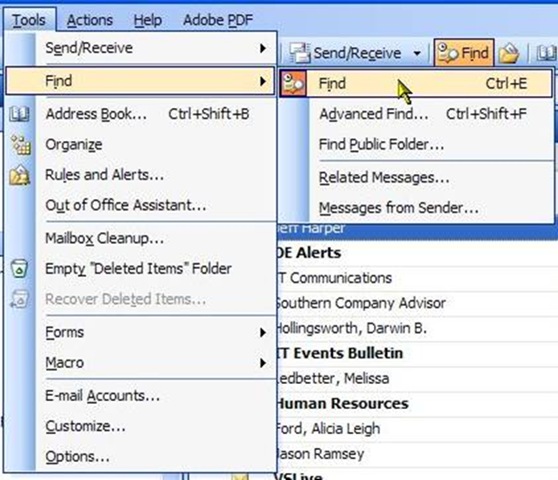
For that I find Outlook’s Find tool invaluable. In Outlook 2003, select Tools, Find, Find from the menu:
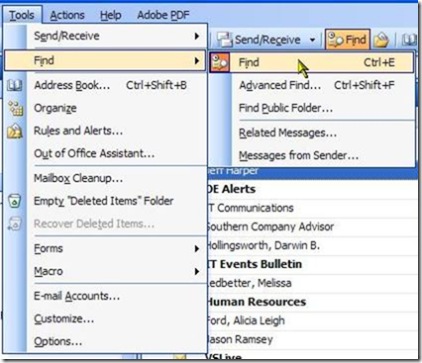
taming01

You should then see a new tool area just above your inbox:

taming02

In Outlook 2007, the Find feature is turned on and built into the Inbox bar by default:

taming03

In either case, simply type in what you want, like the name of your project (remember my first tip?) and hit enter, or click the word Search (2003) or the magnifying glass (2007). The area where your inbox sits will now show only the messages with your search word in either the subject or the message body.

Once you have filtered your box to show only those messages you want, it becomes an easy matter to move them to archive, delete them, or deal with them in some other manner.

When done, simply click Clear (2003) or the X (it pops up where the magnifying glass is in 2007) and your inbox will be returned to it’s non-filtered state, hopefully with a few less messages for you to deal with.

OK, so you have a piece of mail that you want to keep in your inbox for a few days, you don’t want to file it quite yet, but don’t have to handle it right this second. Most common for me are announcements that a database or system will be offline for maintenance. I certainly want to know about it, and be reminded, but don’t need to do anything right now. For this I use the flags.

The very right most column of your inbox depicts a small flag. Clicking on it will turn the flag to a red color. In 2003, you can pick different colors, in 2007 the color is tied to the distance in the future the event will occur.

taming04

In either version, one of the menu options is “Add Reminder”. With it, a dialog pops up to let you give a calendar date / time when you need to take action.

taming05

In this example, the e-mail was letting me know of a live radio interview being done with a member of one of my favorite bands, Midnight Syndicate (http://www.midnightsyndicate.com). I’m adding a reminder to that e-mail so I’ll be sure not to miss it.

I’ll then basically ignore the message, letting it sit in my inbox until the time comes for me to deal with it. Once the event is complete, be it a database outage, meeting, or special event, I can click again on the flag, to “Mark as complete”. I can choose to archive the message, respond to it, or delete it.

Speaking of deleting, the final piece of advice I can offer is delete, delete, delete. Let’s face it, how many of those messages do you really need? If you are the recipient of a long chain of e-mails, just keep the last one and delete the rest, their contents duplicated in the last one.

Meeting announcements, bake sales, grocery lists from the spouse, are all things which hit the bit bucket as soon as I’m done with them. I’d bet if you’re like me, a good percentage of your e-mail can safely be deleted.

Using these techniques, I’m able to keep my inbox to between 100 and 150 messages, a manageable level. A fry cry from the old days where I might have 2,500 messages in my inbox!

I’m always trying to improve, though, so if you have ideas for taming your inbox please post a comment and share with the community.

Arcane Fun Fridays: The Eighth Dimension

I realize the entries this week on facts and dimensions can be enough to give even the most stalwart geek a pain in the pocket protector. So allow me to wrap the week yet stay on the topic of dimensions with a movie suggestion:

The Adventures of Buckaroo Banzai Across the Eight Dimension

(http://www.amazon.com/Adventures-Buckaroo-Banzai-Across-Dimension/dp/B00005JKEX )

This fun little romp from 1984 has a large collection of now well known stars such as John Lithgow, Peter Weller, Christopher Lloyd, and Jeff Goldblum. The hero, Buckaroo Banzai is a brain surgeon, particle physicist, and rock star. His experiments in the eighth dimension land earth right in the middle of an interplanetary war, and that’s just the first few minutes of the movie.

You have to watch this several times in order to catch all of the jokes and subtle humor. I think the funniest line is from Lithgow, playing an apparently insane but in reality alien possessed Dr. Lizardo, who keeps telling everyone “”Laugh-a while you can, monkey boy! You all are-a gonna die!”

After a week of sifting throught facts and dimensions, it’s great to be able to relax and spend a little time with Buckaroo in the eighth dimension. And even if you don’t get to see the movie, at least remember Buckaroo Banzai’s advice…

“No matter where you go… there you are.”

Standard disclaimer: I don’t make any money or have any financial affiliation with this flick or anyone who sells it. Just a cool movie. So there, monkey boy!

Arcane Get-A-Ways

It’s always great to get away with your coworkers every so often, in a situation away from the office. That’s where I’ve been the last few days, in the mountains of north Georgia. Very pretty country, and our big team building event was a 6 mile canoe ride.  

Unfortunately there was no internet access in the lodge we were in. Seems it was being renovated and they hadn’t gotten around to hooking it back up. They barely got the new carpet installed before we arrived. (I was the first one there, and as I was walking in the carpet layer was driving away).

It was a weird experience being internetless for several days. It’s amazing how used to connectivity we’ve all become in such a short time.

Speaking of connectivity, I now have a Pownce account. http://pownce.com/arcanecode/ . I’ve only just started it, will try to figure out how to most effectively use it over the next few weeks. Meanwhile if you have a Pownce account feel free to send me a friend invite.

I also read that WordPress now has a good integration with Facebook, and am considering a Facebook account. Let me know your thoughts.

Finally, I’ve updated the Arcane Lessons page ( https://arcanecode.wordpress.com/arcane-lessons/ ) with more lesson plans, be sure to check it out.

Being a Better Developer… In 6 Months

Scott Hanselman’s show this week was killer. (http://www.hanselminutes.com/default.aspx?showID=90 ). In it, Scott and Carl discuss a thread going around the internet, namely how to become a better developer in six months. They had some excellent ideas, some of which they were passing along from other posters, some were theirs. The post that seems to have started the whole thread was done buy a guy named Justice Gray, back in April. http://graysmatter.codivation.com/HowIAmBecomingABetterDeveloperPart1OfInfinity.aspx or http://shrinkster.com/qvx . Just recently he posted a follow up at http://graysmatter.codivation.com/AnUpdateOnGoals.aspx or http://shrinkster.com/qvy .

I like the whole concept, and am going to implement my own version of it. And the first step is to declare what I’m going to do, so without further ado…

I’m going to start by reading a chapter a week from a book. Now, I know that doesn’t sound like much compared to the plans of others to read a book a week, but it leads to my next step…

I will work all the code samples in the book. Reading is one thing, but doing is even better. Personally, I find I get a better understanding when I actually type in the code samples and run them. And not just run what’s in the book, but tweak it, experiment with it. And then what will I do with my knowledge?

I will teach what I learn. The best way to learn is to teach. I’ll blog, talk with my co-workers over lunch, give presentations, but in some way I will give back what I learned. But I won’t stop this learning process with just books.

I’ll increase my listening of podcasts or videocasts. I recently got an inexpensive MP3/WMA player, which I load up with podcasts. This left the 1 gig card on my iPaq free, which I’ve loaded some videos on. Since the iPaq is portable, it increases my ability to watch these videos. Since I’ve blogged so much about podcasts in the past, I shan’t continue talking about them.

I’ll create at least one new presentation and give it to a user group. Again, the best way to learn is to teach, and there’s no better place than with your peers at your local user group.

I’ll look at the source code for an open source project. This is one I really loved from the show. Look at someone else’s code, see how it works, step through it. Right now I’ve got several in mind, first is the Paint.Net project ( http://www.getpaint.net/index2.html ) since I think the graphics would be interesting, and graphics aren’t something I normally get to play with at work.

Next is RSSBandit, http://www.rssbandit.org with the source at http://sourceforge.net/project/showfiles.php?group_id=96589&package_id=103276 .The networking concepts in there should be quite useful in many instances. Finally is SharpDevelop (http://www.icsharpcode.net/OpenSource/SD/ ). It’d be interesting to see how an IDE works. I’m not sure which of the three I’ll look at, but these are on my short list.

I will learn a brand new or little used technology. There’s a lot of new technology out there, or tech I don’t read much about. Working a lot with the SQL Server BI (Business Intelligence) tools, the upcoming SQL Server 2008 sounds interesting. Of course there’s Visual Studio 2008. And XAML promises to be a hot topic, between WPF and Silverlight I think this will eventually be a “must” for everyone. Those are just some examples, find something that fascinates you and go learn.

The final two items on my list are suggestions from my manager, who my kids have dubbed “Mighty Mike”. I thought these were really good.

I will learn more about the business. No, not the business of programming, although that’s certainly important. I’m talking about what my company does. Most developers aren’t in a job where their company produces software. Instead our programming efforts help support the production of some product, which our company sells. I will learn more about that product, how it’s produced, what processes apply, and what the difficulties are. And finally….

I will get to know my customers. By that, I mean the people who are using, or are affected by the software I write. For most of us, those will be other employees of our company. Meet these people. Get to know them. Buy them a cup of coffee. Take a non-IT coworker to lunch every so often. Setup a half hour meeting with them every so often to learn and understand more about their job. Find out what their pain points are, find ways to solve their problems, offer them solutions to make their jobs better.

Whew, that’s quite the list. It will take a lot of balancing of my time to carry this off, but at the end of it I’ll be a better programmer.

To wrap this up, I’m supposed to tag four other developers, to challenge them as well. So here goes…

First is Jeff Barnes, http://jeffbarnes.net/portal/blogs/jeff_barnes/default.aspx . Payback time! (He knows why, heh heh heh).

Next is Todd Miranda, Birmingham’s newest MVP. Congrats Todd! http://blog.nxtdimension.com/

I think my next victim will be my brother-in-law, Dougal. Even though he’s not fortunate enough to work with .Net, he at least got to do some cool stuff with WordPress. http://dougal.gunters.org/

My final pick is that perfect blend of lunatic and coding genius, Mark Miller. It’s his fault I got deeply involved in coding again. I was thinking of getting into project management, but after seeing his talk at VSLive 2005 I got so enthused about coding again I jumped in with both feet and here I am. So how about it Miller, put down that McGriddle and blog something! http://www.doitwith.net/

An now I challenge you, the reader of this post to go out and be a better developer. Post a link to your development plan. If you don’t have a blog of your own, feel free to post your plan below. Look at others, take the best of the ideas that will work for you.

Now if you’ll excuse me, I’ve got a lot of work to do!