MSDN Southern Fried Roadshow Comes To Alabama

bucketsmall Since there are so many events coming to Alabama, we decided to create an uber-post listing them all! MSDN Southern Fried Roadshow – September Edition The MSDN Southern Fried Roadshow is a half day free developer event with a southern flair, where you will learn about some of the latest developments in Microsoft technologies. For September, 2008 the Roadshow will be presented by Architect Evangelist Chad Brooks and Developer Evangelist Glen Gordon. Chad and Glen will be loading up a minivan with lots of goodies, and trying to hit 5 cities in 5 days. We’ll start the morning with a quick update on a variety of developer topics. The we’ll spend the rest of the morning exploring the impact that REST has had on solutions architecture and the Microsoft Technologies that you need to leverage it. Every attendee will receive an MS Press book (while supplies last) as well as pointers to tons of resources for further learning. Register today using the links below. We’re trying to finalize the last cities, so check back for more.

Join our Facebook group! Come join our Facebook group and stay up to date on our travel adventures. Chime in with questions or comments, or just cheer us on. Resources Stay tuned for links, downloads and more about the topics we’ll be presenting on. Agenda Microsoft Developer Update First, we will do a survey of the set of just-released products and how they will impact developers. See what’s new in Windows Server 2008: Hypervisor Technology, IIS7, and others. SQL 2008 is also packed with goodies for Developers; see the geospatial capabilities as well as the LINQ enhancements. And don’t forget the myriad of enhancements that come with the .Net Framework 3.5! REST with WCF, ADO.NET Data Services, and ASP.NET MVC The evolution of the web has seen many changes in patterns and standards for working with services. In a world of AJAX and other lightweight clients, not all services need to be implemented with the bells and whistles that SOAP and its many specifications allow for. And not all services need to be “transport-neutral”. An alternative architectural approach known as REST is well suited for many web-based scenarios. You can implement a RESTful architecture using a variety of current and future Microsoft technologies. But how do you decide which ones are the best choices for your scenarios? These sessions of technical deep dives helps to answer that question. We will examine implementing RESTful services with WCF 3.5, using ADO.NET Data Services, and introduce the ASP.NET MVC framework.


MSDN Southern Fried Roadshow MSDN Southern Fried Roadshow
Stop That Annoying Auto Reboot After Patch Tuesday Updates

More than any day of the month, I always dread the Wednesday morning after Patch Tuesday. Sure, I like the fact that Windows automatically keeps my system as secure as possible by automatically downloading updates during the night and applying them. But I get so frustrated the morning after. My system has restarted, and I have to go through the entire login and reload all my apps just to check my e-mail and grab my latest podcasts via the Zune software. Not a pleasant thing to go through before your first cup of coffee. But thanks to todays Tekzilla tip, no more!!!

Today’s Tekzilla tip of the day discloses just how to set your system to no longer automatically reboot, but instead wait for you. It was so good I’m going to pass it along. First, you need to open the Group Policy Editor. In XP do a Start, Run, and type GPEDIT. In Vista you can also run GPEDIT from the command line.

When Local Group Policy Editor opens, navigate to Local Computer Policy, Administrative Templates, Windows Components, then finally Windows Update.

StopWindowsReboot

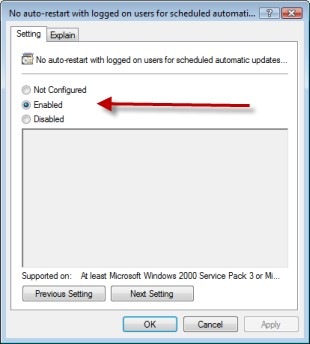
The row you are looking for is “No auto-restart with logged on users for scheduled automatic updates installations”. Double click on it, then change it’s state to enabled, then click OK.

StopWindowsReboot2

You will have to reboot your computer for this to take effect. Then the horror of waking up Wednesday mornings, dreading the overnight reboot will be a thing of the past.

While you are here, you may also wish to change the “Delay restart for scheduled installations” setting. By default this is set to 5 minutes. This is the screen that pops up and says ‘hey I just installed some stuff, I need to reboot to finish’ and your two choices are ‘Restart Now’ and ‘Restart Later’. But if you hit ‘Restart Later’ you are annoyed again a mere five minutes later. Well this is where you can adjust this. Open up the dialog, click Enabled, then you can change the time from the default of 5 minutes up to 30 minutes.

As with any time you go mucking around in your registry or policy settings, you do so at your own risk. Make sure you understand what is going on before you go changing things.

All I know is I’ll be sleeping a whole lot more soundly on Tuesday nights now.

My Dev Kit

There’s a new meme of sorts on the web, folks talking about the tools they use to develop with. I first saw it on Shawn Wildermuth’s blog. Shawn’s a great guy, he co-wrote most of those .Net MCTS/MCPD study guides from MS Press, and does a lot of training on Silverlight. So I thought I would keep the meme alive and talk about my own tools.

Hardware

I do a lot on the road, so a laptop is essential. Mine’s getting up there in age, it’s an HP Pavillion dv8000. 2 gig ram, two internal 160 gig hard disks, 17 inch wide screen, single core 64 bit processor. It’s OK, but will hopefully get replaced next year with something with more cores and horsepower. I don’t care much for the keyboard, so I bought an external keyboard from Lenovo. It’s got a trackpoint so I don’t have to take my hands off the keyboard very often, and I use it with both my laptop and the Dell that work supplies me.

At home I use a larger wireless Microsoft mouse, on the road I use one of the smaller Microsoft travel mice. Also in my hardware list is an external Seagate 1TB drive. It hooks up via either firewire or USB, which is nice when my USB ports are all full.

Also in my list is my Zune. Yes my Zune. Cubical farms can get noisy at times, some good tunes on my Zune really help me to zone out and ignore my surroundings, focusing on my code. It’s also nice on my commute or daily walk, I listen to podcasts to keep up my technical knowledge. At night I hook it to my TV via my X-Box 360 to watch video podcasts, or sometimes I lay in bed before going to sleep and watch.

My final piece of hardware is my iPaq, it helps keep my appointments in line and my contacts, plus I have lots of e-books loaded on it for reading. I also used to use it for podcasts prior to getting my Zune.

Operating System and Dev Tools

My laptop currently runs 32 bit Vista Ultimate with Service Pack 1. Since it maxes out at 2 gig, and some 64 bit drivers were not available when Vista first arrived, I saw no benefit to 64 bit and took the path of least resistance. I have quite a few virtual machines in a variety of OS (Server 2008, 2003, XP, Vista, and Ubuntu) for testing, development, and running Beta versions of programs. For a web browser, I bounce back and forth between FireFox and IE7. For a while I was using FF most of the time, but IE7 was a big improvement over 6, and I’m now using them about 50/50. I suspect when IE8 comes out I may be using it more, but will have to see.

Like Shawn I also use Outlook 2007 for my e-mail client. It’s so much easier to organize my mail in Outlook than the g-mail host. But I also use the other features, such as the calendar and task list to help manage my life. I also use the rest of the Office suite for my daily tasks.

I use SnagIt for grabbing still screen captures, awesome tool, and Camtasia for video screen captures. I’m working on several video tutorials now, which is fun but time consuming (which also explains while my blog posts have been off of late). I use Paint.Net for basic photo / image editing. For creating my blog posts, I write them originally in Word 2007, then use Windows Live Writer to post them to my blog.

For quick access to my daily programs, I use one of two things. I really like Bayden Systems SlickRun. I also create a shortcut menu using a technique I blogged about in February.

Developer Tools

As you might expect I use both SQL Server Management Studio and Visual Studio 2008 Team System for day to day development. My top add-ins are Red-Gates SQL Prompt bundle for SSMS and CodeRush for Visual Studio. For a text editor, I absolutely love UltraEdit. Since I have blogged a lot about my dev tools in the past, I will keep this section short.

The Cloud

I’m on a couple of social networking sites, in addition to this blog:

· Twitter

· Posterous

· LinkedIn

· MSDN Code Gallery – One site for SQL Server Full Text Searching and one for SQL Server Compact Edition.

Passing the Baton

OK, your turn, let’s see your blog with your tools!

TechMixer University Wrap-Up

I can’t believe it’s been a week already since TechMixer University! Wow what a great time. It was our first year, and the last unofficial total I heard was 426 attendees, plus probably another 75 or so in speakers, vendors, and event volunteers. If you attended, I would love to hear from you, especially about the selection of speakers and subjects since I served as chair of the education committee. Shoot me an e-mail at arcanecode at gmail.com. I’ll keep your feedback confidential, but that feedback (good, bad, or ugly) will help us with next years event.

After the event each volunteer was recognized and presented with nice award. I thought the coolest award tough came from my nine year old daughter Raven. She took one of the leftover flyers, cut it up and made her own newspaper article. Here it is for your enjoyment.

A Huge Success

Thanks again to everyone who participated, speakers, organizers, contributors and sponsors, and most of all the attendees.

Ted Neward goes well with cheesy stuffed burritos

I had quite the adventure last week getting to DevLink. Enroute Thursday night part of the electrical system in my old pickup decided to implode, leaving me stranded on the side of the interstate. I got it towed and had to wait for a friend to come get me (thanks Ben!). The closest place to wait was the Mexican Phone Company (aka Taco Bell). I claimed the booth with the wall outlet, setup my laptop, and settled in for 3 hours of waiting. Naturally there was no wi-fi to be found.

Always looking for opportunities to be productive, I worked on editing a Camtasia video I had recorded recently at a Bug.Net meeting. After a bit I decided to take a break and eat. While munching on a cheesy stuffed burrito I watched some videos I had downloaded from the InformIT site. In the first video Ted Neward talked about functional coding and touches on F#, in the second he dives deeper into F#. Once the videos and my cheesy stuffed burritos were done I returned to editing.

So the next day I got my wife’s van out of the shop (transmission had gone out leaving CodeStock – these conferences are getting expensive!) hopped in and took off once again for DevLink, this time making it just in time to see the last session of the day – none other than a presentation by Ted Neward and Amanda Laucher on F#. And I’ll be dog gone if Ted wasn’t wearing the exact same t-shirt he had one while filming the videos I’d watched. Made the experience that much more surreal. Either that or the cheesy stuffed burritos were haunting me, one of the two.

I did at least get one whole day in at DevLink, still well worth going to. And I’m not just saying that because I won a copy of Vista Ultimate and Master Chiefs decapitated head. Oh and if you are looking to learn a little more on F#, Ted’s got a great article in the Sept/Oct 2008 issue of Code Magazine called F# 101. Good reading.

All in all, despite the vehicular issues DevLink was still a good value and I plan to make it an annual trip.

Presenting SQL Server 2005 2008 Full Text Searching at TechMixer University

On August 19th, 2008 I am presenting “Getting Started with SQL Server 2005/2008” at the TechMixer University conference that is taking place between in Birmingham Alabama. This post will have all the links relevant to my talk.

Detailed descriptive material can be found on my blog, ArcaneCode.com, with links to specific posts below.

First off, the slides and sample code can be located at the Code Gallery site I setup specifically for Full Text Searching with SQL Server:

http://code.msdn.microsoft.com/SqlServerFTS

Look on the downloads page to see various projects around SQL Server Full Text Searching. I’ve created one “release” for each of the projects around FTS. Be sure to look on the right side at the various releases in order to see the various projects.

Next, you can get started with the basics by reading these entries on my blog:

Lesson 0 – Getting the Bits to do Full Text Searching in SQL Server 2005
Lesson 1 – The Catalog
Lesson 2 – The Indexes
Lesson 3 – Using SQL
Lesson 4 – Valid Data Types
Lesson 5 – Advanced Searching

After that you’ll be ready for some advanced topics.

Can you hear me now? Checking to see if FTS is installed.
Exploring SQL Servers FullTextCatalogProperty Function
Using the ObjectPropertyEx Function
Using FORMSOF in SQL Server Full Text Searching
Creating Custom Thesaurus Entries in SQL Server 2005 and 2008 Full Text Search
Creating and Customizing Noise Words in SQL Server 2005 Full Text Search
Creating and Customizing Noise Words / StopWords in SQL Server 2008 Full Text Search
Advanced Queries for Using SQL Server 2008 Full Text Search StopWords / StopLists

The Importance of a Good User Interface

Sure, everyone would like a good UI, but most developers simply have not had the training to implement a usable user interface. I’m not necessarily talking about something dazzling and good looking, no I’m talking about USABLE. Think user interfaces aren’t that important?

Last night on Twitter, @djuggler mentioned John Denver. My wife is a huge John Denver fan. Right after we got married, I took her to a John Denver concert. We got all dressed up, did the nice dinner then I surprised her with some great seats. We were on the front row, if you exclude the seats that were down in the orchestra pit. I was especially glad I spent the extra bucks as it turned out to be his last concert in Birmingham before he passed away.

@djuggler ‘s tweet made me curious what year he’d passed away. In reading the Wikipedia article I found an interesting link to an article on ASK TOG. It was titled “When Interfaces Kill: What Really Happened to John Denver”. I’ll let you read the article for the full details, but the short version is the fuel tank toggle switch was poorly designed, and in a location that forced the pilot to remove his hands from the controls. Doing so caused John Denver to lose control and, well, that was that.

I hope this brings to light how important a good UI can be. At the risk of this sounding like a lame lead in to a commercial, I will mention tonight’s BSDA meeting. Shannon Brooks-Hamilton is coming to speak to give us a User Experience Overview. From her extract:

“User Experience” is a person’s overall experience and satisfaction when using a product or service. This presentation will give an overview of the practices, methods, and outcomes of User Experience with an emphasis on tips for great interface designs. The benefits of User Experience include increased product usage, increased e-commerce sales, increased user productivity, decreased support costs, decreased training costs, and fanatical customer loyalty. Google, Apple, and IDEO are examples of companies that embrace User Experience.

We’ll be meeting at 6:30 pm on August 14th at the New Horizons Training Center in Homewood, hope you can make it!

SQL Server Compact Edition Connection Strings

In my recent presentation I talked about an important but subtle difference with connection strings when using SQL Server Compact Edition. It was so important I thought I’d make a special blog post out of it.

There are two methods for programmatically accessing data in SQL Server Compact Edition (SSCE). The first method is using the System.Data.SqlServerCe library. When you create an instance of the SqlCeEngine, you need to pass a connection string formatted like so:

DataSource=”mydatabasename.sdf”; Password=’mypassword’

This method is valid, by the way, for version 3.1 or 3.5 of SSCE. The second method, available with Visual Studio 2008 and the 3.5 version of SSCE is to use LINQ to SQL. When creating the DataContext object, you also need a connection string formatted like so:

Data Source=mydatabasename.sdf; Password=’mypassword’

Note very carefully the two differences. First, the name of the sdf file lacks the double quote marks in the LINQ to SQL version. Second, note the Data Source phrase has a space between the words in the LINQ version, where the SqlCeEngine version lacks the space.

It’s a small distinction, but it’ll drive you nuts if you don’t catch it. I drove myself nuts for quite a while because I didn’t notice the extra space in Data Source when I began experimenting with LINQ to SQL! Hopefully my pain will save others some hair pulling.

Getting Started with SQL Server Compact Edition 3.5

Tonight I will be presenting “Getting Started with SQL Server Compact Edition 3.5” at the Bug.Net users group. If you go to my Arcane Lessons page and scroll down just a little, you will find a section called “Getting Started with SQL Server 2005 Compact Edition”. The subjects referenced there are still valid under Visual Studio 2008 / SQL Server Compact Edition 3.5.

However, there are some new features that make it worth our while to give SSCE 3.5 a second look. For example, did you know you can access Compact Edition using LINQ to SQL? My updated presentation and code demo will show you how.

Speaking of which, you can find my PowerPoint slides and Code Demos at the new Microsoft Code Gallery site I’ve setup:

http://code.msdn.microsoft.com/ssce

Over the coming days I will also be adding blog posts to talk about the new features in version 3.5, and how to access SSCE from LINQ to SQL.

CodeStock

I was at CodeStock in Knoxville over this previous weekend. Great conference. It was run very well, everything went quite smoothly. I attended some really great sessions, and got to meet a ton of great folks.

The twitter get together the night before at the hotel was awesome. It was sort of weird, a lot of the folks I have known on twitter for several months now, but this was the first time we got to meet face to face. As I told my wife, “I got to see a lot of old friends for the very first time and catch up on old times.” We got into some really interesting discussions on development topics, user group activities, and just had a lot of fun in general.

I attended a lot of good sessions during the day, but want to point out a few in particular. The first was put on by Amanda Launcher and Joe O’Brien. They talked about alternative languages such as Ruby and F#, and why learning them was important. They pointed out that alternative languages help you think about different approaches to problem solving. Gave us a lot to think about, and has me eager to dive into those F# books I bought.

The other  two sessions were on LINQ. Joe Kunk did a LINQ to SQL session. His stated goal was to give us enough info to return to the office and write our first LINQ app. This combined with Jim Wooley’s session on LINQ Migration Strategies did just that, I sat down Sunday and, I admit with the help of a few books, in a few hours had written my first LINQ code to talk to SQL Server Compact Edition.

I thought CodeStock was a great investment of my time, and am looking forward to returning next year.

Presenting Getting Started with SQL Server Compact Edition 3.5 at BUG.NET Meeting

Just wanted to let everyone know I’ll be doing a presentation this coming Tuesday night, August the 12th for the Birmingham .Net Users Group (BUG.NET). My topic, as you may have guessed from the title, will be using SQL Server Compact Edition.

While I will be using Visual Studio 2008, I will point out which pieces are 2005 compatible. I will also cover the use of both traditional coding techniques as well as how to use LinqToSQL to talk to the Compact Edition.

The meeting takes place at 6:30 pm at New Horizons Training Center in Homewood.

I also plan a new series of blog posts to start later this week on the subject, and will be creating a new Code Gallery site to hold my examples.

Also, don’t forget the regular BSDA meeting this coming Thursday night, the 14th. Also starting at 6:30 pm at New Horizons, Shannon Brooks-Hamilton, a software usability expert, will be there to talk about user interface design. Lots of good thought material on how we can make better UIs for our users.

Arcane Review: Expert SQL Server 2005 Integration Services

If you recall my “Good Reads” post from June 25th, you will remember I am a big believer in books as a learning medium. I like to employ a lot of different ways to learn: user groups, blogs, podcasts, videocasts, and magazines to name a few. But for really in depth coverage, it’s hard to beat a nice book in your hands. I got some good feedback from my mention last week of Andy Leonard’s new e-book on Data Dude, so I thought that I would continue by adding book reviews to the blog every so often.

Expert SQL Server 2005 Integration Services For this review I thought I’d cover a book that seems to constantly be on my desk lately: Expert SQL Server 2005 Integration Services, by Brian Knight and Eric Veerman. This book does a really good job and is specifically targeted toward the data warehousing professional. One entire chapter is devoted to ETL for dimension tables; another chapter focuses on the fact tables. It was great to have coverage so focused on these topics.

Another favorite part of the book is the two chapters on deploying and managing SSIS packages. So often these topics are glossed over, especially the managing piece. The book does a great job in covering all the tools and practices around this subject. I’ll mention one more chapter, one that focuses on package reliability. They cover logging, auditing, event handling, checkpoint files, and even suggestions on testing error handling logic.

There are many more chapters in the book, such as migration from DTS (SQL Server 2000) and Scalability, for you to discover. The other thing I love about this book is the brevity. The authors cover an amazing amount of information in just 382 pages. As a busy, busy person I very much appreciate the conciseness they achieved without sacrificing any clarity.

I’ve met both authors, and have heard them speak. They are both very nice, knowledgeable individuals, and I highly encourage you to attend one of their presentations if you get the chance, or if not at least buy their book from your favorite retailer; you will find it a great investment.

Deep Fried Debugging

I was listening to the current episode of Deep Fried Bytes and was reminded of an important lesson. In case you haven’t heard of it, Deep Fried Bytes is a relatively new but very good development podcast. I highly recommend the podcast, it’s become a favorite on my Zune.

The hosts, Keith and Woody were interviewing members of the Microsoft.com support team. Yes, the guys who keep the actual Microsoft.com website up and running. Keith Woody asked them about a really challenging problem they hand, and one of the team recounted the tale of a site that had been in production about a year, when performance suddenly tanked. Naturally they went through the standard debugging questions, including “has anything changed in the code?” Since nothing had, they said “oh, well can’t possibly be the code” and went on to look at other things.

They went on to look at other things before finally, in desperation, coming back to the code. It turned out there was a scalability bug that had been there since day one, buried deep in a stored procedure. The select statement inside the stored proc caused a table scan. Not so bad when there were few records but after being up for a year the number of records was bogging down the stored proc.

I have been on many projects where a developer insisted the bug couldn’t possibly be in the code as it’s been running “perfect” and no recent changes have been made. The lesson to learn is never to rule out anything when looking for bugs. True, you should start with the most likely suspects, if no changes have been made to code then the probabilities of it being code are low as compared to say a hardware issue, but don’t rule it out completely. Get the entire team working in parallel. Let the developers look at the code, the DBAs at the database, admins at the server and network, and so on. Through teamwork, and being open to all possibilities you can achieve some deep fried debugging.

SQL Heroes and Data Dudes

In case you are wondering where I’ve been lately, it’s been a combination of issues at work plus putting the final nails in the schedule for TechMixer University. It’s been a big team effort, and as chair of the education committee I’ve had some great help gathering speakers for the event. We just published the first round of speakers and tracks so be sure to go take a look. And if you haven’t signed up yet, you better hurry registration is rapidly filling up!

On the interesting SQL News front, thanks to Jason over at StatisticsIO I just found out about the SQL Heroes site.  They are having a contest for the best SQL Server 2008 community project submitted to CodePlex. Here’s a listing of the current SQL projects currently there. Looks like some useful utilities, and the contest still has a month left in it so plenty of time to assemble your own project and submit to the contest.

I recently began diving deeper into Visual Studio Team System 2008 Database Edition (aka “Data Dude”) and wanted to learn more about it. Fellow SQL MVP Andy Leonard has come out with a new book, the first in a series on the subject. Volume 1, available from Solid Quality Mentors, takes you from the basics of creating your first database project, into versioning your database and scripts, right into building and deploying. There’s also some interesting and useful material in the appendixes, including installation of data dude and importing a database schema. I was also interested in getting a peak at his development environment. And at a mere 15 dollars I thought it was a bargain.