
At the Atlanta ReMix converence, Mehul Harry from DevExpress interviewed me for their TV site. We talked about Visual Studio Database Developer Edition, aka “Data Dude”. Take a look…
Data Dude for Dev Guys at Bug.Net/BSDA June 11, 2010
Tonight I’ll be presenting at the Birmingham .Net / BSDA Users Group on Visual Studio Database Edition, aka “Data Dude”. Here is the slide deck in PDF format, sample code will get uploaded in the next day or so.
SQL Server MVP Deep Dives Deal of the Day
Just found out our book “SQL Server MVP Deep Dives” is Manning Press Deal of the Day! You can get the book (http://bit.ly/jDoCg ) for $25! Use code dotd0504tw at checkout. This is cheaper than I’ve seen it anywhere else, and you can feel good saving money since all proceeds go to War Child International.
At this price by 2 or 3, after all Mother’s Day is coming up!
SharePoint Saturday Huntsville
It’s another Saturday, must be time for another speaking engagement. Today I’m in Huntsville Alabama speaking at their SharePoint Saturday. Now you may wonder what a SQL BI guy is doing at a SharePoint event. There are two kinds of BI professionals in the world, those who are currently working with SharePoint and those who will be working with SharePoint. I believe the converse could also be said for SharePoint people. There those who are currently hosting BI solutions, and those who will be hosting BI solutions. It’s important then, that SharePoint professionals have a clear understanding of what business intelligence is, including all the terms that get used in the BI world. In addition SharePoint 2010 contains features to support a new tool called PowerPivot. Understanding what a PowerPivot workbook is, and how their customers will be using it will give SharePoint professionals better understanding of how to host PowerPivot content.
My first session of the day is entitled “Off and Running With PowerPivot for Excel 2010”. In this session I’ll be giving an overview of PowerPivot, then we’ll be looking at how to import and manipulate data within Excel. This presentation is demo heavy but there are a few slides which can be downloaded from this link.
In my second presentation we’ll dig into the guts of data warehousing and business intelligence. Business Intelligence has its own vocabulary, during the session the audience will learn all the buzzwords around BI and dig into the data warehouse to see how these terms are implemented. This particular presentation is a slide heavy deck, unlike my previous session there is little in the way of demonstrations. We’ll briefly touch on SharePoint, understand though that this presentation centered largely around understanding what BI is so you’ll understand what your SharePoint system is being used for. The slides are available from this link.
If you are reading this after the fact, then let me thank you for coming to my presentations. I hope you found them useful, please don’t hesitate to contact me if I can be of further assistance.
Add Shortcut To Folder In Taskbar In Windows 7 — The Right Way
I very much dislike having to point out errors in other blogs publicly. I generally prefer to leave a comment or e-mail in hopes that the author will correct the error. Recently I found a blog post that at its root was incorrect. I left a comment explaining the error, in hopes the author would correct the issue. However, it’s now been one week and no changes or updates have been made. Further my post is still awaiting moderation while a comment made after mine has been approved.
The post in question is at a site called technixupdate, and begins with the assertion "Windows 7 taskbar does not allow to pin a shortcut or folder path directly to the taskbar, as only program executable can only pinned to the taskbar by default in Windows 7." (Note that’s an exact quote.) The author then goes through this rather convoluted technique of creating a fake executable file to accomplish the task. Unfortunately, the very opening statement is incorrect. Windows 7 taskbar does indeed allow you to pin shortcuts to it. Let’s look at a brief example to illustrate.
On my D drive I have a folder named Data. I’d like to create a shortcut to it on the taskbar. Let’s start by first opening up your "My Documents" folder. I could place the shortcut anywhere, but My Documents seems like a convenient place. Once there right-click then select New, Shortcut from the menu. In the dialog that appears simply type in Explorer “D:\data”. Note that you only need to use the quote marks around the drive and path if your folder names have a space in them. In the screenshot below you can see that I was able to safely omit the quotation marks since there are no spaces in my folder.

Once you’ve entered Explorer and your drive / folder you can click next.

As you can see I replaced the default text of Explorer.EXE With something more meaningful, in this case the word Data. I simply click Finish to complete creating a shortcut. Now that we have a shortcut, it is a simple matter to pin it to the taskbar. Simply right click, then select "Pin to Taskbar”.
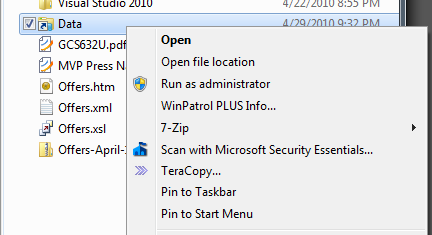
As you can see from the image below, I now have a shortcut to my Data folder on my Taskbar.

This technique will work with any shortcut you wish to create. I hope this will correct the record for those wishing to use this technique. Finally, even though his facts were a little off, I do want to give the author credit for blogging and trying to help out the community.
SQL Saturday 41 – Atlanta
Today is April 24, 2010 and I’m in Atlanta speaking at SQL Saturday number 41. I’m giving three sessions today. I guess I’m just a glutton for punishment, LOL.
My first session is an Introduction to Business Intelligence / Data Warehousing. In it I am covering the basics, it’s a true introductory talk where we’ll demystify all the buzz words surrounding Business Intelligence. You can download the slides from here.
My next session is Off and Running with PowerPivot for Excel 2010. Learn the ins and outs of this exciting new tool from Microsoft, see how you can enable your users to do their own Business Intelligence. The slides are ready from this location.
OK, an update before this blog entry even posts, Vidas Matelis just published his step by step guide for getting SharePoint 2010, SQL Server 2008 R2, and PowerPivot all up and going on a single box. (And when I say just, I mean it went up just as I was typing up this post.) Vidas knows a lot about PowerPivot, it’s a great blog to add to your short list. I have a link to his blog in my slide deck, but wanted to pass along a specific link to his install guide, you can find it at http://powerpivot-info.com/post/66-step-by-step-guide-on-installing-powerpivot-for-sharepoint .
The final session I’ll be doing is on Full Text Searching. You can download the code samples and slides from my Code Gallery site, http://code.msdn.microsoft.com/SqlServerFTS.
Speaking of Full Text Search, I’ll be doing an Interactive Session at Tech-Ed in New Orleans on Full Text Searching. The session is now in the catalog: http://northamerica.msteched.com/topic/list?keyword=DAT07-INT If you are coming to New Orleans for Tech Ed I’d love to see you there. I’ll also be in the Microsoft Data booth during part of the event, so come on by and say Hi!
I hope to be able to sneak in a few sessions today as well, there will be 49 different sessions at SQL Saturday #41 to pick from (7 tracks, and 7 sessions per track) so it promises to have something for everyone. If you want to follow the fun on Twitter, our official hash tag is #sqlsat41 .
Live Streaming from SQL Saturday 41
One of the sponsors for tomorrow’s SQL Saturday in Atlanta Georgia, a company named Set Focus, is going to be live streaming three presentations from the event. I just got the word that my session, "Introduction to Data Warehousing/Business Intelligence" was selected as one of the sessions. My session kicks off the event at 8:30 a.m. Eastern time. Information and a link to the stream site can be found on Set Focus’s blog:
http://blogs.setfocus.com/radar/2010/04/22/streaming-sqlsaturday/
SQL Saturday 41 was sold out some time ago, and there is even quite a waiting list, so if you’re unable to attend then at least you can sit in on three of the sessions via the live stream. The other two sessions to be streamed are "SQL Server Memory Deep Dive" by Kevin Boles and "Database Design Patterns" by Louis Davidson. Both are fellow Microsoft MVPs and excellent presenters, I know you’ll enjoy their presentations as well.
Live streaming technology really excites me. While I feel that you can get the best experience and education from being live at the event, I also understand that this is not always possible for everyone. Work conflicts, distance, family obligations, or the event simply being sold out, as this one is, can limit a person’s ability to attend in person. Live streaming events such as SQL Saturday really helps us to extend our reach into the community and to help serve those who for whatever reason cannot be with us at the event. I want to give a great big thanks to the folks over at Set Focus for making this happen.
Off and Running with PowerPivot for Excel 2010 at the Huntsville .Net Users Group
Tonight, April 19, I will be presenting at the Huntsville .Net Users Group. The subject will be PowerPivot for Excel 2010. Attendees will get to learn all about Microsoft’s new self-service Business Intelligence tool. Both the Excel and SharePoint pieces of PowerPivot will be discussed, plus the audience will get to see demonstrations of the new Excel add-on.
The slides in PDF format are available, PowerPivot.pdf
Spring seems to be a busy time for user groups, code camps, and SQL and SharePoint Saturdays. This Saturday, April 24 I will be speaking at the SQL Saturday in Atlanta Georgia. On May 1 I will be presenting at the Huntsville, Alabama SharePoint Saturday. The SQL Server event is already sold out, with a waiting list. There are still a few seats left for the share point Saturday event so hurry now before it gets sold out too!
The Podcast Junkie Returns for 2010
Last year I did a week long series called “The Podcast Junkie”. (The link is for the first day, but be sure to check out each day of the week for a list of casts.) I’m still a Podcast Junkie, and if anything listen or watch more now than I did last year. Having the ability to hook up my Zune to my TV (either through my XBOX 360 or in the Zune docking cradle) makes it very convenient. In the evenings I often drop my Zune into the dock and kick back with some podcasts.
Right now I’m in the process of reformatting my main laptop and reinstalling everything. I’ve spent a lot of time working with Beta then Release Candidate software over the last year and all the install / uninstalls have likely contributed to the instability of my machine. Not an unusual thing for developers to go through.
I keep all of my data, with two exceptions, on drives other than C so I have almost no data to back up, thus the process goes very quickly. One is my Microsoft Outlook files, easy enough to backup and restore later. The other is my Zune media.
My music, videos and audio books are all on external USB drives, so when I reinstall the the Zune software all I have to do is point it at the drives then kick back and wait for it to index all of it. My playlists are stored in C:\Users\[your username here]\My Music\Zune\Playlists, so I just copied those to a backup device and will restore after the Zune software is reinstalled.
The podcasts though are a bit more painful. Yes I could back them all up, but I’ve found just as with a reformat of the PC, so too does a reset of your podcast list benefit you. In the process of resubscribing to my podcasts I wind up weeding out a few I haven’t listened to in a while. More importantly I also wind up finding new ones to subscribe to, which is the fun part. It’s rare I have time to just sit and look through all the newly added podcasts, so this is a good opportunity to find new material to enjoy and learn from.
So then I get to the question of how best to backup my list. Last time I just went to the Zune Podcast folder and grabbed the list of directory names which match the podcasts I listen to. This time I decided to be a bit more creative, and did screen captures of the list and then merged them into one picture. The result turned out pretty cool, so I thought I’d share it with all of you. Just click on it to see the full size picture to see the podcasts I’m currently addicted to.

I don’t try and add all of them at once after I reinstall. Instead I start with the ones that are most important to me and add them first. I’ll let those download and sync with my Zune so I can be enjoying them while downloading the rest. To keep up with which ones I’ve gotten so far, I’ll make a copy of this picture to act as a check list. As I add each one to my collection, I’ll simply go to my picture editor (I like Paint.Net), use the selection tool to select the podcast and it’s name, then just hit delete. Eventually I should wind up with a blank picture.
One last piece of advice, after you have reset your library on your newly formatted computer, you need to also wipe your current content from your Zune. Your Zune anchors it’s data to the PC it came from, so it thinks your reformatted computer is a “new” PC and will lock away your old content to protect it. You wind up with a big portion of your Zune’s storage space being taken up by media you can’t get to.
To reset your Zune content, hook your Zune up to the computer, then in the software go to Settings (in the upper right). In Settings, click on Device. The top left menu item, Sync Options should be what you are on. At the very bottom you’ll see “Erase All Content”, you want to do this prior to syncing up any music or podcasts. Warning!!!! Make sure you have all the content on your Zune backed up that you need backed up. As I mentioned earlier, all my music and video on external drives, and my podcasts I’ve just redownloaded, so I don’t have anything on my Zune that I’ll lose, but your situation may be different.
Also note that when you do this, it will also delete the games, if you have the games installed. To reinstall the games, while still in the Settings, Device menu go down to Player Update. After making sure your player is up to date, you should see a button that reads “Install Games”. I’m sure by now you’ve deduced that just clicking it will reinstall the games. Not having the games gives you extra space for music, etc. If you have a bigger Zune like the 80 or 120 you probably won’t notice the missing space, if however you have a 4 gig model you might want to think about it.
Hope this helps the next time you have to reformat your computer, or just want to take a look at the podcasts someone else might be listening to. Personally I’m glad there’s no 12 step program for podcast addicts, would hate for someone to try and drag me to the meeting. (I’d probably be sitting in the back listening to my Zune instead of the meeting.)
“Hi, my name is Arcane Code, and I’m a podcast junkie!”
Presenting “Intro to DW/BI” at the Regions Bank Users Group
Today I have the privilege of presenting to the internal Regions Bank users group an Introduction to Data Warehousing and Business Intelligence.
The power point slide deck is available for download that this link.
To all who made it, thanks for attending and please let me know if you have any questions.
SQL Saturday 29 Birmingham
We just finished up our SQL Saturday here in Birmingham Alabama. It was number 29 in the list of SQL Saturdays. First off let me cover some supporting material for the two sessions I gave. The first was an introduction to Microsoft’s new self service BI tool, PowerPivot. Attendees can download my slides here: PowerPivot Slides You can also see all my posts so far on PowerPivot at https://arcanecode.com/category/powerpivot/ or by picking PowerPivot from the drop down over on the right side of this blog.
My second session of the day was an introduction to SSIS. Step by step instructions, the sample project, and the slide deck can all be found on my Code Gallery site. At the end we got a bit rushed for time, hopefully some of your questions can be answered from some of my past posts on SSIS. If not feel free to send me an e-mail (rcain at comframe.com or arcanecode at gmail.com) and I’ll see what I can do to help.
Attendees of both sessions may also find my Introduction to Data Warehousing/Business Intelligence slide deck helpful to clarify some BI terminology.
In my roles as speaker, volunteer, and event planner I had little time to take pictures, but I did grab a few at the very end of the day, I thought I’d share them here:
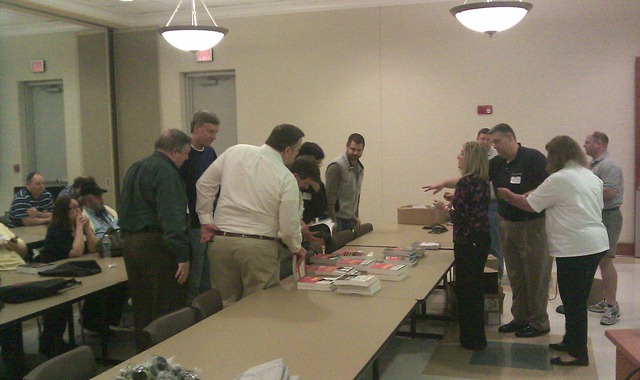
Some lucky winners of books looking over the remaining stack to pick out their prize.
John Baldwin, our fearless leader is in the grey shirt all the way on the right.

Obligatory crowd shot. Dividers broke this big room down to 4 rooms where we had our sessions.

One more crowd shot, showing some of the higher end swag including a Wii, a Garmin GPS, multiple
copies of Office and Windows 7, and two copies of the SQL Server MVP Deep Dives book I coauthored.
My role in event planning was acting as the speaker coordinator. Finding quality people willing to travel to Birmingham, on their own time and expense, to give presentations. Thanks to Sven Aelterman, Kevin Boles, Louis Davidson, Janis Griffin, Kevin Grohoske, Geoff Hiten, Rodney Landrum, Vincent Mayfield, Aaron Nelson, Barry Ralston, Joe Webb and Jim Wooley. It was their presentations that helped us draw the big crowd we did.
Speaking of the crowd, much thanks to all of you who attended. The folks in my sessions were very attentive, asked many good questions, and kept the discussion lively and interesting. I’m glad all of you came and hope to see you all next year.
I also would be remiss if I didn’t thank all of our sponsors. Without their donations we would not have been able to put on the event. Microsoft, Teksouth, Bit Wizards, Confio, Redgate, Attunity, Telerik, Intellinet, CozyRoc, Wrox, TekSystems and O’Reilly Publishing and to the SQL PASS organization.
I should also give personal note of thanks to my employer COMFRAME, for putting up with my extended lunches and letting me juggle my schedule to run errands and do other planning activities and presentation prep time.
Finally a few last thanks and kudos are definitely in order. The first should go to Vito Amato and his merry band of volunteers. They kept everyone in cold drinks, helped the speakers with their needs, answered attendees questions, checked folks in at the door, and in general did everything that needed to be done to keep the event running smoothly.
A big thanks and congratulations to John Baldwin, our fearless leader, and his right hand man Morgan Smith for taking the leadership to plan and organize the event. They worked long and hard to make the event the success it was.
If you want to keep the fun and education continuing, we’d love to have you join us at our monthly user group meetings, http://www.steelcitysql.org/. Thanks for a great SQL Saturday, and I can’t wait for next year’s!
Unmixing the MIX 10 Content
Every year Microsoft puts on a big conference called MIX, this year was MIX 10. It’s a big developers conference focused mostly on Web development, although this year also had a fair amount of information on the new Windows Phone 7 platform. Microsoft is also kind enough to make the sessions available for free download to anyone interested after the conference is over. As of this blog post the average quality WMV recordings are up, and the high quality ones should be up soon. You can download them at http://live.visitmix.com/Videos .
To make downloading easy I suggest using FireFox with an add-in called Down-Them-All. Yes, I know, you’re probably a die hard Microsoft guy and use IE all the time, but you probably have FireFox installed for testing purposes. Go grab the Down-Them-All add-in. Then go to the Mix website (link above), right click anywhere in the webpage, and pick “DownThemALL!”. In the dialog that pops up it will show all the downloadable content on the page. Set the directory to “Save files in:” in the lower part of the dialog (for the average quality WMV files you’ll need about 12.4 gig), then under filters you can pick Videos to get all the WMVs. You could also go to the fast filtering area and set something like *.pptx to download all the slides. Click “Start!” and the downloads will begin. Then go get coffee. And lunch. And probably dinner as well, as this will take a while.
Once you’ve got it all downloaded you’re left with a lot of files with the session names as the file names. CL01.wmv, CL02.wmv, etc. I find it much easier if the file names also contain the text of the session description. That way when I’m looking over the media inside my Zune library or even just browsing in Windows explorer it’s easy to pick something to watch. So using the column mode capabilities plus a simple macro in a text editor called UltraEdit (easily the best software purchase I’ve ever made in my life) I quickly put together a batch file to rename all the files for me. Here is the contents of it:
rename CL01.wmv "CL01 – Changing our Game – an Introduction to Windows Phone 7 Series.wmv"
rename CL02.wmv "CL02 – Authoring for Windows Phone Silverlight 4 and WPF 4 with Expression Blend.wmv"
rename CL03.wmv "CL03 – Prototyping Rich Microsoft Silverlight Applications with Expression SketchFlow.wmv"
rename CL06.wmv "CL06 – Designing Bing – Heart and Science.wmv"
rename CL07.wmv "CL07 – Microsoft Silverlight 4 Overview – What’s in Store for Silverlight 4?.wmv"
rename CL08.wmv "CL08 – Microsoft Silverlight 4 Business Applications.wmv"
rename CL09.wmv "CL09 – Developing with WCF RIA Services Quickly and Effectively.wmv"
rename CL10.wmv "CL10 – Stepping Outside the Browser with Microsoft Silverlight 4.wmv"
rename CL13.wmv "CL13 – Overview of the Windows Phone 7 Series Application Platform.wmv"
rename CL14.wmv "CL14 – Windows Phone UI and Design Language.wmv"
rename CL15.wmv "CL15 – An Introduction to Developing Applications for Microsoft Silverlight.wmv"
rename CL16.wmv "CL16 – Building Windows Phone Applications with Silverlight Part 1.wmv"
rename CL17.wmv "CL17 – Building Windows Phone Applications with Silverlight Part 2.wmv"
rename CL18.wmv "CL18 – Windows Phone Application Platform Architecture.wmv"
rename CL19.wmv "CL19 – Development and Debugging Tools for Building XNA Games for Windows Phone.wmv"
rename CL20.wmv "CL20 – Distributing and Monetizing Windows Phone Applications and Games.wmv"
rename CL21.wmv "CL21 – Building Windows Phone Games.wmv"
rename CL22.wmv "CL22 – Building a High Performance 3D Game for Windows Phone.wmv"
rename CL23.wmv "CL23 – Designing and Developing for the Rich Mobile Web.wmv"
rename CL24.wmv "CL24 – The Microsoft Silverlight Analytics Framework.wmv"
rename CL25.wmv "CL25 – Microsoft Silverlight Media – Moving at 60fps.wmv"
rename CL26.wmv "CL26 – Introducing the Silverlight Rough Cut Editor.wmv"
rename CL27.wmv "CL27 – HTML5 – Cross-Browser Best Practices.wmv"
rename CL28.wmv "CL28 – In-Depth Look at Internet Explorer 9.wmv"
rename CL29.wmv "CL29 – HTML5 – High-Performance Best Practices for Web Sites.wmv"
rename CL30.wmv "CL30 – Building Innovative Windows Client Software.wmv"
rename CL50.wmv "CL50 – Search Engine Optimization for Microsoft Silverlight.wmv"
rename CL51.wmv "CL51 – Building an Accessible Microsoft Silverlight Experience.wmv"
rename CL52.wmv "CL52 – Microsoft Silverlight Optimization and Extensibility with MEF.wmv"
rename CL53.wmv "CL53 – Flash Skills Applied to Microsoft Silverlight Design and Development.wmv"
rename CL54.wmv "CL54 – Software and Web Entrepreneurs – Go Big with BizSpark and WebsiteSpark.wmv"
rename CL55.wmv "CL55 – Dynamic Layout and Transitions for Microsoft Silverlight 4 with Microsoft Expression Blend.wmv"
rename CL56.wmv "CL56 – A Case Study – Rapid WordPress Design and Prototyping with Expression Web 3.wmv"
rename CL58.wmv "CL58 – Accessing Web Services in Microsoft Silverlight.wmv"
rename CL59.wmv "CL59 – Unit Testing Silverlight and Windows Phone Applications.wmv"
rename CL60.wmv "CL60 – Silverlight Performance on Windows Phone.wmv"
rename DS01.wmv "DS01 – The Laws of User Experience.wmv"
rename DS02.wmv "DS02 – Treat Your Content Right.wmv"
rename DS03.wmv "DS03 – Running with Wireframes – Taking Information Architecture (IA) into Design.wmv"
rename DS04.wmv "DS04 – Lifecycle of a Wireframe.wmv"
rename DS05.wmv "DS05 – Total Experience Design.wmv"
rename DS06.wmv "DS06 – Touch in Public – Multi-touch Interaction Design for Kiosks and Architectural Experiences.wmv"
rename DS07.wmv "DS07 – The Art Technology and Science of Reading.wmv"
rename DS08.wmv "DS08 – Creating Great Experiences through Collaboration.wmv"
rename DS09.wmv "DS09 – Peanut Butter and Jelly – Putting ‘Content Management’ Back into Context.wmv"
rename DS10.wmv "DS10 – Service Design Goes Social.wmv"
rename DS11.wmv "DS11 – Great User Experiences – Seamlessly Blending Technology and Design.wmv"
rename DS12.wmv "DS12 – Total Experience – A Design Methodology for Agencies.wmv"
rename DS13.wmv "DS13 – The Elephant in the Room.wmv"
rename DS14.wmv "DS14 – The Democratization of the Design Industry.wmv"
rename DS15.wmv "DS15 – The Type We Want.wmv"
rename DS16.wmv "DS16 – An Hour With Bill Buxton.wmv"
rename EX01.wmv "EX01 – Cloud Computing Economies of Scale.wmv"
rename EX02.wmv "EX02 – The Mono Project.wmv"
rename EX03.wmv "EX03 – Modern Web Form Design.wmv"
rename EX04.wmv "EX04 – Robots at MySpace – Massive Scaling a .NET Website with the Microsoft Robotic Studio.wmv"
rename EX06.wmv "EX06 – 10 Ways to Attack a Design Problem and Come Out Winning.wmv"
rename EX07.wmv "EX07 – Principles of Microsoft Silverlight Graphics and Animation.wmv"
rename EX10.wmv "EX10 – Building a Next-Generation Web Application with Microsoft ASP.NET MVC 2 and jQuery.wmv"
rename EX11.wmv "EX11 – Using Storage in the Windows Azure Platform.wmv"
rename EX12.wmv "EX12 – Creating Effective Info Viz in Microsoft Silverlight.wmv"
rename EX13.wmv "EX13 – Microsoft Surface Goes Social – Research Project at the University of Linz.wmv"
rename EX14.wmv "EX14 – Understanding the Model-View-ViewModel Pattern.wmv"
rename EX15.wmv "EX15 – Build Your Own MVVM Framework.wmv"
rename EX16.wmv "EX16 – Securing Microsoft Silverlight Applications.wmv"
rename EX17.wmv "EX17 – IronRuby for the .NET Developer.wmv"
rename EX18.wmv "EX18 – Developing Natural User Interfaces with Microsoft Silverlight and WPF 4 Touch.wmv"
rename EX19.wmv "EX19 – The OpenRasta Framework for Building RESTful Applications.wmv"
rename EX20.wmv "EX20 – Building Great Standards-Based Websites for the Big Wide World with Microsoft ASP.NET 4.wmv"
rename EX21.wmv "EX21 – Syncing Audio Video and Animations in Microsoft Silverlight Applications.wmv"
rename EX22.wmv "EX22 – Six Things Every jQuery Developer Must Know.wmv"
rename EX23.wmv "EX23 – Building Facebook Apps with Microsoft .NET and Deploying to Windows Azure.wmv"
rename EX25.wmv "EX25 – Design the Ordinary Like the Fixie.wmv"
rename EX26.wmv "EX26 – From Comp to Code – A Design Communion.wmv"
rename EX27.wmv "EX27 – Do You Speak My Language? Microsoft Translator and the Power of Collaboration.wmv"
rename EX28.wmv "EX28 – Building Rich and Interactive User Experiences in SharePoint.wmv"
rename EX29.wmv "EX29 – Building Platforms and Applications for the Real-Time Web.wmv"
rename EX30.wmv "EX30 – SVG – The Past Present and Future of Vector Graphics for the Web.wmv"
rename EX31.wmv "EX31 – Developing Multiplayer Games with Microsoft Silverlight 4.wmv"
rename EX32.wmv "EX32 – Smooth Streaming Live in HD – From Camera to Screen.wmv"
rename EX33.wmv "EX33 – Smooth Streaming Live in HD – 2010 Olympic Winter Games.wmv"
rename EX34.wmv "EX34 – Participating in the Web of Data with Open Standards.wmv"
rename EX35.wmv "EX35 – Opening Up Opportunity with Twitter.wmv"
rename EX36.wmv "EX36 – How jQuery Makes Hard Things Simple.wmv"
rename EX37.wmv "EX37 – Adding the Where to the When of Social Applications.wmv"
rename EX38.wmv "EX38 – Building Large-Scale Data-Centric Applications with Silverlight.wmv"
rename EX39.wmv "EX39 – The Tale of JavaScript. I Mean ECMAScript..wmv"
rename EX50.wmv "EX50 – Debugging Microsoft Silverlight Applications.wmv"
rename EX51.wmv "EX51 – Building Finance Applications with Microsoft Silverlight 4.wmv"
rename EX52.wmv "EX52 – Copyright – A Cloudy Subject.wmv"
rename EX53.wmv "EX53 – Storm Clouds – What to Consider About Privacy Before Writing a Line of Code.wmv"
rename EX55.wmv "EX55 – Building the eBay Simple Lister with Silverlight.wmv"
rename EX56.wmv "EX56 – Designing Rich Experiences for Data-Centric Applications.wmv"
rename FT03.wmv "FT03 – Tips and Tricks for Making Web Forms Shine with Microsoft ASP.NET 4.wmv"
rename FT04.wmv "FT04 – What’s New in Microsoft ASP.NET MVC 2.wmv"
rename FT05.wmv "FT05 – The HaaHa Show – Microsoft ASP.NET MVC Security with Haack and Hanselman.wmv"
rename FT06.wmv "FT06 – Deep Dive into Orchard Extensibility for CMS Developers.wmv"
rename FT07.wmv "FT07 – Beyond File – New Company – From Cheesy Sample to Social Platform.wmv"
rename FT08.wmv "FT08 – Improving Software Quality for the Modern Web.wmv"
rename FT09.wmv "FT09 – Pumping Iron on the Web – IronRuby and IronPython.wmv"
rename FT10.wmv "FT10 – Driving Experiences via Services Using the Microsoft .NET Framework.wmv"
rename FT11.wmv "FT11 – Designing and Delivering Scalable and Resilient Web Services.wmv"
rename FT12.wmv "FT12 – OData – There’s a Feed for That.wmv"
rename FT13.wmv "FT13 – Implementing OData – How to Create a Feed for That.wmv"
rename FT14.wmv "FT14 – Web Deployment Made Awesome – If You’re Using XCopy You’re Doing It Wrong.wmv"
rename FT15.wmv "FT15 – Accessing Data in a Microsoft .NET-Connected Web Application.wmv"
rename FT50.wmv "FT50 – Advanced Web Debugging with Fiddler.wmv"
rename FT51.wmv "FT51 – Internet Explorer Developer Tools.wmv"
rename FTL01.wmv "FTL01 – Reactive Extensions for JavaScript.wmv"
rename FTL02.wmv "FTL02 – Building Pivot Collections.wmv"
rename FTL03.wmv "FTL03 – Unlocking Audio-Video Content with Speech Recognition.wmv"
rename FTL50.wmv "FTL50 – Incarnate – Behind the Scenes.wmv"
rename FTL51.wmv "FTL51 – Quickly Implementing New Cross-Browser Features with Ruby and Python.wmv"
rename KEY01.wmv "KEY01 – Keynote Day 1.wmv"
rename KEY02.wmv "KEY02 – Keynote Day 2.wmv"
rename PR01.wmv "PR01 – Designing Corporate Web Sites using SharePoint 2010.wmv"
rename PR02.wmv "PR02 – Designing an Internet-Facing Web Site Using SharePoint 2010.wmv"
rename SVC01.wmv "SVC01 – Using Windows Identity Foundation for Creating Identity-Driven Experiences in Microsoft Silverlight.wmv"
rename SVC02.wmv "SVC02 – Microsoft Project Code Name Dallas – Data For Your Apps.wmv"
rename SVC03.wmv "SVC03 – Using Ruby on Rails to Build Windows Azure Applications.wmv"
rename SVC04.wmv "SVC04 – Lap around the Windows Azure Platform.wmv"
rename SVC05.wmv "SVC05 – Building Web Applications with Windows Azure Storage.wmv"
rename SVC06.wmv "SVC06 – Microsoft Silverlight and Windows Azure – A Match Made for the Web.wmv"
rename SVC07.wmv "SVC07 – Building Web Applications with Microsoft SQL Azure.wmv"
rename SVC08.wmv "SVC08 – Connecting Your Applications in the Cloud with Windows Azure AppFabric.wmv"
rename SVC09.wmv "SVC09 – Building and Deploying Windows Azure-Based Applications with Microsoft Visual Studio 2010.wmv"
rename SVC10.wmv "SVC10 – Building Offline Web Apps Using Microsoft Sync Framework.wmv"
rename SVC12.wmv "SVC12 – Building PHP Applications using the Windows Azure Platform.wmv"
rename SVC50.wmv "SVC50 – Improving the Usability and Security of OpenID.wmv"
Simply take the above content, copy into notepad and save it in the same folder as all the WMV files. (I saved it as WmvRename.bat). Then just run it and your Mix10 filenames will no longer be all MIXed up!
The Mobility Revolution – TechFriday for March 12, 2010
Mobility is crucial to the success of every business as we move deeper into the 21st century. On March 12th I had the privilege of presenting “The Mobility Revolution” at the Birmingham TechFriday group.
Here is the slide deck I presented in PDF format.
Pragmatic Works Free SQL Server Training
Just wanted to mention the Pragmatic Works company did a week of free webinars. You can view all of these which cover a wide variety of subjects. The sessions include:
- Introduction to Managing a SQL Server Database by Jorge Segarra
- Beginning T-SQL by Patrick LeBlanc
- The Modern Resume: Building Your Brand by Brian Knight
- How to Become An Exceptional DBA by Brad McGehee
- Fundamentals of SSIS by Brian Knight
- 0 to Cube in 60 Minutes (SSAS) by Brian Knight
- Trouble Shooting SQL Server by Christian Bolton
- Introduction to SQL Server Reporting Services by Devin Knight
To get access to the seminars, simply go to:
http://www.pragmaticworks.com/resources/webinars/February2010Webinar.aspx
Alabama Code Camp Mobile 2010
Last Saturday was the Alabama Code Camp, held in Mobile AL. For those unfamiliar with the Alabama Code Camps, we hold on average two a year, and they shift from city to city with different user groups acting as the host group. Other cities include Huntsville, Birmingham, and Montgomery. This time though the Lower Alabama Dot Net User Group under the leadership of Ryan Duclos hosted, and what a great event it was. Everything ran smoothly, there was plenty of drinks and pizza to go around, and some good swag to boot. A big congrats to Ryan and his team of volunteers for a great event, also thanks to Microsoft for sponsoring and the University of South Alabama for the venue.
I was kept busy at this code camp, doing three sessions. The first session was “Introduction to Microsoft PowerPivot”. The slide deck can be found at https://arcanecode.com/wp-content/uploads/2010/01/powerpivot_long.pdf. To see all my PowerPivot posts, simply pick it in the categories to the right or use this link: https://arcanecode.com/category/powerpivot/.
My second session was on Full Text Searching. You can find code samples and the PDF for the presentation at my code gallery site, http://code.msdn.microsoft.com/SqlServerFTS.
The final presentation was an introduction to Business Intelligence and Data Warehousing. Here is the link to the presentations slides in PDF format. As promised in the session I added the additional information for the Kimball Group book.
A quick apology for my delay in posting, a nasty head cold has had me in Zombie land since I got back. Thanks to all who attended, I appreciate you being very interactive, lots of questions, and very attentive. I look forward to the next time Mobile hosts the Alabama Code Camp.
 Arcane Code