Task Factory Null Handler

Nulls. Seems like they are the universal headache among all data based projects. Trying to clean up nulls in SSIS is certainly doable, but not without some work with expressions. An equal headache to null values are blank values. In most cases, you’ll either want these converted to a null, or some specific value. Because null handling is such a common task Task Factory has a transformation specifically designed for working with nulls, the Task Factory Null Handler.

There are three options for handling nulls / blanks within the Null Handler.

  • Convert Null to user defined value
  • Convert blank value to null
  • Convert blank value to a user defined value

Let’s take a look and see just how it works. First, we’ll need some sample data to play with. Here’s a small script I created to do just that.

image

It’s only a few rows, enough to test the various modes Null Transform supports. In the first row, we’ll be converting a null date to a defined value, specifically the date 9999-12-31. In the second row, we’ll convert a null text field to a user defined value, "Was Null”. In the third row, we’ll convert blank text to user defined text. In the final row, we’ll convert a blank to a null.

Now that we have our data in place, it’s time to setup the SSIS package. Create a new package and drop a data flow task on it. Start with a standard OLEDB source, and hook it to the database and NullTestSource table.

Next, drag the Task Factory Null Handler on the display surface, and hook it to the source. When you open it, you’ll see a list of the input columns, to the right they will all be set to ‘No Action”. Expand the drop down for the action beside the SomeDate column. Change the action to “Convert NULL value to user defined value”.

Now click the drop down beside the value. In the Parameter Type drop down are three options, Direct Input, Column, and Variable. These are the various choices you have for providing a replacement value. For this exercise, we’ll just use the Direct Input. Change the replacement value to 12/31/9999.


image

Repeat the steps for SomeText1, only for it’s replacement value use “Was Null”. For SomeText2, select “Convert blank to null” for the action. No other configuration is required for this action. Just leave the SomeAction column set to “No Action”. It’s merely present to tell us what action the row is performing.

Time to test. Place a Task Factory Terminator Destination below the Null Handler. Place a data viewer inline with it and run the package. Your results should be:

SNAGHTML6ac505

Well, this looks pretty good, but it’s not quite right. For the SomeText1 column, we wanted to check for two conditions, first if it’s null we wanted it converted to a value, second if it was blank we wanted it converted to a different value. In the first null transform we handled the conversion of null to a specific value, but now how to also check for a blank in the column and replace it? No problem, all we need to do is insert a second Null Transform between the first one and the Terminator destination.

Inside it, beside the SomeText1, select the action “Convert blank value to a user defined value”. For the user defined value, enter “Was Blank”. Now hook it to the destination, and place a data viewer on it. Now we should see the correct results.

SNAGHTML75abcb

There we go. The Null Transform makes dealing with blank and null values very easy and straightforward.

Task Factory Terminator Destination

I’ve been exploring some of the many controls included with Task Factory since I came to work for Pragmatic Works. One that I think is useful but underappreciated is the simple Terminator Destination. This is an extremely handy tool to use during development. Let’s take a look at a common scenario.

terminator1base

As you can see from the above screen shot, we’re in the process of developing a package. We’ve worked out the logic in the left branch, and are now working on the right. We have a derived column transformation called “Do some more complicated stuff”. It’s got some complex logic, and we’d like to look at the output before we write it to our target destination. That means having a destination after the derived column transform so we can put in a data viewer. So what are our options?

One of the most traditional is the row count, as seen below.

terminator2rowcount

While this seems pretty simple, it required a few setup steps. First, we had to create a temporary variable to hold the results of the row count. Then we had to open up the row count and assign the variable to the row count transformation. Sure, this seems simple, and I suppose it is. But it does take a few minutes to setup, and I can’t tell you how many times I’ve opened up a package to find variables that aren’t being used for anything. Most times these were temporary row count variables that never got removed. That meant a lot of time tracking down what those were used for, and extra testing to ensure there removal doesn’t cause issues. Suddenly those few minutes add up.

An alternate solution might be the script task. With the script task, there’s no variables to be created.

terminator3script

It looks pretty straightforward, but before you can use the script task you have to open the task, then create a script, then save it, and finally close the component. Again not a huge time investment, but very annoying to have to go through all those steps just to have a temporary destination.

A better, and simpler alternative is the Terminator destination that comes with Task Factory.

terminator4terminator

To use the Terminator, you simply drop it on the design surface, then hook it to the derived column transform above it. Add the data viewer and your done. No variables, no configuring anything, you don’t even have to open the control to edit anything on it.

I’m surprised at just how nice development has been using this tool. Dropping the destination on the package is a “thought free” task. I don’t get distracted, having to stop and think to create a variable, or remember to open and edit a script. Since I don’t have to think about it, it means my concentration remains where it needs to be, on the calculations I’ve created in the derived column transform.

Start using this little transform during your development, I think you’ll find it to be one of the most pleasant transforms you’ll ever use.

Disclaimer: Although I said it in the initial paragraph, just to be clear I do work as a consultant for Pragmatic Works, and Task Factory is one of their products.

Books That Changed My Career / Life – CodeStock 2011 Open Spaces

At this years CodeStock conference in Knoxville we had a very active open spaces area. The session I suggested and helped with was on “Books That Changed My Career / Life”. As a group we came up with a list of books that had made an impact on lives. Our only rule was it couldn’t be directly tech, for example a book like SQL Server MVP Deep Dives. (#shamelessplug)

The list was quite surprising. Of course there were some of the classics like the 7 Habits book, or tech related books such as Code by Charles Petzold, who was also the keynote speaker. Also not a surprise were some motivational books, such as those by Seth Godin.

The rest of the list had some surprises, at least for me. There were several works of fiction included, because the participants said it revealed new ways of thinking to them.

So without any more fanfare, here is the list in the order presented. When the author was known, I put their name next to the title after the dash. For any authors out there whose names I’ve misspelled, my apologies. Book titles were being flung out fast and furious and I may have missed the correct spelling. Also in some cases the book author wasn’t known at the time the list was being compiled.

At some point I hope to clean this list up, sort it into groups and add hyperlinks to sites where the book can be obtained. Since I didn’t want to delay publishing the list however, I present it below as it was created at the open spaces session. If you were in attendance, a big thanks! And if you have any corrections please feel free to leave a comment below, it’d be a big help to me and everyone who attended or sees this list.

Rework – Hasson & Fried

Tribes – Seth Godin

Linchpin – Seth Godin

Less – Mark Lesser

Zen and the Art of Motorcycle Maintenance – Robert Pirsig

The Tao of Pooh – Benjamin Hoff

Who Moved My Cheese

Aramis, or For the Love of Technology – Bruno Latour

Tick Tock – James Patterson

Crush It – Vaynerchuck

Secrets of a Buccaneer Scholar

In the Beginning Was The Command Line – Neil Stephenson

How to Win Friends and Influence People

Atlas Shrugged – Ayn Rand

Anthem – Ayn Rand

Libertarianism – Boaz

Leaves of Grass – Lewsky

Cuckoo’s Egg – Clifford Stole

Rouge Warriors Strategy Guide to Success – Richard Marcinko

Elements of Style – Strunk and White

The War of Art – Pressfield

Getting Real

The E-Myth

Enders Game

Griftopia – Taibbi

Last Lecture – Randy Pausch

On Writing – Stephen King

The Hardboiled Wonderland and the End Of The World

Here Comes Everybody

The Way of the Peaceful Warrior – Milman

7 Habits of Highly Successful People

Hackers

Hackers and Painters – Paul Graham

Slideology

Resonate

Beautiful Visualizations

Presentation Zen – Reynolds

The Romans – Richard Talbert

Influence – Cialdini

Socratic Selling

The God Who Was There – Francis Schaffer

The Shack

Hard Drive

The Goal – Elihayu Goldratt

Beyond the Goal – Elihayu Goldratt

Dreaming in Code

4 Hour Work Week

Cognitive Surplus

Do The Work – Pressfield

Pragmatic Thinking and Learning

Makers – Cory Doctorow

Down and Out in the Magic Kingdom– Cory Doctorow

Daemon – Daniel Suarez

Freedom – Daniel Suarez

Total Money Makeover – Dave Ramsey

Anathem – Neil Stephenson

The Second Son – Charles Sailor

Rich Dad Poor Dad

You Are Not A Gadget

Drive – Daniel Pink

Millionaire Mind

Code – Charles Petzold


Video mentions

In addition to the list of above books, two video series were recommended. These titles are below.

Business of Software by Kathy Sierra

Webstock – An Australian based conference that makes their videos available for later viewing

Data Dude Webinar for Pragmatic Works

Just wanted to let everyone know I’ll be doing my first webinar for Pragmatic Works this Thursday, June 9th 2011. It will be at 11 am Eastern time.

I’ll be doing an introduction to “Data Dude”, Visual Studio Database Projects. We’ll cover such things as generating a project from an existing database, using the safe refactoring tools, and generating sample data. There’s no cost, and I hope you can join us live so I can answer any of your questions. If you can’t, then we’ll be recording the session for later viewing. To register, jump on over to our website and register:

http://pragmaticworks.com/Resources/webinars/Default.aspx

If Data Dude isn’t your thing don’t worry, there are lots of upcoming webinars. Next week Brian Knight is doing an intro to MDX session, and Ben Evans will be doing one on Data Driven Website Design. There’s also a nice selection of already recorded past webinars available for instant viewing. And like I said, it’s all free. How cool is that!

CodeStock 2011

Thanks to all who showed up for my “SSIS for Developers” session at CodeStock. For those interested here’s my slide deck. Once again CodeStock was a great success, we had a lot of interesting sessions to attend. Additionally the Open Spaces forum on Saturday was great fun, and stimulated a lot of great conversation. For those who were in the “Books that changed my career” space be patient, I’m still working on the list so look later this week for blog post on it.

CodeStock 2011

Thanks to all who showed up for my “SSIS for Developers” session at CodeStock. For those interested here’s my slide deck. Once again CodeStock was a great success, we had a lot of interesting sessions to attend. Additionally the Open Spaces forum on Saturday was great fun, and stimulated a lot of great conversation. For those who were in the “Books that changed my career” space be patient, I’m still working on the list so look later this week for blog post on it.

Geeks Helping Out

As some of you know I live just outside of Birmingham AL. A few weeks ago this area was ravaged by a series of devastating tornados. Over 200 people were killed, thousands are homeless in the aftermath.

As needs were expressed, a lot of immediate ones were met, such as food, water, clothing. One interesting one that came out was for luggage or other bags to carry things in. Many folks were getting help in the form of clothes and groceries, but had nothing to put them in.

Having been to many community events I had more than my share of backpacks and bags, and cheerfully donated them. It occurred to me other geeks might have the same situation, more backpacks than you can ever use, but too nice to just throw away.

So I put a shout out to some of my fellow SQL MVPs, and have already received some bags. I want to give a special shout out to my fellow MVP Paul Turley, whose bags were not only the first to arrive, but his kids included some backpacks especially for other children.

I wanted to extend the opportunity to other geeks in the community. If you have backpacks or other bags from various events, or perhaps you’ve run an event and have tons of swag bags left over, please send them to me! I’ll be glad to coordinate sending them to my local drop off center.

If you have other left overs, such as t-shirts and the like, you are welcome to send those as well, we’ll take whatever we get to the various relief centers.

If you want to help just send me an e-mail and I’ll pass along further details, you can get me at n4ixt @ hotmail.com.

Note, as I write this I see some severe tornados have hit Missouri, Oklahoma, and Kansas in the last 24 hours or so. I don’t know anyone in those areas, but if you live close to them you might consider helping those folks as well, I’m sure they will have many of the same needs as those here in in the great state of Alabama.

Thanks too to all those that have already helped out.

SQL Rally – Data Dude for Devs and DBAs

I’m at SQL Rally today, presenting a spotlight session on Visual Studio Database Projects, aka Data Dude.

While the slide deck is not overly large, I did want to pass it along. You can download it from here.

Here are some of the topics we’ll be covering

–Creating a project

–Refactoring

–Deployment

–Data Creation

–Schema Comparisons

–Data Comparisons

–Unit Testing

If you are mostly interested in the links, here they are:

SQL Name Game – My example on how to generate Sample Data – https://arcanecode.com/2009/04/02/sql-server-sample-data-the-sql-name-game/

Data Dude Blog – http://blogs.msdn.com/gertd/default.aspx

VS Database Development Tools Forum – http://social.msdn.microsoft.com/Forums/en/vstsdb/threads

VS Development/Database Edition Home – http://msdn.microsoft.com/en-us/vstudio/dd408380.aspx

Finally, here are the tools we’ll be using, along with links to previous versions:

Visual Studio for Database Professionals “Data Dude”

Included with VS2010 Premium and higher

Included with VS2008/2005 Professional and higher

2008 GDR2 – http://www.microsoft.com/downloads/details.aspx?familyid=BB3AD767-5F69-4DB9-B1C9-8F55759846ED&displaylang=en

•2005 DB Pro Addon – http://www.microsoft.com/downloads/details.aspx?FamilyID=7de00386-893d-4142-a778-992b69d482ad&displaylang=en

BI Documenter

When I came to work for Pragmatic Works, I was naturally given the opportunity to use their (well our now) tools. Of all of them I think BI Documenter is my favorite. Boy is this thing complete.

Of course, like some of the other SQL Server documentation packages it will do a great job of reverse engineering an existing relational database. BI Documenter will output either HTML or a compiled help file (CHM) file. It places your database structure into a drill down tree, with all the expected bits and pieces. Tables, columns, stored procedures, functions, all with the code needed to create it.

It doesn’t stop there though. Got Analysis Services? Not a problem. It will generate the same drill down structure that you are used to seeing for a standard SQL Server database. Cubes, Measures, Dimensions, KPIs, Calculations, complete with all the meta data and MDX you could ever want.

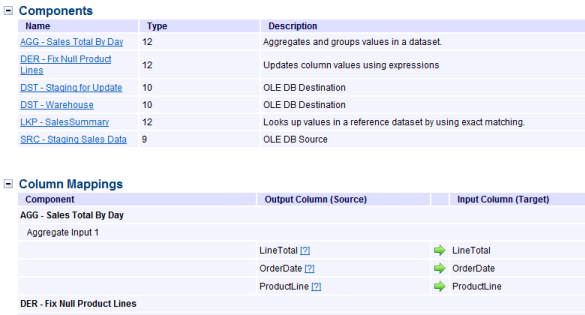
Of all the features though, the absolute coolest is it’s support for Integration Services. You can point it at either your SSIS server, or to a file store, or just to the directory with your solution. Here’s a sample that uses the package from my Intro to SSIS presentation:

image

Not only does it provide detailed info (it appears below the pic) but it will also reproduce the graphical flow! And if that wasn’t cool enough, you can drill down into the other executable parts, such as the data flow.

image


Here’s a small sample of the details:

image

It doesn’t stop there either, providing complete support for SSRS as well. Just point it at your Reporting Services server and away it’ll go!

Now, I realize this sounds a lot like a commercial, and since I now work for Pragmatic Works probably more so. Bu I just think this is an awesomely cool product, I can think of a lot of uses for it too. Providing turn over documentation, running it weekly to create version snapshots so you can track changes to your SQL Server, providing reference material for developers, and probably a zillion other things I haven’t thought of. (If you have thought of some, by all means leave a comment, would love to hear how YOU are using this.)

I’m sure I’m not doing the product justification, so if you want to see some video demos head on over to http://pragmaticworks.com/ for more info. And again, I apologize if this sounds like a commercial but I am blown away by how cool this product is so I just had to share.


Disclaimer: I do work for Pragmatic Works, and received my copy of this really cool software as a result of my employment.

The Pragmatic Arcane Coder

I wanted to let everyone know some exciting news. Starting March 21st I’ll be going to work at Pragmatic Works! Pragmatic Works has a great variety of tools for SQL Server Business Intelligence, training videos, books, as well as a thriving consulting division.

While I’ll miss my friends over at Comframe I’m very excited to be joining one of the premier BI consulting firms in the US. This promises opportunities for even more speaking engagements, as well as multiple outlets for content creation.

Here’s to a Pragmatic future!

Arcane Fun Fridays–More Music to Code By

Last week I listed a few of my favorite soundtracks to program to. This week I’d like to present a few more. These aren’t soundtracks exactly, but sure do sound like them. Very fast paced, orchestral pieces that sound like they were taken right from an action/adventure movie.

Unlike some movie soundtracks, which have a mix of both fast paced and slower interlude style music, there’s not a slow song in the bunch. Every track is fast paced adrenaline pumping code inducing music.

It’s not a single album but a series, called “Position Music”. Right now I have Volumes 1-4, there’s a fifth one of Christmas music that’s on my wish list, it’s totally unlike any holiday album you ever listened to. So without further comment here’s the list, hope you enjoy as much as I do!

image


Position Music – Orchestral Series – Volume 1


image


Position Music – Orchestral Series – Volume 2


image


Position Music – Orchestral Series – Volume 3


image 

Position Music – Orchestral Series – Volume 4


Disclaimer – While I’m working on some self published Kindle books, I have no affiliation with them when it comes to music, feel free to purchase where you will.

Life Balance

In my post a few days ago, one of my resolutions for 2011 is a better work – life balance. I am working on ways to still produce as much as ever but still give more time to my family. I’ve got a few ideas that I wanted to share, and am hopeful you’ll leave comments with your ideas.

Lunch time – I’m lucky enough to work from home quite a bit. On those days I make it a point to emerge from my home office which is down in our basement and eat lunch with my family. True, it’s a brief time, 20 to 30 minutes, but we still get to enjoy each others company. When I’m in the office for several days in a row, they come in to meet me at least once a week where we eat out together.

Date time – I have two daughters, so every couple of weeks my wife and I have “dates” with them. We let the girls plan what they want to do, and each of us takes a kid and goes on a “date”. That gives each of us one on one time with a kid, as well as giving the kids time apart from each other. My oldest daughter and I usually go to the local Doctor Who fan club meetings (she’s a huge Doctor Who fanatic, has her own sonic screwdriver and life size TARDIS). The other daughter loves ice skating and playing video games with me.

Remote working – Living room to dungeon. At the start of the year my wife and I redid our living room. We tossed our old sofa and each got a new recliner and end tables. I took an old laptop and ran the power cord through the drawer and out the back. Now I can sit in my comfy chair, pull out my laptop and remote control my two computers down in the dungeon (aka my home office). When I’m done, I simply close the lid, slide it back in the drawer and close it. It’s hidden out of sight, nice and neat. But now I can easily sit with the family and work on things that don’t require a lot of brain power, setting up virtual machines for example.

The “TO DO” list – Like many people I have a “to do” list apart from my work related tasks, stuff that needs doing around the house, car maintenance, yard work, etc. I’m trying to make a point to accomplish at least one thing on our to do list each week.

Portable Learning – Between my Kindle and Zune it’s now very easy to take my content consumption on the road. While I wait for the family to shop in some ladies clothing store, for example, I can sit and read or catch up on podcasts.

There’s a few ideas, hope they help you too, and please leave comments with your ideas!

T-SQL Tuesdays–Resolutions

There’s a new meme going around the SQL Server blogosphere called T-SQL Tuesdays. A bunch of SQL Bloggers all post about the same SQL related topic on the same day. Back at the beginning of January fellow MVP Jen McGown (blog | twitter) wrote a blog post about resolutions for the new year. Granted I’m way too late to be included in that round of SQL Server related Tuesdays, but thought it was a great idea and wanted to put up my resolutions. Since it’s February it’s a little late for new years, maybe we can call them Ground Hogs’ day resolutions?

Produce more variety – I’ve been doing a lot of content for Pluralsight, I want to continue putting out good content for them, but want to put out other content as well. I want to try and blog more, and hope to self publish a few books on the Kindle platform.

Consume more – As much as I love to produce content, I recognize that I need to do a better job of consuming more. My Kindle has been a big help with that, having a huge library available all the time has made it easy to switch between the subjects I want or need to learn about.

Balance my consumption – While I love technical books, I realize to be a true professional I need a good balance. I’ve started reading a lot of what I call “professional” books. Books that give me insights into things like business, community, time management, and teamwork.

Better balance of family life – Let’s face it, us really aggressive type A folks work a lot. When we’re not doing our 9 to 5 job we’re producing content like blog posts, books, videos, or are off at some user group meeting or weekend event presenting. This has a definite impact on the family. While my family is incredibly understanding, we still miss each other. So I’m working on some creative solutions to this issue.

Get my next certification – Last year I earned my MCTS for SQL Server 2008 Business Intelligence. This year my goal is to advance that and earn my MCITP also in SQL Server BI.

More Beta work – The CTP for the next version of SQL Server is now out. I want to spend more time working with it so when the final version is ready I’ll be well up to speed, plus better able to share the new features with the community.

I suppose this list is identical to the list of many people. but if I put it in writing I’ll be able to both measure it and hold myself accountable.