
Introduction
As you’ve seen with the join in my Fun With KQL – Join post it can be useful to combine two tables in order to clarify the output. What if, though, you need data that isn’t in an existing table?
That’s where the datatable operator comes into use. The datatable allows you to create a table of data right within the query. We’ll see a few useful examples in this post.
The samples in this post will be run inside the LogAnalytics demo site found at https://aka.ms/LADemo. This demo site has been provided by Microsoft and can be used to learn the Kusto Query Language at no cost to you.
If you’ve not read my introductory post in this series, I’d advise you to do so now. It describes the user interface in detail. You’ll find it at https://arcanecode.com/2022/04/11/fun-with-kql-the-kusto-query-language/.
Note that my output may not look exactly like yours when you run the sample queries for several reasons. First, Microsoft only keeps a few days of demo data, which are constantly updated, so the dates and sample data won’t match the screen shots.
Second, I’ll be using the column tool (discussed in the introductory post) to limit the output to just the columns needed to demonstrate the query. Finally, Microsoft may make changes to both the user interface and the data structures between the time I write this and when you read it.
DataTable Basics
Let’s say you have a table that stores colors. These colors though are stored in decimal format, the application that uses them converts them to an HTML hex color. For our report though, we’d like to convert these to a friendly name, which is not stored in the source data.
To accomplish this we can create a color table with the codes as well as friendly color names. We’ll use the datatable operator to do this.
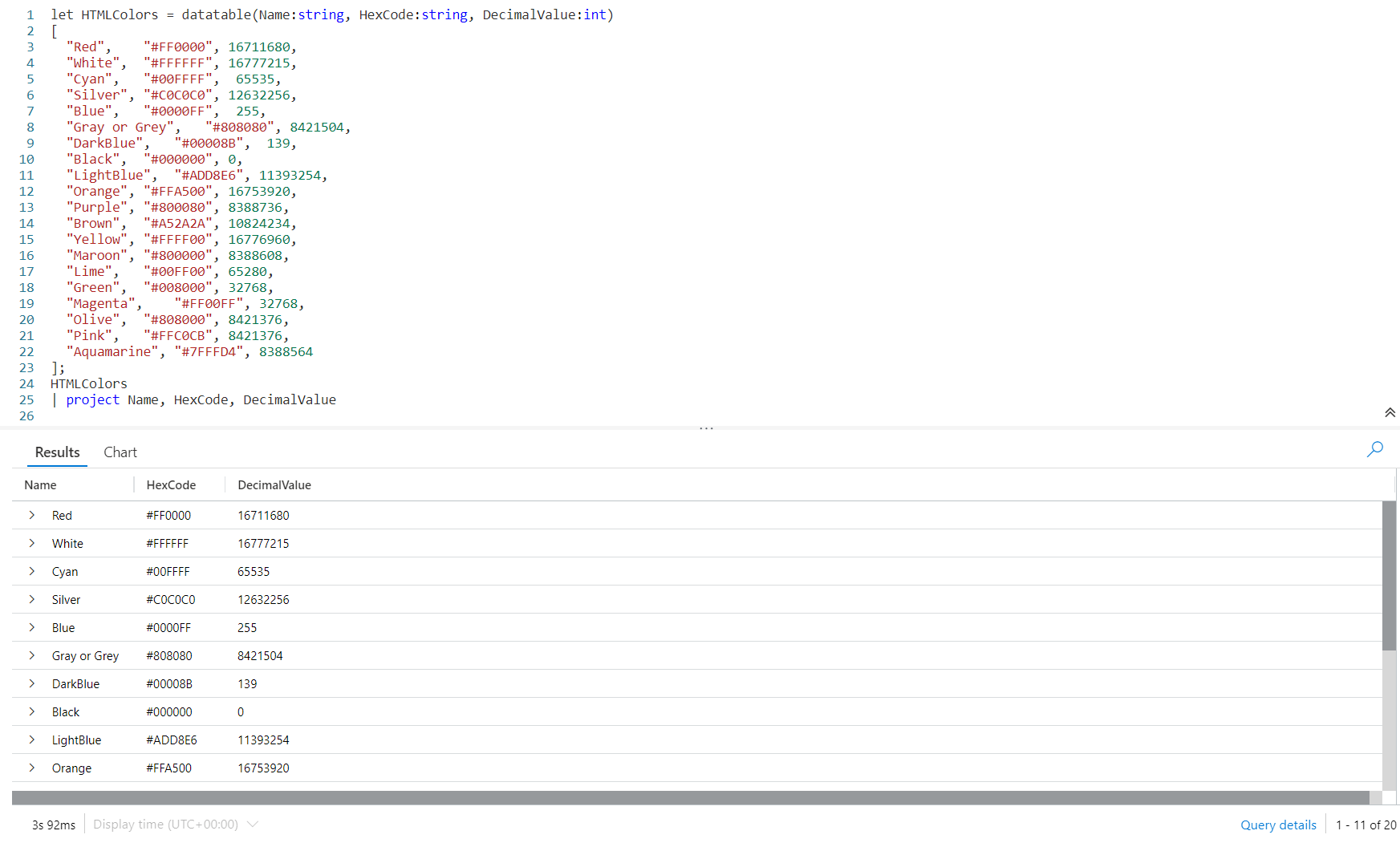
We’ll need to use our old friend let. Following we declare a name for our datatable, here we used HTMLColors although we could use any name we want.
After the equal sign we use the datatable operator. In the parenthesis we declare our column names and their data types. The first is Name, then a colon, then the data type of string. Our second column is also a string, with the name of HexCode.
The final column is DecimalValue, and its datatype is int. You can find a complete list of Kusto data types in the Microsoft documentation, Scalar data types.
After we finish the datatable declaration with a closing right parenthesis, we have an opening square bracket then declare our data. Here I put each row of data on a line by itself, this is a good practice to make it easy to read and modify.
As you can see, our first row is:
"Red", "#FF0000", 16711680,
First is what I call our friendly name associated with the color, followed by a comma. We wrapped it in double quotes, since it is a string datatype.
Then we have the hex color code, also wrapped in quotes to make it a string, followed by a comma. Finally comes the decimal value, which is just an integer number, no quotes required.
Then line ends in a comma, then we proceed to the next line of data. At the end of our data, the row with Aquamarine, we do not have a comma since that is the last row of data. We have a closing square bracket to finish off the datatable data, then a semicolon as the KQL query will continue.
Next have the name of our datatable, piped into a project, then we listed the three columns in the datatable.
As you can see in the image above, the output section has a list of colors, hex values, and decimal value. Note that a few scrolled off the bottom of the screen.
Now we could join this to a table, linking on the DecimalValue column and display the friendly Name column in the output.
Datatable In Practice
Let’s look at an example of the datatable in practice. The Perf table has a column, ComputerName. A lot of the computer names are rather cryptic though. It’d be nice to have a friendly, human readable name that clearly says what the computer is used for, rather than unclear like JBOX10.
Let’s take a look at the query needed to add friendly names to our Perf table output.
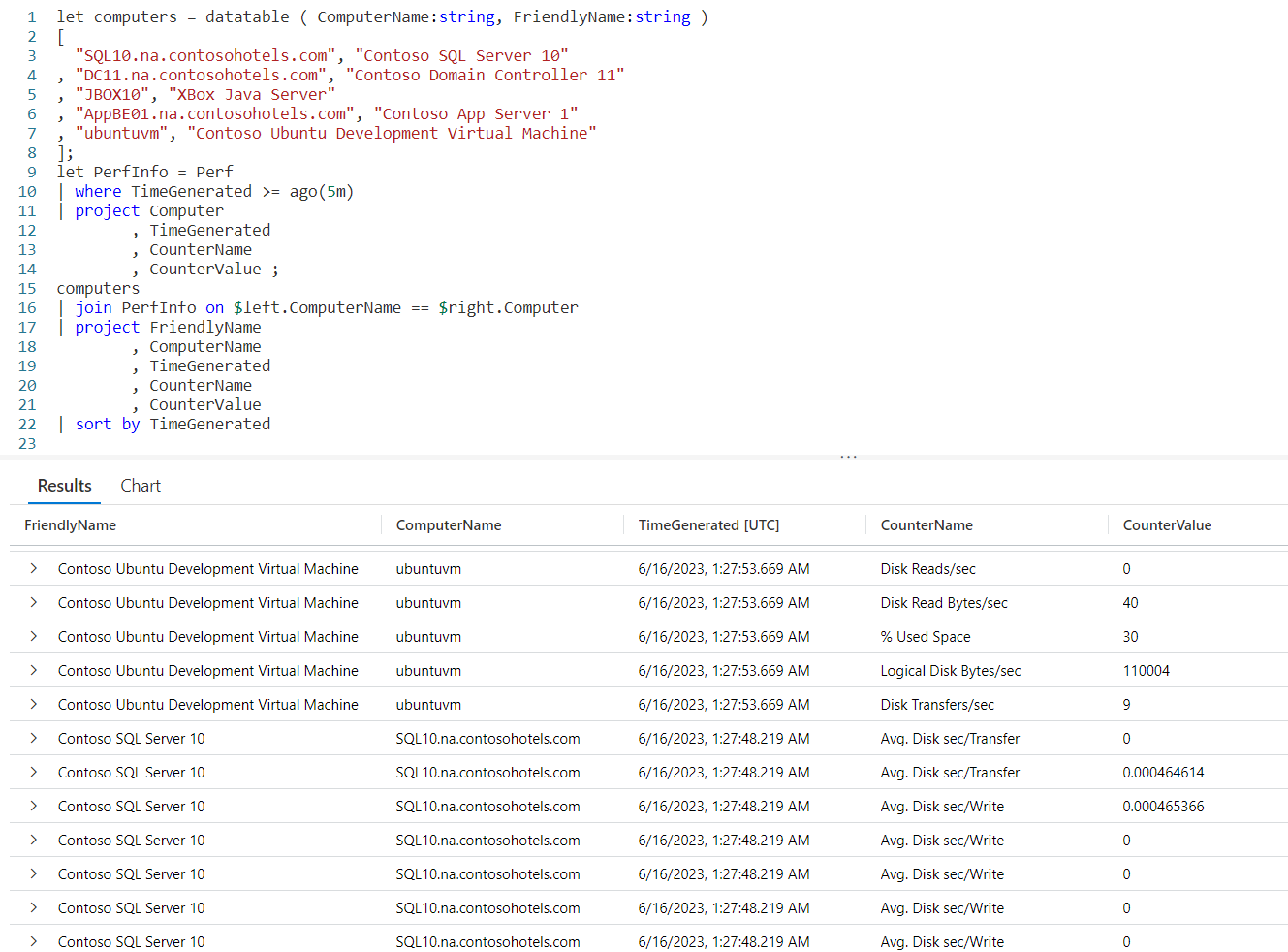
We begin with a let and define a datatable we’ll call computers. It will have two columns, ComputerName and FriendlyName, both of which are strings.
We fall into our data, each line is simply the computer name as found in the Perf table, followed by the friendly name we want to use.
Next comes another let in which we create a datatable from Perf for the last five minutes, and use project to pick out a few columns. We’ve named this datatable PerfInfo.
Now we take our computer datatable and join it to PerfInfo. Because the column we are joining on has different names in each table, I had to use the $left and $right, as described in my Fun With KQL – Join post.
We then project the columns we want, and use sort to order the output.
I should mention I just guessed at the friendly names for some of the computer names in the Perf table. I have no idea if JBOX10 is really the XBox Java Server, but it just sounded good for this demo.
Naming DataTable Columns
I just wanted to mention that normally I would use the same column name in the datatable that is used in the table I’m joining. For example, I would use just Computer in the datatable so it would match up with the Computer column in the Perf table. That way I wouldn’t have to use the $left and $right syntax.
For this example though, I deliberately used a different name so I could remind you of the ability to use $left and $right to join tables when the column name is different.
The most frequent time you’d need this is when you are joining multiple tables with different column names for the same data, which as anyone who has worked with databases for any length of time happens far too often.
Again, for more information on this technique see my Fun With KQL – Join post.
See Also
The following operators, functions, and/or plugins were used or mentioned in this article’s demos. You can learn more about them in some of my previous posts, linked below.
Conclusion
The datatable can be a useful operator for situations where you want to provide user friendly names, but don’t have an existing table that contains them.
It could also be used if you needed to do calculations. For example, rather than using iif statements you could create a datatable with a country code and a standard shipping amount, then in the table use that shipping amount in a calculation, perhaps adding it to the total value of a purchase.
The demos in this series of blog posts were inspired by my Pluralsight courses Kusto Query Language (KQL) from Scratch and Introduction to the Azure Data Migration Service, two of the many courses I have on Pluralsight. All of my courses are linked on my About Me page.
If you don’t have a Pluralsight subscription, just go to my list of courses on Pluralsight . At the top is a Try For Free button you can use to get a free 10 day subscription to Pluralsight, with which you can watch my courses, or any other course on the site.
 Arcane Code