The Diplomacy of Social Networking

I’m going a bit off my normal track of technical blogging to get involved in the world of international politics. One of my Twitter friends, @C_Collins, pointed me to a posting on the American Foreign Policy Council’s website where someone was taking a state department employee, specifically the Deputy Assistant Secretary for Public Diplomacy one Colleen Graffy, to task for her use of Twitter. The original poster was apparently worried that somehow someone might mistake her posting as @Colleen_Graffy and confuse that for official state department communications, and was taking her to task for it.

I posted a reply, which for some reason has not yet made it to the site. I will assume with this being the holiday season no one is checking in to moderate posts. My own blog however is under no such restrictions, so rather than delaying any further I will first direct you to the original site here, http://zi.ma/diplomacy. Go ahead, go read it and the comments so far, I’ll wait.

Back now? Great, here’s my reply to Ilan, the blogger:

Ilan,

I can appreciate your concern over the lack of clarity in message from the state department. To add to the confusion when there is a change in administrations there is a shift in message. In addition, I’ve always thought the state department was doing it wrong. Their communications always seemed targeted towards either the heads of state, or toward a mass audience.

Perhaps then, having personal communications eclipse official ones is exactly what SHOULD be happening. True ideals, such as democracy and personal freedom spread best one person at a time. The internet, for all it’s warts, has done one miraculous thing, it gives all of us an equal voice through which we can connect with others.

Through my blog I reach thousands of people on a daily basis (I average about 2,500 hits a day). Through my twitter account (@arcanecode) I converse with people all over the globe each day. Many of these people I consider good friends, even though some I may never meet in person (but hope to). Quite an accomplishment from my old laptop, sitting here on my back deck in sunny Alabama.

I firmly believe it is the fear of these personal communications that causes other countries to try and block the internet. It’s easy to spread a message of hate when that hate is directed against an amorphous blob like ‘those dirty Americans’ or ‘those evil westerners’. It’s extremely hard though, when there are personal relationships built between individuals.

I am not so much of an idealist not to realize there are some people in this world who are haters, and would love to eradicate others. They need dealing with in strong terms. But there are an awful lot of “average joes” in those same areas who hate because they are taught to believe in hate, and have no information to disbelieve what they are taught. Thats where the internet comes in, as a tool to bring information to everyone.

Perhaps I am just a hopeless romantic geek, but if the world is going to become a better place in the long run it’s not going to be through state diplomacy but through personal diplomacy, one person at a time.

Robert (Arcane Code)

There you go, feel free to leave your own thoughts below.

Oslo – Not just for Norwegians any more

I’ve been looking heavily into Oslo, the new technology announced at PDC 2008. So what exactly is Oslo? Well I couldn’t find a simple explanation, so after digging into it all weekend let me see if I can take a stab at it.

If you are familiar with Sharepoint, you know that it provides you a bunch of web templates. You can take these and create certain types of lists. Documents, lists, forums, etc. What many don’t realize is that all of this gets stored in a “repository” that is in SQL Server.

Oslo takes this concept to the next level. It allows you to create your own “lists” if you will, of fairly complex data types. These are stored in a repository in SQL Server. Along with your data is a lot of meta-data. Oslo also provides a query tool to easily get data back out of the repository, along with runtime components you can use with your favorite programming language. Or, because it’s all in SQL Server you can bypass Oslo runtimes and go directly into the SQL Server repository using traditional tools like ADO.NET or Linq To SQL.

So how does Oslo accomplish this? By providing several tools to us: M the programming language; Quadrant, the graphical tool; and the Repository itself. Lets take a brief look at each one.

M is a new programming language that has three components: MSchema, MGrammer, and MGraph. MSchema is used to define a new chunk of data, it is a representation of how you want the data stored. The product of an MSchema definition is directly translated into T-SQL as a Create Table statement and stored in the Repository.

MGrammer is used to create a translation between one layout of information and the schema created with MSchema. Let’s say you had created an MSchema definition for album names, artists, and ratings. Then let’s say you had an input file that looked something like:

The Thirteenth Hour by Midnight Syndicate rates 5 stars.

Greatest Tuba Hits of 1973 by The Tuba Dudes rates 1 star.

You could create a language template in MGrammer that looked for the words “by” and “rates” and divides up the input into the appropriate fields in your schema. Then run the input file through the MGrammer layout and you’ve now got all that data into a format known as MGraph.

MGraph is a tree like structure that represents the transformed data. If I understand it correctly, you take your data, run it through the DSL you setup with MGrammer and it produces an MGraph. This MGraph can then be loaded into a database schema created with MSchema, passed off to a calling routine, and more.

Quadrant is the tool used to look at data once it’s in the Repository. You can browse data, and create different representations of the data in a tool similar to what you see with Office. For example, you can render a table created by MSchema as a tree, as a grid, as a list, or even as a graph. You can use it to show relationships between MSchemas, and write queries with it. Quadrant could be used by developers or advanced users to create a template representation of the data that could be given to other users to do their data analysis.

Quadrant is also highly extensible and customizable. You can write your own modules to add to it. Although to do so you have to write them in Python, which I have to admit leaves me scratching my head. I don’t have anything against Python, but I would have to imagine most developers who work with Microsoft tools are much more familiar with VB.Net or C#. I have to wonder why they picked a language most Microsoft developers are unfamiliar with and would have to learn in order to extend the Quadrant tool.

The final piece of the puzzle I have mentioned several times, it’s the Repository. The Repository is a database that holds everything about your schemas and data. Currently Oslo only supports SQL Server as the database for a Repository. Interesting thing though, Microsoft will be distributing Oslo under the OSP (Open Specifications Promise). This means a third party vendor could develop a back-end Repository engine so that an Oslo Repository could be stored in something like MySQL or Oracle.

Finally I will mention Oslo will be callable from your favorite .Net language, indeed the Runtime components as they are called are a critical piece of Oslo. There are .Net APIs which can be used to get and retrieve data from the Repository.

Microsoft is serious about Oslo. In a Channel 9 interview about M, I believe it was Chris Anderson who said there were 180 folks working on the Oslo team. Even though it’s early in its development, I get the strong impression Oslo will be a key factor in future of Microsoft development technologies, which is why I intend to invest time now to get up and running with it.

For more information about Oslo, and to download the current Oslo SDK CTP, see the site at http://msdn.microsoft.com/oslo .

Step 5 – Guard your credibility

Around 100 BC the Latin author Publilius Syrus wrote “A good reputation is more valuable than money.” 2,900 years later those words are still just as true. Your reputation, including your online reputation is the most important asset you have and you should guard it jealously. An article at onrec.com states that 25% of HR managers reject applicants due to what they find on their on-line profiles. Sure, it’s OK to have the occasional fun post, or have some humor in your blog, but make sure it’s in good taste. Avoid posting those pictures of you and your friends drinking straight from the keg.

Just as bad as reckless fun can be the rant. Remember not every thought needs to be uttered, or even worse put to the web. One bad outburst, one blog post made in anger can give you the reputation for being a hard to work with hot head. Don’t be “that guy”.

Finally, no matter what remember the web is NOT Las Vegas. What happens on the web does NOT stay on the web. I’ll bet this guy wishes he’d have remembered that.

What was he thinking?

Step 4 – Show up in the community

Community involvement is one of the most, if not the most important thing you can do to increase your marketability. In yesterday’s post I stressed the importance of public speaking. Whether we realize it or not, we are constantly speaking in public, even if the public is a small crowd. A meeting with your boss, the project team, staff meetings, even simple group lunches are all places where we speak before small crowds. User groups, code camps, and conferences are places where you can practice the kind of public, technical speaking that will make you valuable. Nervous? Do it as a group. Partner up with one or two friends so none of you has to speak more than fifteen or twenty minutes. Or participate in something like the recent IPSA Idea Spark, where each presentation is limited to no more than five minutes. Don’t worry about whether a user group will want you. As a leader in several user groups I can assure you we are constantly in need of speakers, and will gladly welcome first timers to our meetings.

But community extends beyond the borders of a user group. Blogging can be a very effective way of communicating your ideas and participating in the community. Even better you can do so freely or inexpensively via sites like WordPress.com, who offer free hosting to blogs. You can also participate in forums. In addition to those on MSDN and TechNet, sites like SQL Server Central offer forums focused on a particular discipline.

You can also participate with your coding skills. Sites like MSDN Code Gallery allow you to post samples for your particular expertise. I have two sites there myself. Or you can participate in one of the many open source projects on such sites as Code Plex or Source Forge.

Finally, consider joining an on-line community at someplace like Twitter. I have met many, many good people through Twitter, and using it can communicate with them on a regular basis.

The critical point here is that community builds relationships, and these relationships are vital to your career. Sometimes these will help you find good people to work with. Sometimes they can help you find answers to difficult questions. Sometimes it’s just about good friendships. And yes, sometimes they can even help you find that next job. It is these relationships that will form the cornerstone to your success.

Step 3 – Understand the business

By far, the people I see who make the most money in the marketplace are those that have a good understanding of both technology and business. I’ll never forget an important business lesson I learned many years ago, from a former boss. Businesses are there for one reason: to make money. It may sound a bit harsh, but let’s face why else would you go into business. Hopefully the business is the type that wants to do so in a moral, ethical way, and in a fashion that makes both the business and the customer feel good.

If you’re like me, you got into technology because it’s “cool”. We love making the electrons sing and dance within the computer at are whim. However, our bosses, or customers, our internal business partners don’t necessarily share our love of tech. In order to get the approval to implement our new whiz-bang project, we need to be able to do two things. First we need to determine the benefit to the business. How much money will the company ultimately save by implementing your project? What will the increase in productivity be? Being able to identify the benefit to the company is crucial.

Once you have identified the benefit, you need to be able to communicate it. Avoid techno-jargon, all it will do is make your listeners eyes glaze over and cause them great confusion. Learn how to speak in terms the business understands. In order to learn the language of business, once per quarter read a book on business strategy. If you don’t have time for reading, consider an audio book. Unlike programming books, business books work well in audio format. Listen in on your Zune as you work out, drive to work, or do those household chores.

In order to communicate clearly, I would highly suggest the Toastmasters organization. Just think of them as a user group for speakers. Going through the program will help you learn to organize your thoughts in a clear and coherent manner.

Having a good understanding of business, in addition to technology, will help you succeed in the highly competitive marketplace of today.

Step 2 – Learn iteratively

There are many ways to learn. Attending a presentation or live webcast is great because you get what I call “condensed knowledge”. You get the results of someone else spending thirty to forty hours of learning and working to condense it into a one to two hour presentation. You also get immediate feedback, you can interact with the presenter and ask questions. On the downside, if you missed something, you missed it (unless the presentation is recorded). These are great for getting an overview, however you won’t really get deep technical understanding out of a presentation like this.

The next step beyond a live presentation is a recorded webcast or video, such as those produced by DNRTV. These are great because you can pause them, rewind, and listen multiple times. However, you lose the ability to get immediate feedback from the presenter, and like live presentations it’s condensed knowledge.

Online reading is the next area available to us for learning. Blogs, MSDN, TechNet, etc. These have a much deeper level of information than previously mentioned formats. Plus they tend to be updated as changes are made. However, there do tend to be some limitations. Content is not quite as polished as a book as often it does not go through professional editors. Also, while the content will be more in depth than a presentation, it will still be limited in scope. It will be rare to find the equivalent of a book given out for free in a blog. Most of the time it will be equivalent to a really long magazine article.

This then, brings us to good old fashioned books. For true topical mastery, there’s nothing like a good thick book filled with code examples for learning. Some pundits are already predicting the death of the print book. However, in my opinion print is simply a medium. Books could be read online, or downloaded to something like a Kindle. Whatever the form, it’s still an in depth presentation of content.

So does this mean you should favor books over other forms of learning? Absolutely not. If you recall yesterday’s post, I mentioned being able to keep up your base. Podcasts, webcasts, user groups, and blogs can be great ways of doing just that, while using books for honing your expert skills in some topic.

Deciding on a delivery mechanism for your learning is the first step. Now you need to decide the process. Learning is a gradual process. It takes learning a little something every day for it to take hold. Even as little as 20 minutes a day can rapidly bring your understanding up to new levels. Avoid cramming, cramming works for short term but studies show long term retention is not good. For ultimate learning, start with a goal. Decide what you want to know. Then gather the materials you’ll need: books, articles, manuals, blogs, etc. Next, schedule the time. As I mentioned you want at least 20 minutes a day devoted to learning. Turn off your e-mail, close your twitter, turn off the radio, close the home office door, and focus on the material.

Practice what you read as well. Type in the code samples, run them, debug them, step through the code line by line. Make changes and see how it affects the flow of the code. Find the patterns and practices for your environment and try them out.

Using an iterative process you will soon be on your way to expert level knowledge.

Step 1 – Become an expert

Last week I did a presentation on “How to become a more marketable software developer”. I thought I would spend this week going over each of the five steps. Today we’ll discuss the first step toward becoming more marketable, “Become an expert”.

image While “Become an expert” sounds obvious, there are several things to consider. First, you need to pick an area that is viable. I don’t see much call these days for Microsoft BOB experts. For me, it is a mix of SQL Server Full Text Searching and SQL Server Compact Edition. For a friend of mine, Shawn Wildermuth it is Silverlight and his Silverlight Tour that is his current expertise. But Shawn’s story is one that beautifully exemplifies my next point: don’t be afraid to change your expertise!

While Shawn is known today for Silverlight, it wasn’t that long ago he was known as “The ADO.NET Guy”. Before that he was known as a co-author to many of the .Net MCTS/MCPD study guides. You need to constantly be flexible and react to the needs of the market. Don’t be afraid to retool your skill sets as new technologies emerge on the marketplace.

While you focus on an area of expertise, don’t forget your base skills. I recently heard someone describe your skills as a pyramid. Your expertise is right at the top, but it’s built upon a broad, wide foundation. Don’t forget to take some time on a regular basis to work with the basics, write some code, listen to some podcasts, read a “general programming” book so you keep in touch with the core development skills in your area.

How to be a more marketable software developer

On Thursday I am presenting a quick talk at the Internet Professional Society of Alabama. This is part of an event called Idea Spark, where multiple individuals give five minute talks. I thought it’d be fun to steer away from the normal tech talks and talk about something near and dear to all of our hearts: money!

My talk will give a few quick points on some basic, inexpensive things you can do to make yourself more valuable, and thus command a larger salary in the marketplace. I can testify these things work, having done them myself. However it’s not with out a lot of sweat equity. You’ll need to invest a fair amount of time to achieve success, but everything worth doing is worth taking the time to do right.

Here’s the slide deck in PDF format: how-to-be-a-more-marketable-software-developer

I have to give thanks and much credit to Doug Turnure, a content architect for Microsoft. He first gave a very similar presentation some time back and was gracious enough to share the slides. I took them, did some rearranging, trimming, and additions to achieve this current version which is a blend of his thoughts and mine.

I hope you find the talk and the slides valuable as you give yourself the edge in this competitive marketplace.

Second Chances – The MSDN Developer Conference

If you are like me, you missed PDC this year, and are probably pretty bummed about it. Fortunately you do get second chances sometimes! Microsoft is hosting a series of developer conferences around the country called the MSDN Developer Conference. This is a one day event that highlights the best of the PDC presentations, put on by a mix of Microsoft employees and community leaders in the area where the conference is held. I’ll be attending the Atlanta event on December 16 2008, but there are events in Houston, Orlando, Chicago, and other areas beginning in December and running into February of next year. Be sure to check the site for more info.

There will be three tracks at the event, the new Azure Services Platform, Client and Presentation, and Tools Languages and Frameworks. There is a $99 attendance fee, but if you compare that to the cost of PDC that’s quite a bargain. There’s also going to be some cool swag, and attendance is limited so be sure to register today. 

BSDA – BUG.NET Christmas Party

It’s party time! The Birmingham Software Developers Association and the Birmingham .Net Users Group are joining forces to throw a holiday blast. The event will take place Tuesday, December 2nd 6:00 pm at Richard’s BBQ and Grill on Acton Road, just off Interstate 459. This is a family friendly event, spouses and children are encouraged to attend. We promise to keep the geek talk to a minimum.

The clubs want to extend an invitation to all user groups in the Birmingham community. No matter what your group we’d like to extend a special invite to all to attend. Rumor has it there will be some swell door prizes and swag to give away.

Please be aware the event is BYOW! Bring Your Own Wallet. Each family will be responsible for it’s own bill. Not to worry though, Richard’s rates are very reasonable, and they have a wide variety of food to pick from. In addition to BBQ they have a nice meat and three selection, and some of the best burgers you ever put in your mouth.

Please RSVP to altechevents@gmail.com by close of business Monday, November 30th with how many will be attending so we can give the restaurant a semi-accurate count. Look forward to seeing you all then!

Gentleman, JumpstartTV Your Engines

Thought I’d spread a little link love today, and to start with I will point you to the http://jumpstarttv.com website. JumpstartTV hosts short training videos with one very specific, focused topic per video. When I say short, I mean short. Three to five minutes is the goal for each video. I was honored recently when asked to participate in the site, and have created a series for them on SQL Server Full Text Searching. The first video on installing was featured yesterday, but you don’t have to wait for the videos to be featured, you can see all of them by jumping to my JumpstartTV profile.

One thing to note, you will be asked to create an online profile. This is free, and it turns out very useful. You can use it to track all of the videos you watched. This makes it very convenient to come back later and refresh yourself on something you learned. In addition, the site has a “watch it later” feature. You can go all over the site picking out videos you think would be interesting and clicking the “watch it later” link. Then when you go to your profile, you’ll be able watch the selected videos one after the other. JumpstartTV has videos on both SQL Server and .Net, as well as some interesting ones in the “Misc” category, including bartending, self defense, and more.

The second link for the day is an interesting article on the simple-talk website, “Taking Back Control of your IT Career”. It was written by a friend of mine, Stephan Onisick and chronicles his ordeal of getting laid off from his company of seven years, through a period of retraing himself and ultimately landing a new job that met the needs he set out. Even if your company is nice and stable, you will find good advice for keeping your skills up in this article. Disclaimer, he does mention a presentation I did in the article, but in spite of that it’s still a good read. 😉

Next is a new SQL Server resource brought to us by the fine folks at Quest Software, it’s the new SQLServerPedia. The site is both a wiki and a series of podcast like videos you can subscribe to from your Zune or other music player. I have my Zune setup to automagically download new episodes as they come out. I believe it was @BrentO himself who clued me in on the site.

I’ve written in the past about CodeRush, the tool I refuse to code without. Well the wonderful folks at Devexpress have created a free version called CodeRush Xpress for Visual Studio. Now if you need to code on a budget, you can still enjoy CodeRushy goodness in your 2008 IDE! And it’s not even Christmas yet!

Many of you follow me on Twitter, if you don’t I’d love to invite you, I”m on as @arcanecode . Guy Kawasaki has a great article on How To Pick Up Followers on Twitter. Good article that shows some of the strengths of Twitter, and how to use them to everyone’s advantage.

Speaking of Twitter, thanks to @theronkelso I found a new service called TweetLater. This service lets you schedule a tweet to be delivered to Twitter at a later time. For example, I would like to be able to tweet that our BSDA meeting is about to begin. But as the current President I’m usually up front introducing the guest speaker, and thus not at a keyboard. TweetLater to the rescue, I can set it to auto post the meeting is starting and be in two places at once.

It’s also great as a reminder tool, I can queue up meeting reminder tweets for the entire year ahead of time and forget all about it. Another feature, you can set it to auto reply with a message to new followers, and it can even be setup to automatically follow anyone who is following you. I believe this is a resource I’ll be using a lot.

The next to final link is a reminder really, to the Alabama Tech Events site. This is a community site for posting technical events of interest to folks in the state of Alabama. Please note that the event doesn’t have to be in Alabama, just of reasonable interest to folks in the state. We’ve posted events in Tennesee, Mississippi, Florida and Georgia. If you have a technical event contact me or one of the other user group leaders to get it added.

I’ll wrap up today’s link lovefest with the site analogous to the Alabama Tech Event site, but for the entire country: Community Megaphone. This site lists events from all over the United States. You can filter by state or event type.

Phoenix: Veni, Vidi, Fodi

On Monday November 10th, 2008 NASA lost contact with the Mars Phoenix Lander. As Mars enters it’s winter, sunlight faded to the point where the Phoenix lander was no longer able to recharge it’s batteries. The lander made many important discoveries, but frankly one of the things it did the most was to put a human face on space exploration via it’s frequent updates on Twitter.

Of course, intellectually we know the real lander wasn’t doing the actual tweets. That credit goes to the amazing Veronica McGregor at JPL. But the twitter feed was managed in such a way that we could really feel like the real Phoenix lander itself was sending these messages. Over 38,000 people followed the lander, putting it among the true Twitter elite. Do you recall when we all first found out about ice on Mars? It wasn’t through a NASA press release, newspaper, or the evening news. No, the folks who first found out were the ones who followed the lander on a social networking site. How geekily cool is that?

Wired magazine held a contest of sorts for appropriate epitaphs, and posted them on their site. The winner was veni, vidi, fodi (I came, I saw, I dug) but there were many many more well worth reading. Some were funny, some inspiring, and many emotionally touching. Gizmodo is carrying the final message from the Pheonix lander on it’s site. Very good, includes much information, including that while the lander could wake up when the winter season is over, that won’t be until our spring of 2010. After being encased in darkness and ice for that long, starting back up is highly unlikely. Still, the @MarsRovers were only supposed to last a few months, and they are still going after 5 years so anything is possible. Hope springs eternal.

The level of communication brought about through sites, such as Twitter, means that anyone, from you or I to a probe on another planet can make their voice heard around the world. No, scratch that. Around the universe. 

My favorite epitaph was the following quote from James T. Kirk.

“…of all the souls I have known, his was the most… human.”

Installing Ubuntu 8.10 under Microsoft Virtual PC 2007

Installing Ubuntu 8.10 under Virtual PC 2007 is the easiest version to install by far, if you have all your bits in the right place. First, you’ll need Virtual PC 2007, available from the Microsoft site. After you have installed VPC 2007, you will need to download and install Virtual PC 2007 Service Pack 1 (SP1). I had problems until I installed VPC SP1.

Next you will need to setup a Virtual Machine to hold your Ubuntu. If you are not familiar with VPC, you can see either my step by step instructions or my instructional video. And finally you’ll of course need a copy of Ubuntu 8.10. You can either download an ISO from the Ubuntu website, which is what I did, or find it in some magazine.

OK, just so we’re on the same page, I created my VPC and named it “Ubuntu 8.10 Desktop”. I used that name for both the vmc and vhd files. I selected “Other” for my OS, adjusted the ram to 512 MB. Finally, I left my hard disk at the default of 16384, Launch the VPC and point your virtual CD Drive at either the ISO or the drive where your Ubuntu disk is.

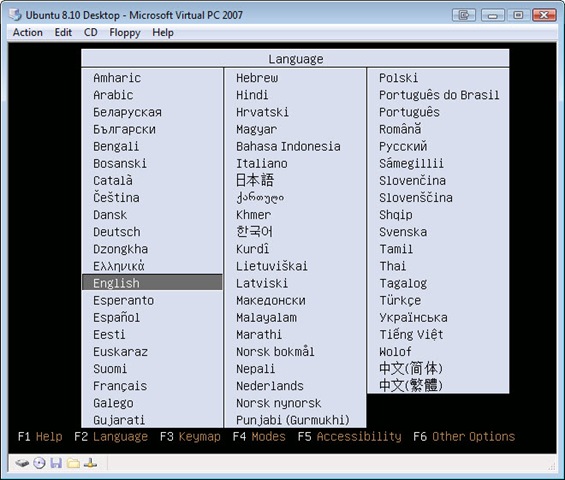
Upon launching, the first thing you see is a screen asking your to select your language. Pick yours by highlighting it and pressing enter. (Note you can get full size images for any of these by clicking on the image.)

u810_01

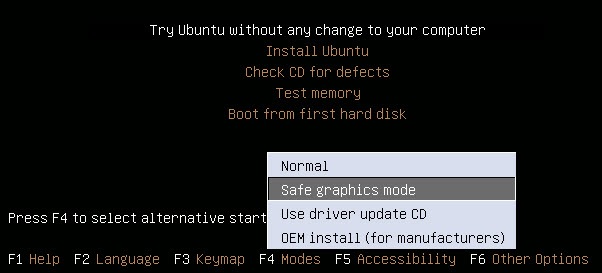
Now you are at the default screen.

u810_02

Now you need to press F4, for Modes, and pick “Save graphics mode” and press Enter.

u810_03

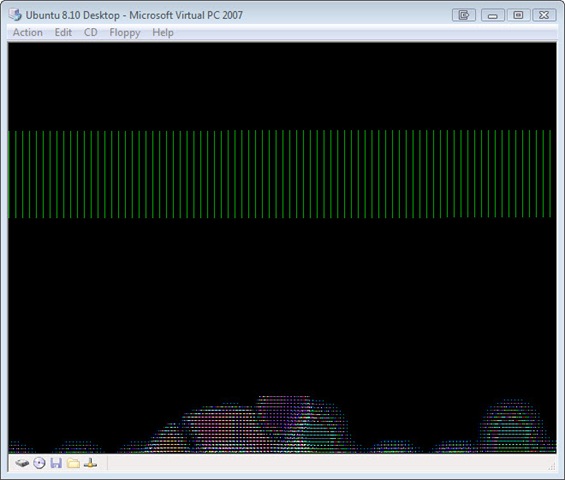
You should now see “Try Ubuntu without any changes to your computer” already highlighted (as you can see two pictures above). Press enter to begin. During the launch the screen will go black, and stay that way for several minutes (about 4 on my system). Don’t freak out, this is normal. You may also see some garbled graphics, something like:

u810_04

Again, not a big deal, wait several minutes (was about 5 on my system) then the screen turned brown, lasted a few more minutes then came up to a login prompt that offered to auto login as “user” in 10 seconds. I did nothing, and just let it automatically log me in. OK, to be honest I was distracted watching the latest Tekzilla on my Zune piped over my TV and missed the screen, but the end result was the same, I got this screen:

u810_05

If you want, you can explore the Ubuntu environment for a few minutes. One reminder / hint, when you click inside the virtual machine, your mouse becomes “trapped”. To be able to drag the mouse outside the window, press the RIGHT ALT key. (The left won’t work!) Your mouse will escape to freedom.

OK, let’s say we’ve done some playing, or perhaps are single minded and are ready to install. Just double click the install icon. Note it took about 2 minutes on my slow machine for the install dialog to appear. When it did, here’s the screen I saw:

u810_06

Since my language is already selected, all I have to do is click Forward to go onto the next screen. On this screen, it asks me to pick a city near me so the time zone can be set. Chicago IL is in my time zone, so I’m going to pick it, you should of course pick one in your time zone. You can do so by clicking the map, but this is something of a pain, so I went with the faster route of picking my town from the drop down then clicking Forward.

u810_07

On the next screen we’re asked about keyboard layout. Select yours, or in my case it was already selected so all I had to do was hit Forward yet again.

u810_08

After hitting Forward, you’ll see a dialog appear briefly while Ubuntu looks at your disks while it determines the best way to partition them.

u810_09

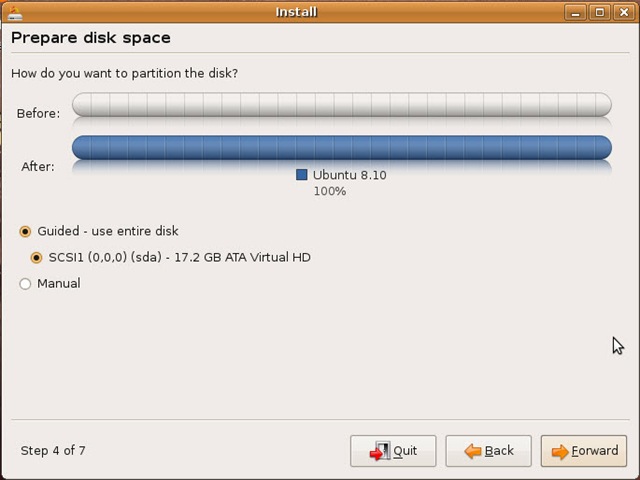
You don’t have to do anything but be patient while this runs, on my system this was about 3 to 4 minutes. When it completed the step 4 appeared:

u810_10

Here we can adjust how to allocate disk space. Since this is all virtual, the simple thing to do is just accept the default and click Forward, which we will do. The disk will churn for a few minutes (in my case about 5) while it sets up the partition then present me with the next screen.

u810_11

You can see here it’s prompting me for information so it can setup my login name. Here I filled it out, and let it go with the default name to login with (my first name, arcane). I created a password, remember this as it’s also your admin password. Under name of the computer it defaults to your user name with a “-desktop” after it. I added the word virtual in the middle to make it clear.

Also note the “Log in automatically” check box. If you are the only person using this VPC, and you don’t plan to store anything sensitive you may want to check this on, but if you are in doubt leave it unchecked to maintain the best security. For myself, I’ll leave this unchecked.

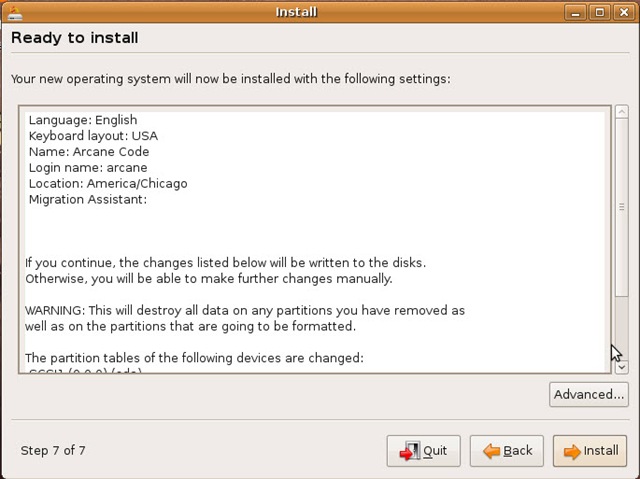
OK, this last screen says we’re almost to the finish line.

u810_12

Just click “Install” to begin the install.

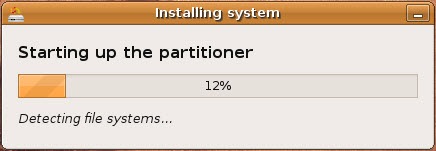
u810_13 

This dialog will keep you updated as it goes through it’s install. I did notice an odd quirk, when my mouse was escaped the install seemed to pause itself. If possible you may want to leave your focus inside the VPC. Don’t be alarmed if your screen goes black during the install. Just move your mouse around or hit some key. The blank screen is the Ubuntu screen saver kicking in! You’d think the installer would disable the screen saver, but it does not.

On my system, the total install time was just under an hour and a half. When it was complete, I saw this message appear:

u810_14

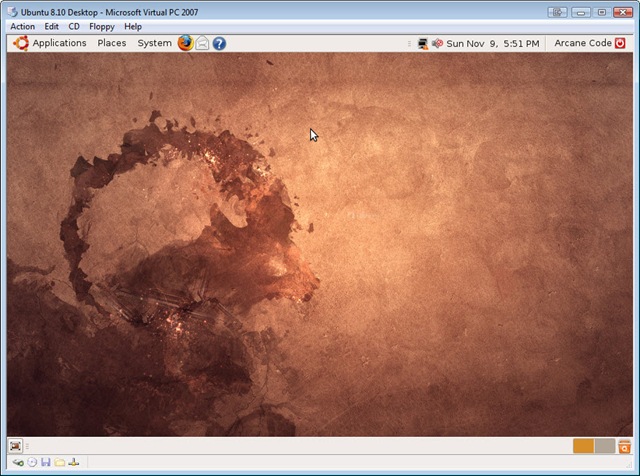
I picked Restart Now. Only it didn’t, screen went blank after a few minutes and eventually everything just stopped. I wound up doing an Action, Reset from the VPC menu. After that the boot process for my VPC was quite similar to the test environment we just did. I saw the screen go blank for about a minute and a half, then the Ubuntu logo appeared. Another delay while it churned, showed me some garbled graphics, but finally (about 4 minutes total) it fired up and worked fine. I was able to enter my login info and away I went.

u810_15

I want to stress the key to success was, I believe, in having the latest Virtual PC service pack installed, attempts to load prior to updating with the service pack all failed due to graphics errors.

The entire install process took about an hour and a half on my single core Vista computer with 2 gig of ram. I was creating the VPC on an external hard disk via firewire connection. Your install times will vary accordingly.

SQL Server 2008 Books On Line Update

The SQL Server Books On Line have been updated and are available for download. Having your local copy is important when you develop off-line, or if you have a slow connection. Just like your software should be kept up to date, so should your documentation. Click on the link below to be taken to the Microsoft site to download the books on line.

SQL Server 2008 Books on Line Update

Even though they haven’t been updated in a bit, if you have never updated your SQL Server 2005 Books you should do so from the link below.

SQL Server 2005 Books on Line Update

If you do prefer to read on-line, you can jump right to the MSDN site for SQL Server 2008 Books on Line at http://msdn.microsoft.com/en-us/library/ms130214.aspx. The 2005 version is at http://msdn.microsoft.com/en-us/library/bb418498.aspx