Big Thinkers – Steve Jones

image

I’m devoting this week to “Big Thinkers”. I want to highlight individuals who challenge my thought processes and cause me to think about my profession, my methodologies, and force me to reflect on my skills. Some of these individuals I have the privilege of knowing personally, others I have only known via Podcasts or Twitter. I’m hoping that by highlighting these Big Thinkers you too will be challenged to grow and evolve in your craft. Last week was focused on individuals in the development community, this week will focus on the SQL Server realm.

Steve began working with SQL Server way back in 1991. One of his earliest DBA jobs was on SQL Server version 4.2 running on OS/2 v1.3. To say Steve is prolific is an understatement; he seems to be all over the web. He does a regular column at SQL Server Central, which he cofounded. Steve also does a regular video podcast called “The Voice of the DBA”. Finally he is very active on Twitter, engaging others in regular conversation.

I think that is what I like most about Steve. His style is very conversational, when ever I read his editorials or watch his video podcasts I always feel like I’m right there with him, having a discussion. A frequent closing line to his videocast is “tell me what you think”. Thinking is what Steve inspires, after he throws out a topic I invariably wind up pondering it for a while. I’ve met Steve, and he is just like what you see in the videos, I never walk away from him without having something fun to mull over in the old gray matter. Check out Steve and see if your brain isn’t buzzing afterward.

Big Thinkers – Mark Miller

image

I’m devoting this week to “Big Thinkers”. I want to highlight individuals who challenge my thought processes and cause me to think about my profession, my methodologies, and force me to reflect on my skills. Some of these individuals I have the privilege of knowing personally, others I have only known via Podcasts or Twitter. I’m hoping that by highlighting these Big Thinkers you too will be challenged to grow and evolve in your craft.

Mark Miller is an insane genius. I can think of no other way to describe his quirky sense of humor, unbridled energy, and extreme coding ability. What he does for me though is make me think deeply about user interfaces, and how they can make or break my application. Not just in vague ways either, Mark can demonstrate in concrete terms what makes a good UI. How many pixels does the mouse have to travel in order to let the user accomplish the task? Are the colors used of a similar hue and shade? How can I use contrast most effectively in my user interface?

Of course in some ways the education I’ve received is a classic double edge sword. Now when I sit down with a new app I began analyzing it in terms of what I know, and immediately thinking of how it could be better. Some might call that hubris, I prefer to think of it as critical thinking based on good UI design methodologies preached by the “Millenator”.

Mark has appeared on Dot Net Rocks numerous times, including Episodes 80, 101, 134, 153, 185, 338, and 395. He has also done a ‘boat load’ of DNR TV episodes, including Episodes 5, 40, 44, 72, and 107. His best work though, can be seen in the two part DNR TV series on “The Science of a Great User Experience”, Episodes 112 and 123. In these episodes Mark actually demonstrates good UI in a way that you can visually see the clear improvements using the techniques he recommends.

I can think of no better way to wrap up Big Thinkers week than to recommend the mad genius that is Mark Miller.

But wait, there’s more! This week I focused on Big Thinkers in the development community. Next week I’ll put on my other hat and focus on Big Thinkers in the SQL Server community!

Big Thinkers – Robert “Uncle Bob” Martin

image

I’m devoting this week to “Big Thinkers”. I want to highlight individuals who challenge my thought processes and cause me to think about my profession, my methodologies, and force me to reflect on my skills. Some of these individuals I have the privilege of knowing personally, others I have only known via Podcasts or Twitter. I’m hoping that by highlighting these Big Thinkers you too will be challenged to grow and evolve in your craft.

“Uncle Bob” Martin has been in the computer industry since 1970. As such he has some great stories to tell, many of which I can relate to having gotten into computers in the late 70’s myself. Uncle Bob is not only concerned with coding, but with the act of coding. He sees coding as a profession and encourages us to take pride in that profession. He is also the inventor of the SOLID principals of coding. Most of all when I listen to him I think about the way I code, the way I architect applications, and stop for a moment to actually think before I start hammering out code.

Uncle Bob has been on many podcasts, including Episode 388 of Dot Net Rocks, Episodes 145 and 150 of Hanselminutes, and Episode 41 of Stack Overflow. I hope you enjoy listening to him as much as I do.

Big Thinkers – Richard Campbell

image

I’m devoting this week to “Big Thinkers”. I want to highlight individuals who challenge my thought processes and cause me to think about my profession, my methodologies, and force me to reflect on my skills. Some of these individuals I have the privilege of knowing personally, others I have only known via Podcasts or Twitter. I’m hoping that by highlighting these Big Thinkers you too will be challenged to grow and evolve in your craft.

Richard Campbell is one of those people who, at least to us lowly mortals, appears to be able to do it all. He knows hardware, SQL Server, and .Net fluently. He runs his own company Strangeloop Networks, is a frequent speaker at conventions, and finds the time to do two podcasts a week. In addition to hosting he was also the interviewee, in Dot Net Rocks Episode 300 and more recently Episode 157 of Hanselminutes.

I got to meet Richard at DevLink 2008, and had a fascinating conversation with him in the bar for quite a long time. I can say that he is as friendly and knowledgeable in person as he appears on the show. Richard serves as proof that it is indeed possible to be proficient in multiple technologies, and forces me to think about ways to improve myself and to continually learn and grow. Whenever I hear Richard speak it inspires me to hit the books even harder to work toward the pinnacle of my craft.

Big Thinkers – Ted Neward

image

I’m devoting this week to “Big Thinkers”. I want to highlight individuals who challenge my thought processes and cause me to think about my profession, my methodologies, and force me to reflect on my skills. Some of these individuals I have the privilege of knowing personally, others I have only known via Podcasts or Twitter. I’m hoping that by highlighting these Big Thinkers you too will be challenged to grow and evolve in your craft.

It’s hard to believe anyone would not know who Ted Neward is. I had the pleasure of meeting him at DevLink 2008, then saw him again at the 2009 MVP summit where we had several enjoyable conversations. Ted is truly a renaissance man when it comes to languages. He is best known for his skills in Java and .Net, and more recently F#, but his love for programming languages seems boundless. It’s not about knowing a language though, it’s about understanding how each language solves programming problems. For example, how does language A handle variables versus language B? What advantages or disadvantages does that approach give language A over B?

By attempting to understand how a language solves problems, we can take those techniques and apply them in other languages. F# is a great example, it is a language from Microsoft Research that is functional rather than object based. Recently though I have seen several articles on how to implement functional methods in C#, traditionally an object based language.

Ted has been on Dot Net Rocks probably more times than anyone one else, as well as it’s sister video podcast DNRTV. One of my favorite episodes was a little over a year ago, “Ted Neward on the New Language Renaissance”. Very recently he was on Code Cast, in Episode 21 he was talking about .Net and Java and how Oracles buy out of Sun affects the industry.

The most memorable podcast I have seen him in was an interview he did on F#. I was on my way to DevLink 2008, got about half way there when my poor old truck broke down. As I sat waiting in a local Taco Bell for rescue, I pulled out my laptop and watched some videos I’d downloaded including Ted’s F# interview. If you notice in the video, Ted is wearing a rather snazzy “I Love C#” t-shirt. The next day I get back on the road and once again strike out for DevLink arriving just in time for the last session of the day, a session on F# with Ted and Amanda Laucher. I was quite thrown to see Ted wearing the exact same shirt. I had to pinch myself to ensure I had not fallen asleep in the Taco Bell!

Hopefully Ted’s love of languages, his passion to learn different ways to solve problems will wear off on you too. And who knows, with his new found fame and fortune perhaps he can afford a second t-shirt!

Big Thinkers – The Alan Stevens Syndrome

image

I’m devoting this week to “Big Thinkers”. I want to highlight individuals who challenge my thought processes and cause me to think about my profession, my methodologies, and force me to reflect on my skills. Some of these individuals I have the privilege of knowing personally, others I have only known via Podcasts or Twitter. I’m hoping that by highlighting these Big Thinkers you too will be challenged to grow and evolve in your craft.

The first person I’d like to highlight is someone I consider a friend, fellow MVP Alan Stevens. Alan hails from Knoxville TN and is constantly involved in community activities, such as the upcoming CodeStock and DevLink events. I like Alan for two reasons. First, he is constantly evaluating his skills and seeking to learn from others. His approach to coding strikes me as almost Zen like, in his quest to constantly learn and improve. Alan seems to be on a trip to code enlightenment, but (to borrow an old line) realizes the journey is as important as the destination.

Second, Alan has a deep passion for community. To meet with other developers and share knowledge. Note I did not say teach, although many would consider him an excellent teacher. Instead when Alan is explaining a concept I can see he is learning as much, if not more than the people he is sharing with. Alan is also well known for his evangelism of “open spaces” as a learning platform. If you have never been to an open spaces session, a group of developers get together and post suggestions on what to discuss. The group votes and topics are selected, and then a free flow of ideas ensues. These are truly remarkable, I highly suggest you try and attend at least one open spaces session if you get the opportunity. I honestly think one day Alan will launch a conference that is nothing but a day of “open spaces” discussions.

If you would like to hear more about Alan, I’d suggest you learn directly from him. In February he was featured on episode 420 of Dot Net Rocks:

http://www.dotnetrocks.com/default.aspx?showNum=420

Alan also gave an excellent presentation called “Coding In Public – If You’re Gonna Suck, Do It With Gusto!” which was recorded in video and placed on his blog. (By the way, if you are wondering just what the “Alan Stevens Syndrome” is you’ll have to watch the video!)

http://netcave.org/CodingInPublicSlidesAndVideo.aspx

Getting into the Mix – Mix 09 that is

First, I want to say I think it’s incredibly generous of Microsoft to provide videos of all the sessions for free, to anyone. Many people spent thousands to attend, so giving this away is a real boon to us who were unable to attend for whatever reason.

If you haven’t downloaded the sessions yet, you can go to http://videos.visitmix.com/mix09/all to see everything, in various formats. The fastest way to get them all is to use Firefox with an add on called DownThemAll. When you use down them all, it will let you quickly select all the links on a page for a specific file time, or with words in their links. To grab all of the high quality ones, you can use the Fast Filtering feature, and type in wmv-hq which is part of the path name. For the portable format you can use mp4,or pptx will snare you all the slides.

A couple of things to note, Ask The Gu is only available in high quality, while the day 2 keynote is only available in standard quality. Also not all the sessions have slides. There’s also one session I noticed, T17F that only has a high quality session, no low or MP4 version.

If I had any complaint, it is around the file names. They are very short, just the session numbers, such as T20F. Not very useful when I’m looking through a directory trying to decide what to watch. So, I created a simple batch file to rename them. I thought others may find it useful as well, so here it is. They, actually, three, one for the WMVs, one for the MP4, and one for the Powerpoint slides.

WMVs

rename B01M.wmv "B01M – Scaling a Rich Client to Half a Billion Users.wmv"
rename B02M.wmv "B02M – Software Entrepreneurs – Go Big with BizSpark.wmv"
rename B03M.wmv "B03M – Copyright Laws for Web Designers and Developers.wmv"
rename B04M.wmv "B04M – Enhancing Large Windows Media Platforms with Microsoft.wmv"
rename B05M.wmv "B05M – Exposing Web Content to a Global Audience Using Machine.wmv"
rename C01F.wmv "C01F – Sketch Flow – From Concept to Production.wmv"
rename C02F.wmv "C02F – Improving UX through Application Lifecycle Management.wmv"
rename C03F.wmv "C03F – Microsoft Expression Web – No Platform Left Behind.wmv"
rename C04F.wmv "C04F – The Future of Microsoft Expression Blend.wmv"
rename C05F.wmv "C05F – C Sharp for Designers.wmv"
rename C06F.wmv "C06F – Ten Ways to Ensure RIA Failure.wmv"
rename C07F.wmv "C07F – Deep Zoomplusplus  – Build Dynamic Deep Zoom Applications with.wmv"
rename C08F.wmv "C08F – Using Total Experience Design to Transform the Digital.wmv"
rename C09F.wmv "C09F – A Website Named Desire.wmv"
rename C10F.wmv "C10F – Design Prototyping – Bringing Wireframes to Life.wmv"
rename C11F.wmv "C11F – Escaping Flatland in Application Design – Rich User.wmv"
rename C12F.wmv "C12F – Go Beyond Best Practices – Evolving Next Practices to.wmv"
rename C13F.wmv "C13F – Interaction Techniques Using the Wii Remote (and Other.wmv"
rename C14F.wmv "C14F – Interactive Prototyping with DHTML.wmv"
rename C15F.wmv "C15F – Touch and Gesture Computing, What You Haven’t Heard.wmv"
rename C16F.wmv "C16F – The Way of the Whiteboard – Persuading with Pictures.wmv"
rename C17F.wmv "C17F – Web Form Design.wmv"
rename C18F.wmv "C18F – Wireframes That Work – Designing (Rich Internet).wmv"
rename C19F.wmv "C19F – How Razorfish Lights Up Brand with Microsoft SharePoint.wmv"
rename C20F.wmv "C20F – State of the Art in Web Site Design on Microsoft.wmv"
rename C21F.wmv "C21F – User Experience Design Patterns for Business.wmv"
rename C22F.wmv "C22F – Creating a Great Experience on Digg with Windows.wmv"
rename C23F.wmv "C23F – Windows Internet Explorer 8 in the Real World – How Is.wmv"
rename C24F.wmv "C24F – Measuring Social Media Marketing.wmv"
rename C26F.wmv "C26F – Designing the Windows 7 Desktop Experience.wmv"
rename C27M.wmv "C27M – Creating Interactivity with Microsoft Expression Blend.wmv"
rename C28M.wmv "C28M – Integrating Microsoft Expression Blend with Adobe.wmv"
rename C29M.wmv "C29M – Effective Infographics with Interactivity.wmv"
rename C30M.wmv "C30M – User Experience Design for Non-Designers.wmv"
rename KEY01.wmv "KEY1 – Day One Keynote.wmv"
rename KEY02.wmv "KEY2 – Day Two Keynote.wmv"
rename T01F.wmv "T01F – A Lap around Microsoft .NET Services.wmv"
rename T02F.wmv "T02F – Simplifying Distributed Access Control with Microsoft.wmv"
rename T03F.wmv "T03F – Connecting Applications across Networks with Microsoft.wmv"
rename T04F.wmv "T04F – Mesh-Enabled Web Applications.wmv"
rename T05F.wmv "T05F – Live Framework and Mesh Services – Live Services for.wmv"
rename T06F.wmv "T06F – What’s New in Microsoft SQL Data Services.wmv"
rename T07F.wmv "T07F – Overview of Windows Azure.wmv"
rename T08F.wmv "T08F – Windows Azure Storage.wmv"
rename T09F.wmv "T09F – Building Web Applications with Windows Azure.wmv"
rename T10F.wmv "T10F – RESTful Services for the Programmable Web with Windows.wmv"
rename T11F.wmv "T11F – Developing RESTful Services and Clients with.wmv"
rename T12F.wmv "T12F – Principles of Microsoft Silverlight Animation.wmv"
rename T13F.wmv "T13F – Working across the Client Continuum.wmv"
rename T14F.wmv "T14F – What’s New in Microsoft Silverlight 3.wmv"
rename T15F.wmv "T15F – High-Speed RIA Development with the Microsoft.wmv"
rename T16F.wmv "T16F – Building Microsoft Silverlight Controls.wmv"
rename T17F.wmv "T17F – Deep Dive into Microsoft Silverlight Graphics.wmv"
rename T18F.wmv "T18F – Delivering Ads to a Silverlight Media Player.wmv"
rename T19F.wmv "T19F – Creating Media Content for Microsoft Silverlight Using.wmv"
rename T20F.wmv "T20F – Using Microsoft ASP.NET MVC to Easily Extend a Web Site.wmv"
rename T21F.wmv "T21F – Running PHP on Microsoft Servers and Services.wmv"
rename T22F.wmv "T22F – Using Dynamic Languages to Develop Microsoft.wmv"
rename T23F.wmv "T23F – Choosing between ASP.NET Web Forms and MVC.wmv"
rename T24F.wmv "T24F – The Microsoft Web Sandbox – An Open Source Framework for.wmv"
rename T25F.wmv "T25F – Web Development Using Microsoft Visual Studio – Now and.wmv"
rename T26F.wmv "T26F – Love the New Windows Live Messenger Web Toolkit for.wmv"
rename T27F.wmv "T27F – Protecting Online Identities.wmv"
rename T28F.wmv "T28F – Standards for Aggregating Activity Feeds and Social.wmv"
rename T29F.wmv "T29F – Adding Microsoft Silverlight to Your Company’s.wmv"
rename T30F.wmv "T30F – Advance Your Design with UX Design Patterns.wmv"
rename T31F.wmv "T31F – Microsoft Xbox Lips and Fable II -.wmv"
rename T32F.wmv "T32F – Cloud Computing – What’s in It for Me?.wmv"
rename T33F.wmv "T33F – Customized Live Search for Web and Client Applications.wmv"
rename T34F.wmv "T34F – Introducing the Microsoft Virtual Earth Silverlight Map.wmv"
rename T35F.wmv "T35F – Building a Rich Social Network Application.wmv"
rename T36F.wmv "T36F – Modeling RESTful Data Services – Present and Future.wmv"
rename T37F.wmv "T37F – Extending Your Brand to the Desktop with Windows 7.wmv"
rename T38F.wmv "T38F – See through the Clouds – Introduction to the Azure.wmv"
rename T39F.wmv "T39F – What’s New in Windows Presentation Foundation (WPF).wmv"
rename T40F.wmv "T40F – Building Amazing Business Centric Applications with.wmv"
rename T41F.wmv "T41F – .NET RIA Services – Building Data-Driven Applications.wmv"
rename T42F.wmv "T42F – Consuming Web Services in Microsoft Silverlight 3.wmv"
rename T43F.wmv "T43F – Microsoft Silverlight Media End-to-End.wmv"
rename T44F.wmv "T44F – Microsoft ASP.NET Model View Controller (MVC) – Ninja on.wmv"
rename T45F.wmv "T45F – Building Out of Browser Experiences with Microsoft.wmv"
rename T46F.wmv "T46F – Microsoft ASP.NET 4.0  – What’s Next?.wmv"
rename T47F.wmv "T47F – Microsoft ASP.NET 4.0 Data Access – Patterns for Success.wmv"
rename T48F.wmv "T48F – Microsoft ASP.NET – Taking AJAX to the Next Level.wmv"
rename T49F.wmv "T49F – File-New – Company – Creating NerdDinner.com.wmv"
rename T50F.wmv "T50F – ASP.NET MVC – America’s Next Top Model View.wmv"
rename T51F.wmv "T51F – The Microsoft Web Platform – Starring Internet.wmv"
rename T52F.wmv "T52F – A Lap around Windows Internet Explorer 8.wmv"
rename T53F.wmv "T53F – Building High Performance Web Applications and Sites.wmv"
rename T54F.wmv "T54F – Securing Web Applications.wmv"
rename T55F.wmv "T55F – Creating a Next Generation E-Commerce.wmv"
rename T56F.wmv "T56F – Delivering Media with Internet Information Services 7.wmv"
rename T57F.wmv "T57F – Developing and Deploying Applications on Internet.wmv"
rename T58F.wmv "T58F – Build Applications on the Microsoft Platform Using.wmv"
rename T59F.wmv "T59F – Building Scalable and Available Web Applications with.wmv"
rename T60F.wmv "T60F – Miss March and Other Distractions.wmv"
rename T61F.wmv "T61F – Windows Mobile 6.5 Overview.wmv"
rename T62F.wmv "T62F – There’s a Little Scripter in All of Us – Building a.wmv"
rename T63M.wmv "T63M – Building Data-Driven Scalable AJAX Web Pages.wmv"
rename T64M.wmv "T64M – Caching REST with Windows Communication Foundation.wmv"
rename T65M.wmv "T65M – Building Accessible RIAs in Microsoft Silverlight.wmv"
rename T66M.wmv "T66M – Building Microsoft Silverlight Applications with.wmv"
rename T67M.wmv "T67M – Building an Optimized, Graphics-Intensive Application.wmv"
rename T68M.wmv "T68M – When Errors Happen – Debugging Microsoft Silverlight.wmv"
rename T69M.wmv "T69M – Microsoft Silverlight Is Ready for Business.wmv"
rename T70M.wmv "T70M – Optimizing Performance for Microsoft Expression Encoder.wmv"
rename T71M.wmv "T71M – Going Inside Microsoft Silverlight – Exploring the Core.wmv"
rename T72M.wmv "T72M – Making XML Really, Really Easy with Microsoft Visual.wmv"
rename T73M.wmv "T73M – What’s New for Microsoft Silverlight and Microsoft.wmv"
rename T74M.wmv "T74M – Protecting Against Internet Service Abuse.wmv"
rename T75M.wmv "T75M – Five Killer Scenarios for the Windows Live Messenger.wmv"
rename T76M.wmv "T76M – Lighting Up Web and Client Applications with Microsoft.wmv"
rename T77M.wmv "T77M – Oomph – A Microformat Toolkit.wmv"
rename T78M.wmv "T78M – Offline Network Detection in Microsoft Silverlight 3.wmv"
rename T79M.wmv "T79M – How’d they do it? Real App. Real Code. Two Weeks..wmv"
rename T80M.wmv "T80M – How I Learned to Stop Worrying and Love the Microsoft.wmv"
rename T81M.wmv "T81M – Using the Windows Azure Tools for Microsoft Visual.wmv"
rename T82M.wmv "T82M – Introducing the Microsoft Web Platform.wmv"
rename T83M.wmv "T83M – Automated User Interface (UI) Testing with Microsoft.wmv"
rename T84M.wmv "T84M – A Shot of Windows Live Messenger and a Pint of.wmv"
rename T85M.wmv "T85M – Improving Mobile Experiences with the Microsoft Mobile.wmv"
rename T86M.wmv "T86M – Search Engine Optimization (SEO) for Web Developers.wmv"
rename T87F.wmv "T87F – Microsoft Silverlight and Windows Presentation.wmv"

MP4

rename B01M.mp4 "B01M – Scaling a Rich Client to Half a Billion Users.mp4"
rename B02M.mp4 "B02M – Software Entrepreneurs – Go Big with BizSpark.mp4"
rename B03M.mp4 "B03M – Copyright Laws for Web Designers and Developers.mp4"
rename B04M.mp4 "B04M – Enhancing Large Windows Media Platforms with Microsoft.mp4"
rename B05M.mp4 "B05M – Exposing Web Content to a Global Audience Using Machine.mp4"
rename C01F.mp4 "C01F – Sketch Flow – From Concept to Production.mp4"
rename C02F.mp4 "C02F – Improving UX through Application Lifecycle Management.mp4"
rename C03F.mp4 "C03F – Microsoft Expression Web – No Platform Left Behind.mp4"
rename C04F.mp4 "C04F – The Future of Microsoft Expression Blend.mp4"
rename C05F.mp4 "C05F – C Sharp for Designers.mp4"
rename C06F.mp4 "C06F – Ten Ways to Ensure RIA Failure.mp4"
rename C07F.mp4 "C07F – Deep Zoomplusplus  – Build Dynamic Deep Zoom Applications with.mp4"
rename C08F.mp4 "C08F – Using Total Experience Design to Transform the Digital.mp4"
rename C09F.mp4 "C09F – A Website Named Desire.mp4"
rename C10F.mp4 "C10F – Design Prototyping – Bringing Wireframes to Life.mp4"
rename C11F.mp4 "C11F – Escaping Flatland in Application Design – Rich User.mp4"
rename C12F.mp4 "C12F – Go Beyond Best Practices – Evolving Next Practices to.mp4"
rename C13F.mp4 "C13F – Interaction Techniques Using the Wii Remote (and Other.mp4"
rename C14F.mp4 "C14F – Interactive Prototyping with DHTML.mp4"
rename C15F.mp4 "C15F – Touch and Gesture Computing, What You Haven’t Heard.mp4"
rename C16F.mp4 "C16F – The Way of the Whiteboard – Persuading with Pictures.mp4"
rename C17F.mp4 "C17F – Web Form Design.mp4"
rename C18F.mp4 "C18F – Wireframes That Work – Designing (Rich Internet).mp4"
rename C19F.mp4 "C19F – How Razorfish Lights Up Brand with Microsoft SharePoint.mp4"
rename C20F.mp4 "C20F – State of the Art in Web Site Design on Microsoft.mp4"
rename C21F.mp4 "C21F – User Experience Design Patterns for Business.mp4"
rename C22F.mp4 "C22F – Creating a Great Experience on Digg with Windows.mp4"
rename C23F.mp4 "C23F – Windows Internet Explorer 8 in the Real World – How Is.mp4"
rename C24F.mp4 "C24F – Measuring Social Media Marketing.mp4"
rename C26F.mp4 "C26F – Designing the Windows 7 Desktop Experience.mp4"
rename C27M.mp4 "C27M – Creating Interactivity with Microsoft Expression Blend.mp4"
rename C28M.mp4 "C28M – Integrating Microsoft Expression Blend with Adobe.mp4"
rename C29M.mp4 "C29M – Effective Infographics with Interactivity.mp4"
rename C30M.mp4 "C30M – User Experience Design for Non-Designers.mp4"
rename KEY01.mp4 "KEY1 – Day One Keynote.mp4"
rename KEY02.mp4 "KEY2 – Day Two Keynote.mp4"
rename T01F.mp4 "T01F – A Lap around Microsoft .NET Services.mp4"
rename T02F.mp4 "T02F – Simplifying Distributed Access Control with Microsoft.mp4"
rename T03F.mp4 "T03F – Connecting Applications across Networks with Microsoft.mp4"
rename T04F.mp4 "T04F – Mesh-Enabled Web Applications.mp4"
rename T05F.mp4 "T05F – Live Framework and Mesh Services – Live Services for.mp4"
rename T06F.mp4 "T06F – What’s New in Microsoft SQL Data Services.mp4"
rename T07F.mp4 "T07F – Overview of Windows Azure.mp4"
rename T08F.mp4 "T08F – Windows Azure Storage.mp4"
rename T09F.mp4 "T09F – Building Web Applications with Windows Azure.mp4"
rename T10F.mp4 "T10F – RESTful Services for the Programmable Web with Windows.mp4"
rename T11F.mp4 "T11F – Developing RESTful Services and Clients with.mp4"
rename T12F.mp4 "T12F – Principles of Microsoft Silverlight Animation.mp4"
rename T13F.mp4 "T13F – Working across the Client Continuum.mp4"
rename T14F.mp4 "T14F – What’s New in Microsoft Silverlight 3.mp4"
rename T15F.mp4 "T15F – High-Speed RIA Development with the Microsoft.mp4"
rename T16F.mp4 "T16F – Building Microsoft Silverlight Controls.mp4"
rename T17F.mp4 "T17F – Deep Dive into Microsoft Silverlight Graphics.mp4"
rename T18F.mp4 "T18F – Delivering Ads to a Silverlight Media Player.mp4"
rename T19F.mp4 "T19F – Creating Media Content for Microsoft Silverlight Using.mp4"
rename T20F.mp4 "T20F – Using Microsoft ASP.NET MVC to Easily Extend a Web Site.mp4"
rename T21F.mp4 "T21F – Running PHP on Microsoft Servers and Services.mp4"
rename T22F.mp4 "T22F – Using Dynamic Languages to Develop Microsoft.mp4"
rename T23F.mp4 "T23F – Choosing between ASP.NET Web Forms and MVC.mp4"
rename T24F.mp4 "T24F – The Microsoft Web Sandbox – An Open Source Framework for.mp4"
rename T25F.mp4 "T25F – Web Development Using Microsoft Visual Studio – Now and.mp4"
rename T26F.mp4 "T26F – Love the New Windows Live Messenger Web Toolkit for.mp4"
rename T27F.mp4 "T27F – Protecting Online Identities.mp4"
rename T28F.mp4 "T28F – Standards for Aggregating Activity Feeds and Social.mp4"
rename T29F.mp4 "T29F – Adding Microsoft Silverlight to Your Company’s.mp4"
rename T30F.mp4 "T30F – Advance Your Design with UX Design Patterns.mp4"
rename T32F.mp4 "T32F – Cloud Computing – What’s in It for Me?.mp4"
rename T33F.mp4 "T33F – Customized Live Search for Web and Client Applications.mp4"
rename T34F.mp4 "T34F – Introducing the Microsoft Virtual Earth Silverlight Map.mp4"
rename T35F.mp4 "T35F – Building a Rich Social Network Application.mp4"
rename T36F.mp4 "T36F – Modeling RESTful Data Services – Present and Future.mp4"
rename T37F.mp4 "T37F – Extending Your Brand to the Desktop with Windows 7.mp4"
rename T38F.mp4 "T38F – See through the Clouds – Introduction to the Azure.mp4"
rename T39F.mp4 "T39F – What’s New in Windows Presentation Foundation (WPF).mp4"
rename T40F.mp4 "T40F – Building Amazing Business Centric Applications with.mp4"
rename T41F.mp4 "T41F – .NET RIA Services – Building Data-Driven Applications.mp4"
rename T42F.mp4 "T42F – Consuming Web Services in Microsoft Silverlight 3.mp4"
rename T43F.mp4 "T43F – Microsoft Silverlight Media End-to-End.mp4"
rename T44F.mp4 "T44F – Microsoft ASP.NET Model View Controller (MVC) – Ninja on.mp4"
rename T45F.mp4 "T45F – Building Out of Browser Experiences with Microsoft.mp4"
rename T46F.mp4 "T46F – Microsoft ASP.NET 4.0  – What’s Next?.mp4"
rename T47F.mp4 "T47F – Microsoft ASP.NET 4.0 Data Access – Patterns for Success.mp4"
rename T48F.mp4 "T48F – Microsoft ASP.NET – Taking AJAX to the Next Level.mp4"
rename T49F.mp4 "T49F – File-New – Company – Creating NerdDinner.com.mp4"
rename T50F.mp4 "T50F – ASP.NET MVC – America’s Next Top Model View.mp4"
rename T51F.mp4 "T51F – The Microsoft Web Platform – Starring Internet.mp4"
rename T52F.mp4 "T52F – A Lap around Windows Internet Explorer 8.mp4"
rename T53F.mp4 "T53F – Building High Performance Web Applications and Sites.mp4"
rename T54F.mp4 "T54F – Securing Web Applications.mp4"
rename T56F.mp4 "T56F – Delivering Media with Internet Information Services 7.mp4"
rename T57F.mp4 "T57F – Developing and Deploying Applications on Internet.mp4"
rename T58F.mp4 "T58F – Build Applications on the Microsoft Platform Using.mp4"
rename T59F.mp4 "T59F – Building Scalable and Available Web Applications with.mp4"
rename T60F.mp4 "T60F – Miss March and Other Distractions.mp4"
rename T61F.mp4 "T61F – Windows Mobile 6.5 Overview.mp4"
rename T62F.mp4 "T62F – There’s a Little Scripter in All of Us – Building a.mp4"
rename T63M.mp4 "T63M – Building Data-Driven Scalable AJAX Web Pages.mp4"
rename T64M.mp4 "T64M – Caching REST with Windows Communication Foundation.mp4"
rename T65M.mp4 "T65M – Building Accessible RIAs in Microsoft Silverlight.mp4"
rename T66M.mp4 "T66M – Building Microsoft Silverlight Applications with.mp4"
rename T67M.mp4 "T67M – Building an Optimized, Graphics-Intensive Application.mp4"
rename T68M.mp4 "T68M – When Errors Happen – Debugging Microsoft Silverlight.mp4"
rename T69M.mp4 "T69M – Microsoft Silverlight Is Ready for Business.mp4"
rename T70M.mp4 "T70M – Optimizing Performance for Microsoft Expression Encoder.mp4"
rename T71M.mp4 "T71M – Going Inside Microsoft Silverlight – Exploring the Core.mp4"
rename T72M.mp4 "T72M – Making XML Really, Really Easy with Microsoft Visual.mp4"
rename T73M.mp4 "T73M – What’s New for Microsoft Silverlight and Microsoft.mp4"
rename T74M.mp4 "T74M – Protecting Against Internet Service Abuse.mp4"
rename T75M.mp4 "T75M – Five Killer Scenarios for the Windows Live Messenger.mp4"
rename T76M.mp4 "T76M – Lighting Up Web and Client Applications with Microsoft.mp4"
rename T77M.mp4 "T77M – Oomph – A Microformat Toolkit.mp4"
rename T78M.mp4 "T78M – Offline Network Detection in Microsoft Silverlight 3.mp4"
rename T79M.mp4 "T79M – How’d they do it? Real App. Real Code. Two Weeks..mp4"
rename T80M.mp4 "T80M – How I Learned to Stop Worrying and Love the Microsoft.mp4"
rename T81M.mp4 "T81M – Using the Windows Azure Tools for Microsoft Visual.mp4"
rename T82M.mp4 "T82M – Introducing the Microsoft Web Platform.mp4"
rename T83M.mp4 "T83M – Automated User Interface (UI) Testing with Microsoft.mp4"
rename T84M.mp4 "T84M – A Shot of Windows Live Messenger and a Pint of.mp4"
rename T85M.mp4 "T85M – Improving Mobile Experiences with the Microsoft Mobile.mp4"
rename T86M.mp4 "T86M – Search Engine Optimization (SEO) for Web Developers.mp4"
rename T87F.mp4 "T87F – Microsoft Silverlight and Windows Presentation.mp4"
rename T55F.mp4 "T55F – Creating a Next Generation E-Commerce.mp4"
rename T31F.mp4 "T31F – Microsoft Xbox Lips and Fable II -.mp4"

Powerpoint

rename B01M.pptx "B01M – Scaling a Rich Client to Half a Billion Users.pptx"
rename B02M.pptx "B02M – Software Entrepreneurs – Go Big with BizSpark.pptx"
rename B03M.pptx "B03M – Copyright Laws for Web Designers and Developers.pptx"
rename B04M.pptx "B04M – Enhancing Large Windows Media Platforms with Microsoft.pptx"
rename B05M.pptx "B05M – Exposing Web Content to a Global Audience Using Machine.pptx"
rename C01F.pptx "C01F – Sketch Flow – From Concept to Production.pptx"
rename C02F.pptx "C02F – Improving UX through Application Lifecycle Management.pptx"
rename C03F.pptx "C03F – Microsoft Expression Web – No Platform Left Behind.pptx"
rename C04F.pptx "C04F – The Future of Microsoft Expression Blend.pptx"
rename C05F.pptx "C05F – C Sharp for Designers.pptx"
rename C06F.pptx "C06F – Ten Ways to Ensure RIA Failure.pptx"
rename C07F.pptx "C07F – Deep Zoomplusplus  – Build Dynamic Deep Zoom Applications with.pptx"
rename C08F.pptx "C08F – Using Total Experience Design to Transform the Digital.pptx"
rename C09F.pptx "C09F – A Website Named Desire.pptx"
rename C10F.pptx "C10F – Design Prototyping – Bringing Wireframes to Life.pptx"
rename C11F.pptx "C11F – Escaping Flatland in Application Design – Rich User.pptx"
rename C12F.pptx "C12F – Go Beyond Best Practices – Evolving Next Practices to.pptx"
rename C13F.pptx "C13F – Interaction Techniques Using the Wii Remote (and Other.pptx"
rename C14F.pptx "C14F – Interactive Prototyping with DHTML.pptx"
rename C15F.pptx "C15F – Touch and Gesture Computing, What You Haven’t Heard.pptx"
rename C16F.pptx "C16F – The Way of the Whiteboard – Persuading with Pictures.pptx"
rename C17F.pptx "C17F – Web Form Design.pptx"
rename C18F.pptx "C18F – Wireframes That Work – Designing (Rich Internet).pptx"
rename C19F.pptx "C19F – How Razorfish Lights Up Brand with Microsoft SharePoint.pptx"
rename C20F.pptx "C20F – State of the Art in Web Site Design on Microsoft.pptx"
rename C21F.pptx "C21F – User Experience Design Patterns for Business.pptx"
rename C22F.pptx "C22F – Creating a Great Experience on Digg with Windows.pptx"
rename C23F.pptx "C23F – Windows Internet Explorer 8 in the Real World – How Is.pptx"
rename C24F.pptx "C24F – Measuring Social Media Marketing.pptx"
rename C26F.pptx "C26F – Designing the Windows 7 Desktop Experience.pptx"
rename C27M.pptx "C27M – Creating Interactivity with Microsoft Expression Blend.pptx"
rename C28M.pptx "C28M – Integrating Microsoft Expression Blend with Adobe.pptx"
rename C29M.pptx "C29M – Effective Infographics with Interactivity.pptx"
rename C30M.pptx "C30M – User Experience Design for Non-Designers.pptx"
rename KEY01.pptx "KEY1 – Day One Keynote.pptx"
rename KEY02.pptx "KEY2 – Day Two Keynote.pptx"
rename T01F.pptx "T01F – A Lap around Microsoft .NET Services.pptx"
rename T02F.pptx "T02F – Simplifying Distributed Access Control with Microsoft.pptx"
rename T03F.pptx "T03F – Connecting Applications across Networks with Microsoft.pptx"
rename T04F.pptx "T04F – Mesh-Enabled Web Applications.pptx"
rename T05F.pptx "T05F – Live Framework and Mesh Services – Live Services for.pptx"
rename T06F.pptx "T06F – What’s New in Microsoft SQL Data Services.pptx"
rename T07F.pptx "T07F – Overview of Windows Azure.pptx"
rename T08F.pptx "T08F – Windows Azure Storage.pptx"
rename T09F.pptx "T09F – Building Web Applications with Windows Azure.pptx"
rename T10F.pptx "T10F – RESTful Services for the Programmable Web with Windows.pptx"
rename T11F.pptx "T11F – Developing RESTful Services and Clients with.pptx"
rename T12F.pptx "T12F – Principles of Microsoft Silverlight Animation.pptx"
rename T13F.pptx "T13F – Working across the Client Continuum.pptx"
rename T14F.pptx "T14F – What’s New in Microsoft Silverlight 3.pptx"
rename T15F.pptx "T15F – High-Speed RIA Development with the Microsoft.pptx"
rename T16F.pptx "T16F – Building Microsoft Silverlight Controls.pptx"
rename T17F.pptx "T17F – Deep Dive into Microsoft Silverlight Graphics.pptx"
rename T18F.pptx "T18F – Delivering Ads to a Silverlight Media Player.pptx"
rename T19F.pptx "T19F – Creating Media Content for Microsoft Silverlight Using.pptx"
rename T20F.pptx "T20F – Using Microsoft ASP.NET MVC to Easily Extend a Web Site.pptx"
rename T21F.pptx "T21F – Running PHP on Microsoft Servers and Services.pptx"
rename T22F.pptx "T22F – Using Dynamic Languages to Develop Microsoft.pptx"
rename T23F.pptx "T23F – Choosing between ASP.NET Web Forms and MVC.pptx"
rename T24F.pptx "T24F – The Microsoft Web Sandbox – An Open Source Framework for.pptx"
rename T25F.pptx "T25F – Web Development Using Microsoft Visual Studio – Now and.pptx"
rename T26F.pptx "T26F – Love the New Windows Live Messenger Web Toolkit for.pptx"
rename T27F.pptx "T27F – Protecting Online Identities.pptx"
rename T28F.pptx "T28F – Standards for Aggregating Activity Feeds and Social.pptx"
rename T29F.pptx "T29F – Adding Microsoft Silverlight to Your Company’s.pptx"
rename T30F.pptx "T30F – Advance Your Design with UX Design Patterns.pptx"
rename T31F.pptx "T31F – Microsoft Xbox Lips and Fable II -.pptx"
rename T32F.pptx "T32F – Cloud Computing – What’s in It for Me?.pptx"
rename T33F.pptx "T33F – Customized Live Search for Web and Client Applications.pptx"
rename T34F.pptx "T34F – Introducing the Microsoft Virtual Earth Silverlight Map.pptx"
rename T35F.pptx "T35F – Building a Rich Social Network Application.pptx"
rename T36F.pptx "T36F – Modeling RESTful Data Services – Present and Future.pptx"
rename T37F.pptx "T37F – Extending Your Brand to the Desktop with Windows 7.pptx"
rename T38F.pptx "T38F – See through the Clouds – Introduction to the Azure.pptx"
rename T39F.pptx "T39F – What’s New in Windows Presentation Foundation (WPF).pptx"
rename T40F.pptx "T40F – Building Amazing Business Centric Applications with.pptx"
rename T41F.pptx "T41F – .NET RIA Services – Building Data-Driven Applications.pptx"
rename T42F.pptx "T42F – Consuming Web Services in Microsoft Silverlight 3.pptx"
rename T43F.pptx "T43F – Microsoft Silverlight Media End-to-End.pptx"
rename T44F.pptx "T44F – Microsoft ASP.NET Model View Controller (MVC) – Ninja on.pptx"
rename T45F.pptx "T45F – Building Out of Browser Experiences with Microsoft.pptx"
rename T46F.pptx "T46F – Microsoft ASP.NET 4.0  – What’s Next?.pptx"
rename T47F.pptx "T47F – Microsoft ASP.NET 4.0 Data Access – Patterns for Success.pptx"
rename T48F.pptx "T48F – Microsoft ASP.NET – Taking AJAX to the Next Level.pptx"
rename T49F.pptx "T49F – File-New – Company – Creating NerdDinner.com.pptx"
rename T50F.pptx "T50F – ASP.NET MVC – America’s Next Top Model View.pptx"
rename T51F.pptx "T51F – The Microsoft Web Platform – Starring Internet.pptx"
rename T52F.pptx "T52F – A Lap around Windows Internet Explorer 8.pptx"
rename T53F.pptx "T53F – Building High Performance Web Applications and Sites.pptx"
rename T54F.pptx "T54F – Securing Web Applications.pptx"
rename T55F.pptx "T55F – Creating a Next Generation E-Commerce.pptx"
rename T56F.pptx "T56F – Delivering Media with Internet Information Services 7.pptx"
rename T57F.pptx "T57F – Developing and Deploying Applications on Internet.pptx"
rename T58F.pptx "T58F – Build Applications on the Microsoft Platform Using.pptx"
rename T59F.pptx "T59F – Building Scalable and Available Web Applications with.pptx"
rename T60F.pptx "T60F – Miss March and Other Distractions.pptx"
rename T61F.pptx "T61F – Windows Mobile 6.5 Overview.pptx"
rename T62F.pptx "T62F – There’s a Little Scripter in All of Us – Building a.pptx"
rename T63M.pptx "T63M – Building Data-Driven Scalable AJAX Web Pages.pptx"
rename T64M.pptx "T64M – Caching REST with Windows Communication Foundation.pptx"
rename T65M.pptx "T65M – Building Accessible RIAs in Microsoft Silverlight.pptx"
rename T66M.pptx "T66M – Building Microsoft Silverlight Applications with.pptx"
rename T67M.pptx "T67M – Building an Optimized, Graphics-Intensive Application.pptx"
rename T68M.pptx "T68M – When Errors Happen – Debugging Microsoft Silverlight.pptx"
rename T69M.pptx "T69M – Microsoft Silverlight Is Ready for Business.pptx"
rename T70M.pptx "T70M – Optimizing Performance for Microsoft Expression Encoder.pptx"
rename T71M.pptx "T71M – Going Inside Microsoft Silverlight – Exploring the Core.pptx"
rename T72M.pptx "T72M – Making XML Really, Really Easy with Microsoft Visual.pptx"
rename T73M.pptx "T73M – What’s New for Microsoft Silverlight and Microsoft.pptx"
rename T74M.pptx "T74M – Protecting Against Internet Service Abuse.pptx"
rename T75M.pptx "T75M – Five Killer Scenarios for the Windows Live Messenger.pptx"
rename T76M.pptx "T76M – Lighting Up Web and Client Applications with Microsoft.pptx"
rename T77M.pptx "T77M – Oomph – A Microformat Toolkit.pptx"
rename T78M.pptx "T78M – Offline Network Detection in Microsoft Silverlight 3.pptx"
rename T79M.pptx "T79M – How’d they do it? Real App. Real Code. Two Weeks..pptx"
rename T80M.pptx "T80M – How I Learned to Stop Worrying and Love the Microsoft.pptx"
rename T81M.pptx "T81M – Using the Windows Azure Tools for Microsoft Visual.pptx"
rename T82M.pptx "T82M – Introducing the Microsoft Web Platform.pptx"
rename T83M.pptx "T83M – Automated User Interface (UI) Testing with Microsoft.pptx"
rename T84M.pptx "T84M – A Shot of Windows Live Messenger and a Pint of.pptx"
rename T85M.pptx "T85M – Improving Mobile Experiences with the Microsoft Mobile.pptx"
rename T86M.pptx "T86M – Search Engine Optimization (SEO) for Web Developers.pptx"
rename T87F.pptx "T87F – Microsoft Silverlight and Windows Presentation.pptx"

Windows 7 Programmers Calculator

As I’ve been exploring Windows 7 I ran across a real gem. The newly redesigned calculator. For Windows 7 it’s received a nice face lift, and the previous functionality of standard mode and scientific modes are still there. There’s a statistical mode, but what’s cool for developers is the new programmers mode.

image

While the .Net Framework saves us from having to deal with a lot of bit math, this will still be useful to many developers. If you haven’t take a look do so, it’s one of the many things I’m looking forward to with Windows 7.

Generating a PDF file from a Reporting Services Report Viewer Control

In yesterday’s post, I demonstrated how to generate a SQL Server Reporting Services report without having to have SQL Server Reporting Services. The sample application used the Microsoft Report Viewer control to display the report. A common need in business is to generate documents, such as PDFs, that will later be archived. It turns out if you are using a report viewer control, this is easy to do programmatically.

First, you need to add one using statement to the top of your class, in addition to the others that were added yesterday.

using System.IO;

Next, we only need a few lines of code to generate the PDF.

      Warning[] warnings;

      string[] streamids;

      string mimeType;

      string encoding;

      string extension;


      byte[] bytes = reportViewer1.LocalReport.Render(

        "PDF", null, out mimeType, out encoding, out extension,

        out streamids, out warnings);


      FileStream fs = new FileStream(@"D:\ReportOutput.pdf", FileMode.Create);

      fs.Write(bytes, 0, bytes.Length);

      fs.Close();

This code snippet came right from the MSDN Books on Line, and is pretty simple. I could have selected another format by changing the first value passed into the Render method, for example “EXCEL” would have rendered it as a Microsoft Excel document.

In the code samples I placed the above sample in it’s own button, but I could just have easily placed it under one of the other demo buttons.

This ability brings up some interesting possibilities. For example, the report viewer control does not have to be visible to the user in order for this to work. Thus you could create an application that every night generated a series of reports and saved them as PDFs to some central location, such as a web server or document control server. All the user (assuming one was around) would have to see is a progress bar, the reports themselves never get displayed.

Using SQL Server Reporting Services in Client Mode

Recently I did a presentation at the March BSDA meeting. I showed how to use SQL Server Reporting Services without a SQL Server, or more specifically a SQL Server running Reporting Services. It got an enthusiastic response so I thought I’d add to it here by adding some reminder documentation, as much for myself as for all of you wonderful readers.

Using Reporting Services in Client, or Local mode is a 4 step process. First, you will need an XSD schema file to create the report on. Once you have the XSD you will be able to move to the second step, creating the report. Third you will need to place a Report Viewer control on your windows form, WPF form, or ASP.NET page. Finally you will need to write some code that generates an ADO.NET dataset, loads the report in the report viewer control, then binds it all together. Lets look at this step by step.

Normally when you create a report you connect to a database, then base it off of some object like a query, view, or stored procedure. The report is then uploaded to a Reporting Services server, which takes care of hosting it, displaying it, and generating the data for it. With client mode you have no server available, so we have to instead create a surrogate. That’s where our XSD file comes in.

Right click in Solution Explorer and “Add a new item”, and from the list of goodies select “XML Schema”. Name it something appropriate, letting the default extension be XSD. For this example I will be getting customer order data, so I’ve given it the name CustomerOrders.xsd. Visual Studio will think about it then add it to the project, and even helpfully open it for you. I don’t know about you, but hand typing XML Schema’s isn’t my idea of fun, so you should glace at it, go “that’s nice” then close it.

Now right click on the XSD file in Solution Explorer, and pick “Open with….”. In the dialog that appears, select “Dataset Editor”. When you do, Visual Studio presents a big scary warning message letting you know that you could lose contents, and that this will forever be a dataset XSD file. We have nothing in the file, so we’re cool with this, just click OK.

You will now be presented with a big surface area. In the middle it tells you to drag items from the server explorer or right click. If you have a table, view, or stored procedure you are free to drag it in, but most of the time you’ll want to base this off of a SQL query. Right click on the surface, and select Add…., Table Adapter from the menu. The first screen asks you for the database connection. This is the only time you’ll actually need a connection, in this example I am using the good old Northwind database. I pointed at Northwind and clicked next.

image

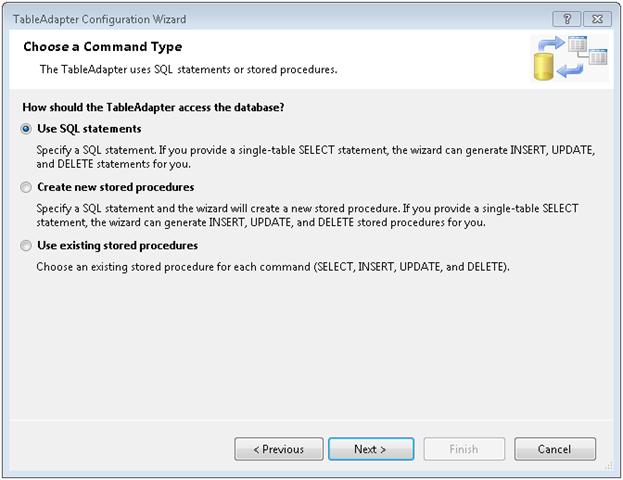
Next we are asked how we are going to access the data. Since we have a SQL Statement just pick the default of “Use SQL statements” and click Next.

image

Now take your SQL Statement and paste it in, and click Next.

image

OK, click Finish to wrap up the addition of the XSD. By default the adapter has a generic name, we should give ours something more meaningful. Click in the top bar, then enter a new name. Since my example report is for customer order data, I’ll name it CustomerOrders. I then went to the bottom bar and renamed the TableAdapter1 to CustomerOrderTableAdapter. You should now see something like:

image

Note that this will become your Data Source for the report. The data source will have the name of the XSD followed by the name of the source, in this case it will read CustomerOrders_CutomerOrders. OK, now it’s time to create the report.

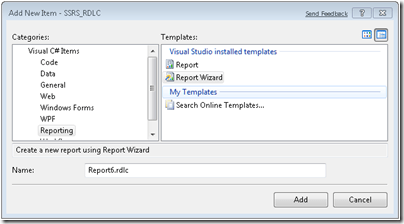
Go back to Solution Explorer, right click and pick Add New Item. Navigate to the Reporting area and pick Report Wizard. Note the file extension should end in RDLC. If you have used Reporting Services before, you will know that reports typically end in RDL. However, client mode reports have just a slightly different syntax to them, thus the RDLC extension to differentiate the two. While you can modify an RDL to become an RDLC and vice versa, you have to do so by hacking the XML behind the report.

Note you can also choose just Report, but then you’ll have to setup everything manually. For this simple example though, we’ll just use the Report Wizard.
image

Give your report a meaningful name and click Add. The report wizard then shows you a welcoming screen if you’ve never run it before, just click Next.

Now we need to pick the data source. In this example, you want the CustomerOrders branch, so select it and click Next.

image

The next screen asks if we want a Tabular or Matrix report. Select the one for you, in my example I picked Tabular and clicked Next. The next screen asks how we want to display the data. For my example, I opted to group by the customers company name and contact name, then the order data went into the details area. Fill out as appropriate for your report and click Next.

image

The next screen asks how we want things laid out. This affects the look and feel of the report. For my example I just took the default and clicked next, however you are free to play with this to experiment with the different looks and feels your reports might have.

Likewise the next screen is also a look and feel one, asking what colorings we want to apply. Pick one that makes you happy and click next. You can always change it later, many times I pick the Generic one (which adds no colors) then fix it up afterward.

The final screen is the wrap up. Give your report a meaningful name and click Finish.

image

OK, you have a report, now you need a container. Open up the user interface you want to place the report viewer control on. In my example I went with a very simple Windows Forms application.

In my toolbox, I navigated to the Reporting section, where I only found one control, the MicrosoftReportViewer control. (Note I am using Visual Studio 2008 SP1, if you are on an earlier version your names may differ slightly). Grab it and drop it onto your design surface. I also added a Button control to the form to kick off the report display process.

image

Now it’s time for the last step, adding some code. In this example I’ve used a Windows Form. Opening it, the first thing we find in the form load area is::

      this.reportViewer1.RefreshReport();

(Note I left my report viewer control named reportViewer1.) Delete it, we’ll have it refresh elsewhere.

Now we need to add some using statements to the top of our class.

//Add these to the standard list above

using System.Data.Sql;

using System.Data.SqlClient;

using Microsoft.Reporting.WinForms;

The first two will be used in accessing our Northwind database, you may need to use different libraries if you were going to another database. I’ve also included a referenced to the Reporting.WinForms library so we can manipulate the report programmatically.

Now let’s go to the code for the button click event. First, we need to reset the report viewer in case we’d been using it to host another report.

      // Reset in case report viewer was holding another reportViewer1

      reportViewer1.Reset();

Next We need to set the report viewer to local mode. This tells it we’ll be supplying the report name from a local file, and binding the report to a local ADO.NET datasource.

      // Set the processing mode for the ReportViewer to Local

      reportViewer1.ProcessingMode = ProcessingMode.Local;

Our third step is to create a local report variable, and set it’s reference to the report viewer’s local report. This will make it easier to work with. Then we’ll set the location of the report we want to use.

      LocalReport localReport = reportViewer1.LocalReport;

      localReport.ReportPath = @"D:\Presentations\SQL Server\SSRS RDLC\SSRS_RDLC\Report2.rdlc";

Now we need to create an ADO.Net dataset, and populate it. I implemented most of that functionality in a method called GetCustomerOrders, which I’ll append at the bottom of these instructions. It’s very straight forward code.

      DataSet dataset = new DataSet("Northwind");


      // Get the sales order data

      GetCustomerOrders(ref dataset);

At this stage we have told it where our report is, and have created the dataset. Now we need to create a datasource for the report itself. We’ll use the ReportDataSource object. For the name, we’ll use the same name as the XSD schema, CustomerOrders_CustomerOrders. Then for the value we will give it the table from the dataset we created in code. It’s possible for a report to have multiple datasets, in the report we’d give each one it’s own name (based on the XSD) then here we’d bind the dataset table to the name we’d used in the report. Once done we will then add the new ReportDataSource to the local reports DataSources collection. Finally, we’ll referesh the report viewer to make it generate the report.

      // Create a report data source for the sales order data

      ReportDataSource dsCustomers = new ReportDataSource();

      dsCustomers.Name = "Customers_Customers";

      dsCustomers.Value = dataset.Tables["Customers"];


      localReport.DataSources.Add(dsCustomers);


      // Refresh the report

      reportViewer1.RefreshReport();

You can download a copy of these instructions, along with the entire sample project including code and reports, at the Microsoft Code Gallery site http://code.msdn.microsoft.com/SqlServerRSClient . As promised, below is a copy of the GetCustomerOrders routine, for your reference.

    private void GetCustomerOrders(ref DataSet dsNorthwind)

    {

      string sqlCustomerOrders = "SELECT c.[CustomerID]"

        + " ,c.[CompanyName]"

        + " ,c.[ContactName]"

        + " ,c.[ContactTitle]"

        + " ,c.[Address]"

        + " ,c.[City]"

        + " ,c.[Region]"

        + " ,c.[PostalCode]"

        + " ,c.[Country]"

        + " ,c.[Phone]"

        + " ,c.[Fax]"

        + " ,o.[OrderID]"

        + " ,o.[CustomerID]"

        + " ,o.[EmployeeID]"

        + " ,o.[OrderDate]"

        + " ,o.[RequiredDate]"

        + " ,o.[ShippedDate]"

        + " ,o.[ShipVia]"

        + " ,o.[Freight]"

        + " ,o.[ShipName]"

        + " ,o.[ShipAddress]"

        + " ,o.[ShipCity]"

        + " ,o.[ShipRegion]"

        + " ,o.[ShipPostalCode]"

        + " ,o.[ShipCountry]"

        + "  FROM [Northwind].[dbo].[Customers] c"

        + "  join [Northwind].[dbo].[Orders] o on c.CustomerID = o.CustomerID";


      SqlConnection connection = new

        SqlConnection("Data Source=(local); " +

                      "Initial Catalog=Northwind; " +

                      "Integrated Security=SSPI");


      SqlCommand command =

          new SqlCommand(sqlCustomerOrders, connection);


      SqlDataAdapter customerOrdersAdapter = new

          SqlDataAdapter(command);


      customerOrdersAdapter.Fill(dsNorthwind, "CustomerOrders");


    }

Tracking down SQL Server Integration Services issues with Collation

At work I’ve been developing a big suite of packages to convert data from an Oracle system into our Data Warehouse. A lot of the supporting tables are almost a straight pull, except we are of course adding our own primary key, and then setting up a non clustered unique index on what had been the primary key in the old system.

A few tables have been driving us batty though, giving us “duplicate value” errors when trying to insert the rows from our SSIS package. The first thing I did to try and track down the problem was create an error table, and instead of having the package fail have it redirect error rows to my new error table. In case you are wondering, this is going to be a “one time shot” use for the packages, so we chose not to invest a lot of time and effort into error handling. We either want all the rows or none, and we’ll be running the packages manually so we’ll be there to know the results. But I digress.

When I went to look at the error table, it had all the rows from our source system in it. I scratched my head, thinking that can’t be right. A quick search found the answer in the Technet Forums. I needed to go into the OLE DB Destination and set the Max Commit count to 1. Of course you wouldn’t want to leave it like that for production, but for debugging it worked great. Once I did that, I was able to rerun the package and quickly identify my misbehaving row.

Next I looked at the value, and then looked for a similar value in my table. What I found was my source system had two rows, something like this example:

Arcane Code

Arcane code

Yes, the only difference was the second row had a lowercase letter at the beginning of the second word. Our Oracle instance had case sensitivity turned on. To it, these were two entirely different values. However, by default SQL Server is case insensitive; to it these two were the same. So my dilemma, how to fix this one column without having to alter my entire database?

It turns out there is an option in the Create Table syntax to set the collation. First, you should find out what your collation is currently set to. This is easy enough, just open SQL Server Management Studio, right click on the database and pick properties. Right there on the front page is the Collation.

image

Alternatively I could have run this SQL in SSMS (substitute your database name where I have AdventureWorks2008):

select databasepropertyex('AdventureWorks2008', 'collation')

Either way, in this example the default is SQL_Latin1_General_CP1_CI_AS. The important thing to note is the “_CI_”, which indicates case insensitivity. If we wanted to set the entire database, we would issue commands to change this to SQL_Latin1_General_CP1_CS_AS, which stands for case sensitivity. But as I said, in my case I don’t want to affect the entire database, so instead I will use this collation name in the create table syntax. Here is a simple example:

create table TestTable
(
  BogusPK bigint identity
  , FieldFromOracle varchar(200) collate SQL_Latin1_General_CP1_CS_AS not null
  , AnotherField varchar(200) null
)

All that I had to do was insert the collate clause between the data type and the not null clause. Note that this only affects the one column I had an issue with. FieldFromOracle is now a case sensitive column, I can add “Arcane Code” and “Arcane code” and still be able to add a unique index. The second column, here named “AnotherField” will remain case insensitive, the behavior you normally expect.

Before I wrap this up, I know someone will point out that allowing primary keys in your system that only differ in case is bad practice. For the record I totally agree, however this is a soon to be legacy system built by a vendor. Additionally, for various reasons I was not allowed to do any data cleansing to the source system. Just pull it like it is and put it in the warehouse. I imagine most of you are like me, that you don’t get to live in the ideal world, so hopefully knowing how to diagnose and deal with collation issues between databases will make your life a little easier.

Presenting SQL Server 2005 2008 Full Text Searching at Alabama Code Camp

On January 31st, 2009 I am presenting “Getting Started with SQL Server 2005/2008” at the Alabama Code Camp that is taking placin Montgomery, Alabama. This post has all the links relevant to my talk.

First off, the slides and sample code can be located at the Code Gallery site I setup specifically for Full Text Searching with SQL Server:

http://code.msdn.microsoft.com/SqlServerFTS

Look on the downloads page to see various projects around SQL Server Full Text Searching. I’ve created one “release” for each of the projects around FTS. Be sure to look on the right side at the various releases in order to see the various projects.

Next, you can get started with the basics by reading these entries on my blog:

Lesson 0 – Getting the Bits to do Full Text Searching in SQL Server 2005
Lesson 1 – The Catalog
Lesson 2 – The Indexes
Lesson 3 – Using SQL
Lesson 4 – Valid Data Types
Lesson 5 – Advanced Searching

After that you’ll be ready for some advanced topics.

Can you hear me now? Checking to see if FTS is installed.
Exploring SQL Servers FullTextCatalogProperty Function
Using the ObjectPropertyEx Function
Using FORMSOF in SQL Server Full Text Searching
Creating Custom Thesaurus Entries in SQL Server 2005 and 2008 Full Text Search
Creating and Customizing Noise Words in SQL Server 2005 Full Text Search
Creating and Customizing Noise Words / StopWords in SQL Server 2008 Full Text Search
Advanced Queries for Using SQL Server 2008 Full Text Search StopWords / StopLists

Step 5 – Guard your credibility

Around 100 BC the Latin author Publilius Syrus wrote “A good reputation is more valuable than money.” 2,900 years later those words are still just as true. Your reputation, including your online reputation is the most important asset you have and you should guard it jealously. An article at onrec.com states that 25% of HR managers reject applicants due to what they find on their on-line profiles. Sure, it’s OK to have the occasional fun post, or have some humor in your blog, but make sure it’s in good taste. Avoid posting those pictures of you and your friends drinking straight from the keg.

Just as bad as reckless fun can be the rant. Remember not every thought needs to be uttered, or even worse put to the web. One bad outburst, one blog post made in anger can give you the reputation for being a hard to work with hot head. Don’t be “that guy”.

Finally, no matter what remember the web is NOT Las Vegas. What happens on the web does NOT stay on the web. I’ll bet this guy wishes he’d have remembered that.

What was he thinking?