
Introduction
The Kusto Query Language includes a set of functions collectively known as Window Functions. These special functions allow you to take a row and put it in context of the entire dataset. For example, creating row numbers, getting a value from the previous row, or maybe the next row.
In order for Window Functions to work, the dataset must be serialized. In this post we’ll cover what serialization is and how to create serialized datasets. This is a foundational post, as we’ll be referring back to it in future posts that will cover some of the KQL Windowing Functions.
The samples in this post will be run inside the LogAnalytics demo site found at https://aka.ms/LADemo. This demo site has been provided by Microsoft and can be used to learn the Kusto Query Language at no cost to you.
If you’ve not read my introductory post in this series, I’d advise you to do so now. It describes the user interface in detail. You’ll find it at https://arcanecode.com/2022/04/11/fun-with-kql-the-kusto-query-language/.
Note that my output may not look exactly like yours when you run the sample queries for several reasons. First, Microsoft only keeps a few days of demo data, which are constantly updated, so the dates and sample data won’t match the screen shots.
Second, I’ll be using the column tool (discussed in the introductory post) to limit the output to just the columns needed to demonstrate the query. Finally, Microsoft may make changes to both the user interface and the data structures between the time I write this and when you read it.
Serialization
When a dataset is serialized, its data is placed in a specific order and that order is retained as the dataset goes through various transformations. Some of the Windowing Functions that require a serialized dataset to work are row_number, next, and prev to name just a few that will be covered in this and future posts.
There are some KQL functions that by their nature emit a dataset that is already ordered, in other words serialized. These include functions that I’ve already written about such as top and sort.
There are also some operators that if they receive a serialized dataset as input, will preserve the serialized ordering when the data is output. I’ve written about all of these in past posts, and they include: extend, mv-expand, parse, project, project-away, project-rename, take and where.
So the big question is, what if I need to use a Window Function but my data is not already serialized?
The Serialize Operator
For situations when you do not have an already serialized dataset you can easily create one using the serialize operator. Here’s a simple example.

All we have to do is take our dataset and pipe it into the serialize operator. The dataset will then have its order preserved, and will mark the dataset safe for use with KQLs Windowing Functions, similar to when a social media site lets you mark yourself safe from a hurricane, tornado, or all night HeavyDSparks marathon on YouTube. (#GuiltyPleasures)
Of course we don’t see any visible change here, but now we can use it with a Windowing Function. If you peeked at the post title, you’ve probably guessed already that for this post we’ll use the Window Function row_number.
But first…
A Warning!
Eagle eyed readers may notice the serialze in the screen shot above is underlined with red squiggles. This indicates there is a warning associated with this operator.
If we hover over the serialize operator the interface will display the specific warning to us.

It’s letting us know that in addition to being marked safe for Kusto Window Functions, the dataset will also be stored in memory. This could adversely affect the query runtime.
Sometimes it’s necessary to use serialize in order to get the results you need, but keep it in mind. Should you have a slow running query think about reducing the size of the dataset or see if there are other ways to accomplish the same results.
That said, let’s see how to use a basic Window Function, the row_number.
Row_Number
Calling the row_number function is easy. After the serialize operator we first provide a new column name that will hold our row number, here I used MyRowNumber. I then assign it the function row_number(). Note because it is a function we have to include the parenthesis after the function name.
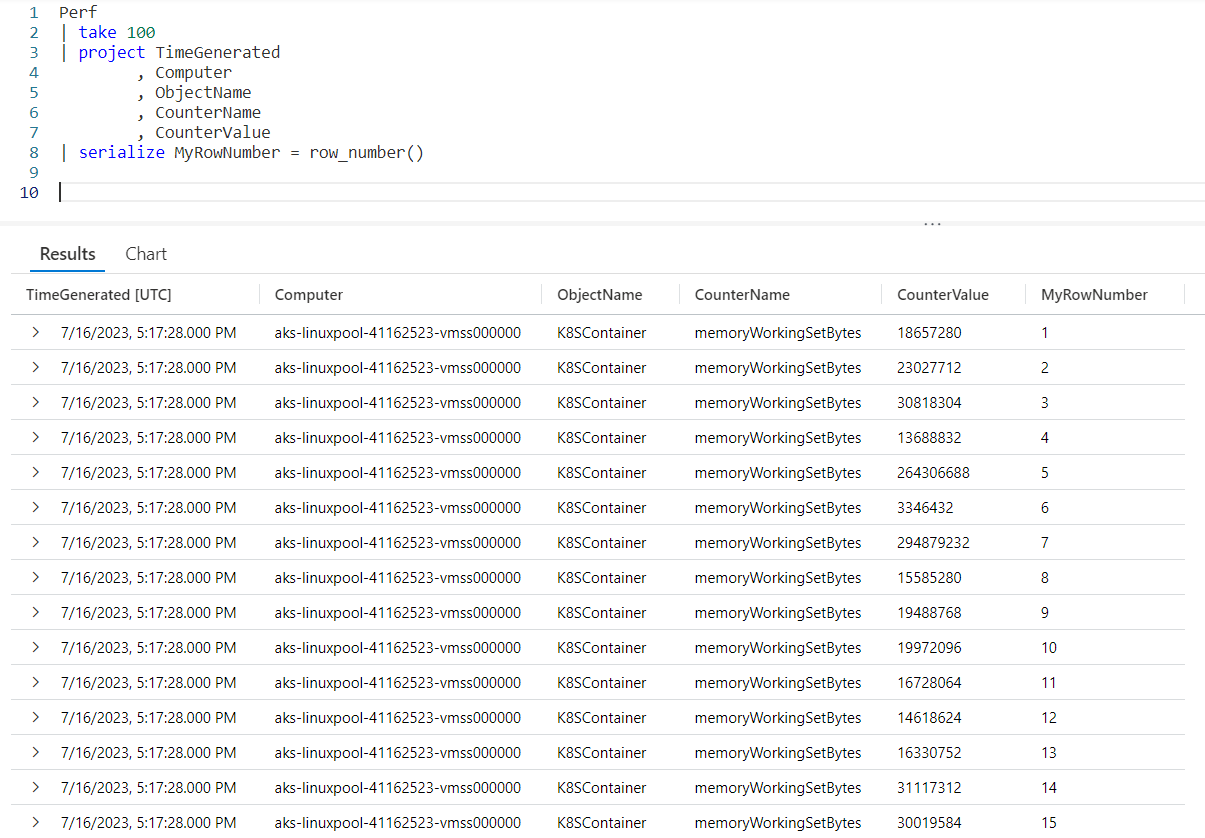
In the very right most column you can see our new row number column, MyRowNumber. The value is incremented with each row.
Row_Number Without Serialize
It’s possible to call the row_number function without using the serialize operator. As discussed earlier in this post the Windowing Functions need a serialized dataset to work with, and there are a few operators that will produce a dataset that is already safe to be serialized, such as top and sort.
In addition we have the operators that will preserve serialization when a serialized dataset is passed in. As a refresher these operators include: extend, mv-expand, parse, project, project-away, project-rename, take and where.
In this example, we’ll use a sort to get our data in the order we want, then use an extend to add the new MyRowNumber column by calling the row_number() function.
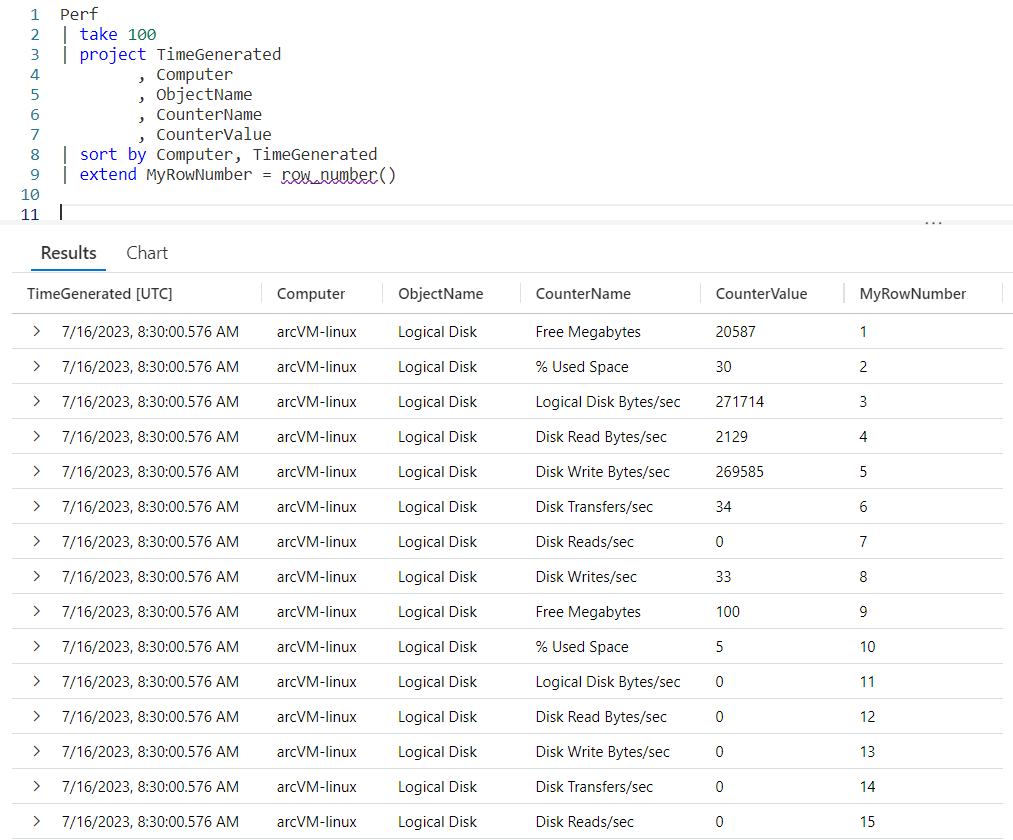
As you can see, after the sort we call extend and use the same syntax as before, creating the new column of MyRowNumber and assigning it the function row_number(). Looking to the right you can see the new MyRowNumber column in the output.
You also may notice the row_number function now has a red squiggly line under it, indicating a warming. Let’s go see what that’s all about…
Another Warning!
Hovering over the row_number displays the following warning:

This warning is similar to the one you saw when we used the serialzie operator. It states that by calling row_number the data will be stored in memory, which could slow down the query.
It does have an interesting implication though. Using sort means the data can be serialized, but doesn’t mean it is. The warning states it’s the calling of a Windowing Function, such as our new friend row_number, that actually triggers the data to be serialized.
Serialize and Window Functions Recap
When we talk about Windowing Functions, I wanted to stress an important point. The serialize operator is used to convert a dataset that is not already safe for serialization into one that is. The serialization is required in order to use a Windowing Function such as row_number or one of the other’s we’ll cover in this series.
There are a list of other operators though that output data that is already safe for serialization, in other words if we use one of these operators then we can use a Windowing Function without the need to use serialize. I mentioned top and sort already, but for completeness here is the full list.
I’ve already done blog posts for the first two (you can click on the command to follow the link to the post), and have one planned for range. If there’s interest I may cover the other two.
For completeness, let me go ahead and list the operators that will preserve the serialized state of the data when used. Note each is linked to a blog post I’ve done previously which covers each operator.
See Also
The following operators, functions, and/or plugins were used or mentioned in this article’s demos. You can learn more about them in some of my previous posts, linked below.
Fun With KQL – Project – Variants of Project (Project-Away and Project-Rename)
Conclusion
In this post we learned hot to use serialize to create a dataset with which we can call one of the Kusto Languages Windowing Functions. We also learned there are a handful of operators that already produce datasets safe for serialization, and can be used with Windowing Functions without the requirement to use the serialize operator.
Finally we saw the row_number Windowing Function in action. In future posts we’ll cover more of the Windowing Functions built into the Kusto Query Language.
The demos in this series of blog posts were inspired by my Pluralsight courses on the Kusto Query Language, part of their Kusto Learning Path.
There are three courses in this series so far:
I have two previous Kusto courses on Pluralsight as well. They are older courses but still valid.
These are a few of the many courses I have on Pluralsight. All of my courses are linked on my About Me page.
If you don’t have a Pluralsight subscription, just go to my list of courses on Pluralsight. On the page is a Try For Free button you can use to get a free 10 day subscription to Pluralsight, with which you can watch my courses, or any other course on the site.
 Arcane Code