I was in the process of creating a new report in SQL Server Reporting Services today. I was loading my dataset from a stored procedure, and when I hit the “Refresh Fields” button I recieved the following error:
“Could not create a list of fields for the query. Verify that you can connect to the data source and that your query syntax is correct.”
When I clicked the details button I got this further information:
“An item with the same key has already been added.” Here’s a screen shot of my error.
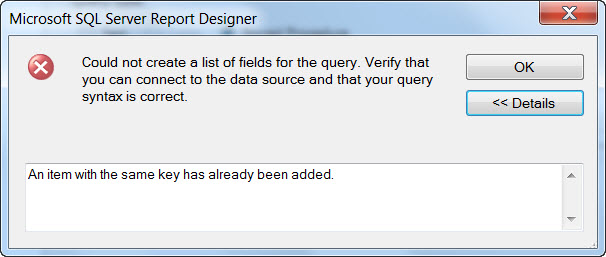
Well this had me scratching my head, as I had made sure to run the stored procedure, and it executed with no errors. After doing some considerable research I finally found a question in the Technet forums that was tangentially related to the error. This gave me the clue to figure out what I had done.
In my stored procedure, I had inadvertantly included the same column name from two different tables. My query looked something like:
SELECT a.Field1, a.Field2, a.Field3, b.Field1, b.field99
FROM TableA a JOIN TableB b on a.Field1 = b.Field1
SQL handled it just fine, since I had prefixed each with an alias (table) name. But SSRS uses only the column name as the key, not table + column, so it was choking.
The fix was easy, either rename the second column, i.e. b.Field1 AS Field01 or just omit the field all together, which is what I did.
As it took me a while to figure this out, tought I’d pass it along to anyone else who might be looking.

 Arcane Code
It worked !! Thanks
Thank you I have the same problem (In my SP I put the same column twice)
that fixwd it
Thanks, this was causing me to lose sleep!!
Thanks heaps, you saved me so much time!
thanks a lot for doing so, because I did scratch my head also. Good Job!
thank you – saved me some time
Thanks Breh
Thanks,
Have this problem yesterday give me some nightmare 🙂
Very helpful
Thanks this saved me lot of headache
Thanks for posting. saved my some head scratching myself.
Thanks … saved me a hassle .. nice descriptive error Microsoft …
Worked for me too! Cheers for that.
Helped me out in that I did not just have to wait for admins to apply some SQL or SSR fix. What I did was take my dataset (SELECT) and edited it to SELECT … INTO #temp (Table) and Report Builder 3.0 immediately told me the column that was duplicate. I added a # (number) to the end of the AS (e.g., quotenumber TO quotenumber2, etc.) and the problem went away.
This is true, I could troubleshoot further doing the “INTO #temp” approach on my final SELECT statement. Thanks!
I had the same issue with my Dataset. I was breaking my head and tried all the possible solutions until I found your solution. Thanks for sharing your experience. It helped a lot.
Thanks
Thanks, was pulling my hair out about this
Thanks so much! You saved me God knows how much headache and wasted time!
Wow… this really saved me. Thanks for sharing!!
Thanks for the info. It was really helpful. Saved me a lot of time.
Thanks a ton for this…would never have figured it out! 🙂
Thank you so so much! (^_^)
Whoa, I thought I would be at this for days. Thank you, thank you, thank you for posting.
This was exactly what I needed to fix same issue! Thanks!
kudos mate
Hey all….. I ran into the same problem.
But here’s the KICKER…..
I had the same problem because I used ‘coalesce’ on more then 1 column…..AGAIN…. MsSql handles coalesce’ing more then 1 column fine, but SSRS fails if you DO NOT DO AN ‘AS blah’ on each coalesce… seems coalesce LOSSES the identifier…. I verified this when I added 1 column with coalesce and it added my sql fine, then I looked at the column names and the column was ‘ID’… hence…. more then 1 column with the same generic ‘id’ name…….
what a kick in the
thank you
Thanks man . It helps Really…..
Helped me too. Thanks to your post coming up immediately in my search, this issue only took a few minutes of head scratching. Would have been a lot more without it so thanks for this and I have to say its a very well worded article.
In my case the procedure was correct but I had put in a debugging SELECT statement in to the query just before I went home last night and that SELECT statement contained two identical column names.
David Bridge
David Bridge Technology Limited
http://davidbridge.wordpress.com
thanks man really helped
Helped me tremendously!! Thanks
thanks, me too!!!
Thanks for translating the error!
Wao!! That was amazing, I solve my problem!! Thanks.
Thanks……..
Thanks, needed exactly this today.
My problem was because I was doing select * instead of individually listing the fields. I had the fields aliased and renamed properly but using the asterisk caused the same problem as you described above. Listing the fields solved it. Thanks for the answer!
Thanks! I had done the same thing – inadvertently duplicated fields in my query.
Thank you very much. With your post it made it much easier to figure out what was wrong.
Thank You, Thank You, Thank you …and may I add…. Thank You! We’ve been scratching our heads over this for days now. Your post was a lifesaver
Yes, this was very helpful. Thanks for posting it. Thank you!
Thanks! That saved my a headache and a couple of hundred dollars in consulting fees!
Great Post! This helped me quickly!
Thank you so much
Thank You….Very Much……….
not really helped this one …………….is there any other alternative for this to handle
Thanks a ton !! It saved me lot of time
Legend! Saved me a migraine.
You are the hero!
I can’t believe I got caught out by the two identical column names from the different tables, great quick tip
Thanks
Thanks.
Very helpful..
Thank you so much..
Very helpful… Thanks a lot.,,.
I was going crazy, thanks for the quick tip!
Cool, thoughtful, useful post. Thanks a ton!
I had a similar issue…and further testing I found out what was causing it.. Here is an example:
DECLARE @test INT
SELECT @test=1
SELECT @test
This will not work.
DECLARE @test INT,@test2 INT
SELECT @test=1,@test2=2
SELECT @test,@test2
EDIT: Sorry, forgot which one was the one with issues.
My problem was that I was using the sum() function and not aliasing the column. Your post led me straight to the answer, though. Thanks!
Thank you.
Thanks for the help.
You are the man!!! 🙂
OMG…you saved my life. This was driving me crazy. Thanks! I wonder if MS would consider changing this “bogus” error message.
Thanks to people like you for sharing this on the web. I only struggled with this error for about 5 minutes before doing a quick search on Google and found this post. It very quickly helped me isolate my issue and got me back on track. I appreciate you taking the time to document this for the rest of us!
Thanks for the tip. The stored procedure was working fine for Crystal Reports but as soon as I tried it with SSRS no joy.
Thanks again.
THANK YOU.
You just saved me a whole bunch of time being confused.
Good stuff …….Thanks Alot Problem solved……………..
Thanks! Just ran into the same thing.
Thank you so much! In my case I had got unnamed field from aggregates … doh!
Hey Robert! I ran into this today, Google search found your blog. I was like, “HEY! I know you!” Thanks for the help.
Yes, I faced the same problem and found that I also have two fields without any Alias.
good stuff…. thx mate
This was a great help to me also! Exactly what was causing my problem.
tankssssssssssss
goood
kiss you
Super, ese era el error! Gracias
Excellent tip – I was referencing the same table twice to pull out different information. Worked fine in SQL Management Studio & couldn’t fathom why it wouldn’t work in Report Designer 3 until I read this. Thanks!
Thank you so much. It could have cost me a couple of hours to figure it out.
Big thanks for this, saved me a lot of time. As a few others have had, I had two aggregate fields without an alias, which works fine in Server Management Studio, but not for SSRS.
Thanks bragh
Thanks and please continue posting …
thanx it’s very helpfull for me.
LOL, what an awful way to integrate stored procedures. How can Microsoft design BOTH the syntax for stored procedures AND a report writer, and not even bother linking them together better than this? Pa-thetic. I just finished writing a ‘wrapper’ stored procedure that creates a temporary table, and fills it with the output of ANOTHER stored procedure. Just so SSRS is happy.
Awe Ma se kinners, help me alot.
Thanks, why is SSRS 2008 SO much more awkward than 2005!!
This just saved me a ton of time. Thanks for sharing.
This issue gave me a headache for half an hour until i decided to paste the detail on google and found your post. Thanks man! You just cured me instantly, you’re my savior.
Thank you so much
Just had this same problem and this post helped me resolve the issue super fast! Thanks!!!!
Awesome, thanks!
Yay! Thanks for the info!!!
Excellent response it fixed my report right away.
Lourdes
Miami, Florida
You da MAN!!!! Thanks very much!
Ace sorted my problem thanks mate
Your research triggered a solution to a similar problem I had. My dataset would not connect when I had an MSSQL stored proc that had compiled.
My problem was I had variables as columns in my final dataset.
SELECT @value1,
@value2,
@value3
I gave each field an alias and my code worked fine.
SELECT @value1 as ‘value1’,
@value2 as ‘value2’,
@value3 as ‘value3’
fixed it for me to, thank you!
Thank you so much – I had obviously been over zealous with my copy and pasting… But you were right 2 columns with the same name. Cheers for posting the solution.
Thanks for sharing. My issue was because I concatenated two columns together and just removed the concatenation from the two and the error disappeared.
Thanks for posting, solved my problems and reduced my head scratching!
Thanks – you fixed my problem too.
Classic SSRS problem to have! Lots of cumbersome fixes when trying to do something simple. SSRS may be free, but you sure pay for it with your time. It could be worth it to look into some alternatives; Here is a comparison with SSRS: http://www.windward.net/reporting-comparisons/ssrs-comparison/
Thanks for save my time
I’m trying to do this:
;with temp as (select row_number()over(order by linenumber asc) as ‘Row’,*
from [ATMJOURNALS].[dbo].[PPT000120141111]
)
SELECT * from temp t1
inner join temp t2 on t2.Row = t1.Row+1
where t1.word3 = t2.word3 and t2.word4 like ‘%END%’
works on sql, can’t figure our how to make different column names for t2 so throwing above exception on ssrs, any ideas?
Its good tip. In my query I used one field twice from the same table.
I am also facing that same problem, please anybody help me to solve that problem, i attach my query so where need to change,
SELECT
a1.CtgVarDesc,
“Active” =
CASE
WHEN
a1.CtgChrWebActive = 1 THEN ‘Active’
END,
“Inactive” =
CASE
WHEN
a1.CtgChrWebActive = 2 THEN ‘Inactive’
END,
b1.CtgVarDesc,
“Active” =
CASE
WHEN
b1.CtgChrWebActive = 1 THEN ‘Active’
END,
“InactiveActive” =
CASE
WHEN
b1.CtgChrWebActive = 2 THEN ‘Inactive’
END,
c1.CtgVarDesc,
“Active” =
CASE
WHEN
c1.CtgChrWebActive = 1 THEN ‘Active’
END,
“InActive” =
CASE
WHEN
c1.CtgChrWebActive = 2 THEN ‘Inactive’
END,
d1.PrdVarDesc,
“Active” =
CASE
WHEN
d1.PrdChrActiveYN = ‘y’ THEN ‘Active’
END,
“InActive” =
CASE
WHEN
d1.PrdChrActiveYN = ‘N’ THEN ‘Inactive’
END
FROM CbzCtgMst a1
INNER JOIN CbzCtgMst b1
ON (a1.CtgIntId = b1.CtgIntPtid)
INNER JOIN CbzCtgMst c1
ON (b1.CtgIntId = c1.CtgIntPtId)
INNER JOIN cbzprdmst d1
ON (c1.CtgIntId = d1.PrdIntCtgId)
order by a1.CtgVarDesc,b1.CtgVarDesc,c1.CtgVarDesc,d1.PrdChrActiveYN
Thanks, it works
You REALLY helped me out! Thanks!
had to add column aliases and then it worked:
SELECT fcm.Name,
col.Name,
adv.AdvertisementName,
col.CollectionID
become:
SELECT fcm.Name as MN,
col.Name as CN,
adv.AdvertisementName,
col.CollectionID
Thanks man…Saved me from a lot of heartburn…The error message doesn’t give you any hint on where you should look at…
thanks for your post. I can see lots of people problem got solved with your solution. but I am still struggeling.
I have a table with woId column in it and have a view that pulls out data and so some calculation on each field from the same table, therefore the view again give me a table with woId column and I am joining the table from view and Table on the woId column.
so what you said is that I need to rename the column in my table? I know that I will mess up with so many things if I change a column name in that table.
do aliasing help here?
i really appreciate any help.
Thank you! I couldn’t figure that one out.
Thank you VERY MUCH! It worked. Saved this Newbie LOTS of time.
All these years later and you helped me. I was beside myself over this… Very grateful.
Thanks for this valuable info!
Super Solution.. Thank you so much
Thanks , would have taken me forever to work out what was causing this error
This article helped me to resolve my problem
Thanks for publishing and appreciate educating the community.
I had two tables t1 and t2 in my query then my select statement had t1.name, t2.name
Query worked fine in SSMS
This query I out it in Stored Procedure and procedure worked fine in SSMS
But When I choose this procedure in SSRS reporting for creating data set then it erored out what you faced the problem.
SSRS is unable to under stand prefixes carried in sql stmt or stored proc hence we have to clearly specify distinct name for SSRS fields
Thanks a lot
Thanks for the solution.It worked
Thank you !!!
Thank you, very helpful!
THANKS! Still using this app so this was very helpful, especially the Ron Mcvicar suggestion to select into #temp!
Great, Many thanks
thanks,it really helped me
Great ,Thank u.